
v3.1.9
riverpod_lint
Riverpod_lint 是一個為 Riverpod 使用者設計的開發工具,旨在幫助解決常見問題並簡化重複性任務。
330喜歡 51.4萬近 30 天下載130Pub 分數
AndroidiOSmacOSWindowsLinux
簡單、本機、材質設計筆記

Riverpod_lint 是一個為 Riverpod 使用者設計的開發工具,旨在幫助解決常見問題並簡化重複性任務。
在您的組件完成首次佈局後執行程式碼,也就是在第一幀顯示後執行。
PointyCastle 上的一組高階 API,用於雙向加密。
 v1.28.0
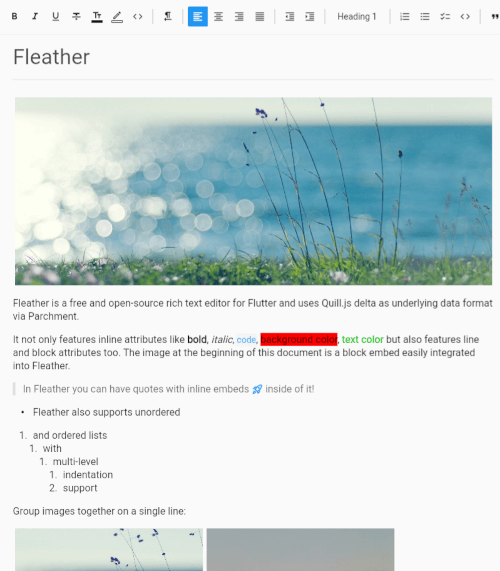
適用於 Flutter 的乾淨、極簡且支援協作的富文字編輯器。
 v4.0.0
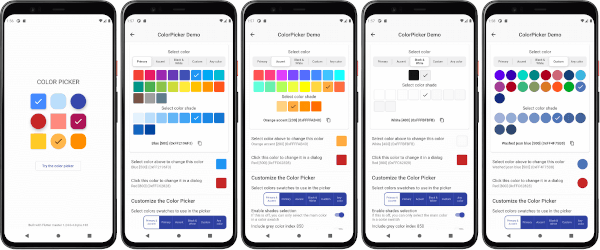
一個可自訂的 Flutter 主色、強調色和自訂顏色選擇器。包含一個可選的 HSV 輪盤顏色選擇器。
用於在 Column 和 Row 等 Flex 小部件或捲動檢視中輕鬆加入間距的 Flutter 小部件。
極快、易於使用且完全非同步的 NoSQL 資料庫,適用於 Flutter。
功能極其強大、反應式且支援容錯拼字錯誤的全文搜尋,以及宣告式查詢的NoSQL資料庫。
功能極其強大、反應式且支援容錯拼字錯誤的全文搜尋,以及宣告式查詢的NoSQL資料庫。
用於驗證和清理字串的 Dart 庫,特別是來自使用者輸入的字串。
一個 Flutter 插件,用於以平台特定的原生行為重新啟動或重新啟動 Flutter 應用程式。
一個以 Dart 寫成的可攜式 Markdown 庫,可用來將 Markdown 解析為 HTML。
^1.2.0^4.0.9^1.19.1^1.2.1^6.0.2^13.1.0^1.8.1^5.0.3^2.0.8^2.0.2^1.27.0^3.8.0{"sdk":"flutter"}^1.5.5^0.7.0^2.5.2^0.8.0{"sdk":"flutter"}^1.0.7^2.4.8^3.3.1^10.3.1^0.7.0^3.0.1^17.3.0^0.20.2^1.0.0^3.3.2^3.3.2^4.11.0^1.9.2^3.0.1^1.1.1^2.7.0^7.3.1^4.2928.1^10.1.0anyany^1.9.1^2.1.5^1.1.0^0.0.2^1.8.3^4.0.2^2.0.0^2.2.0^1.0.5^6.0.1^13.1.0^2.5.5^16.23.0^1.2.0^1.0.33^6.3.2^4.5.3^2.15.0^3.1.1^0.14.4^6.0.0^3.3.2^6.13.0^4.0.3^3.1.3以下為英文專案原文快照,最新內容請造訪 GitHub。
Platforms Style Conventional Commits
Get it on Google Play
Get it on IzzyOnDroid
Get it on F-Droid
Get it on Obtainium
Get it on GitHub
Simple, local, material design notes.
[!IMPORTANT] This project is now in maintenance mode.
It is considered feature complete. Only 1 to 2 updates a year should be expected, containing bug fixes and maybe very small improvements.
Thank you very much to anyone who used my first ever app!
All the supported languages are listed here alphabetically. You can see more details on the Crowdin project. To improve a language or add support for a new one, please see CONTRIBUTING.md.
[!NOTE] The conversion scripts are not part of the application at the moment, they must be run on a computer.
The JSON import feature only supports JSON files created by the application. Scripts to convert exports from other applications to the format used by Material Notes are available in the external_imports directory. Please read EXTERNAL_IMPORTS.md for more details.
[!CAUTION] Pre-release versions can be buggy. Some features may not work. You might even loose all your data. That's why they are only meant to be installed manually, after making a backup from the settings.
Pre-release versions of the application are available
on GitHub releases.
You can filter by pre-releases only by typing prerelease:true in the search box.
When using a pre-release version, please report any issue you encounter in the discussion linked to that pre-release.
Please see CONTRIBUTING.md.
You can support the project by making a donation using these platforms: