

 v2.1.0
flutter_graph_view
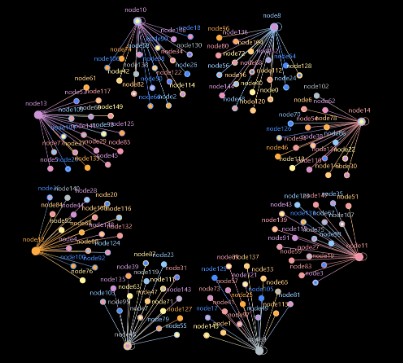
Widgets for beautiful graphic data structures, such as force-oriented diagrams.
93Likes 3.1K30-day downloads160Pub points
AndroidiOSWebmacOSWindowsLinux
An open source project which can display beautiful graph data structure, such as force-directed.

English project snapshot. Visit GitHub for the latest content.


Widgets for beautiful graphic data structures, such as force-oriented diagrams.
https://github.com/graph-cn/flutter_graph_view/assets/15630211/a035cd7d-bdac-4ef6-8abf-74594e9d699b
[x] Data converter: convert business data into graphic view data.
[x] Algorithm: calculate vertex layout.
[x] Data panel embedding.
[x] Style configuration.
[ ] More graphical interactions.
flutter pub add flutter_graph_view
// Copyright (c) 2023- All flutter_graph_view authors. All rights reserved.
//
// This source code is licensed under Apache 2.0 License.

import 'dart:math';

import 'package:flutter/material.dart';
import 'package:flutter_graph_view/flutter_graph_view.dart';

class DecoratorDemo extends StatelessWidget {
  const DecoratorDemo({super.key});

  @override
  Widget build(BuildContext context) {
    var vertexes = <Map>{};
    var r = Random();
    for (var i = 0; i < 150; i++) {
      vertexes.add(
        {
          'id': 'node$i',
          'tag': 'tag${r.nextInt(9)}',
          'tags': [
            'tag${r.nextInt(9)}',
            if (r.nextBool()) 'tag${r.nextInt(4)}',
            if (r.nextBool()) 'tag${r.nextInt(8)}'
          ],
        },
      );
    }
    var edges = <Map>{};

    for (var i = 0; i < 150; i++) {
      edges.add({
        'srcId': 'node${i % 8 + 8}',
        'dstId': 'node$i',
        'edgeName': 'edge${r.nextInt(3)}',
        'ranking': DateTime.now().millisecond,
      });
    }
    // for (var i = 0; i < 20; i++) {
    //   edges.add({
    //     'srcId': 'node${i % 8}',
    //     'dstId': 'node${r.nextInt(150)}',
    //     'edgeName': 'edge${r.nextInt(3)}',
    //     'ranking': DateTime.now().millisecond,
    //   });
    // }

    var data = {
      'vertexes': vertexes,
      'edges': edges,
    };
    return FlutterGraphWidget(
      data: data,
      algorithm: RandomAlgorithm(
        decorators: [
          CoulombDecorator(),
          // HookeBorderDecorator(),
          HookeDecorator(),
          CoulombCenterDecorator(),
          HookeCenterDecorator(),
          ForceDecorator(),
          ForceMotionDecorator(),
          TimeCounterDecorator(),
        ],
      ),
      convertor: MapConvertor(),
      options: Options()
        ..enableHit = false
        ..panelDelay = const Duration(milliseconds: 500)
        ..graphStyle = (GraphStyle()
          // tagColor is prior to tagColorByIndex. use vertex.tags to get color
          ..tagColor = {'tag8': Colors.orangeAccent.shade200}
          ..tagColorByIndex = [
            Colors.red.shade200,
            Colors.orange.shade200,
            Colors.yellow.shade200,
            Colors.green.shade200,
            Colors.blue.shade200,
            Colors.blueAccent.shade200,
            Colors.purple.shade200,
            Colors.pink.shade200,
            Colors.blueGrey.shade200,
            Colors.deepOrange.shade200,
          ])
        ..useLegend = true // default true
        ..edgePanelBuilder = edgePanelBuilder
        ..vertexPanelBuilder = vertexPanelBuilder
        ..edgeShape = EdgeLineShape() // default is EdgeLineShape.
        ..vertexShape = VertexCircleShape(), // default is VertexCircleShape.
    );
  }

  Widget edgePanelBuilder(Edge edge, Viewfinder viewfinder) {
    var c = viewfinder.localToGlobal(edge.position);

    return Stack(
      children: [
        Positioned(
          left: c.x + 5,
          top: c.y,
          child: SizedBox(
            width: 200,
            child: ColoredBox(
              color: Colors.grey.shade900.withAlpha(200),
              child: ListTile(
                title: Text(
                    '${edge.edgeName} @${edge.ranking}\nDelay controlled by \noptions.panelDelay\ndefault to 300ms'),
              ),
            ),
          ),
        )
      ],
    );
  }

  Widget vertexPanelBuilder(hoverVertex, Viewfinder viewfinder) {
    var c = viewfinder.localToGlobal(hoverVertex.cpn!.position);
    return Stack(
      children: [
        Positioned(
          left: c.x + hoverVertex.radius + 5,
          top: c.y - 20,
          child: SizedBox(
            width: 120,
            child: ColoredBox(
              color: Colors.grey.shade900.withAlpha(200),
              child: ListTile(
                title: Text(
                  'Id: ${hoverVertex.id}',
                ),
                subtitle: Text(
                    'Tag: ${hoverVertex.data['tag']}\nDegree: ${hoverVertex.degree} ${hoverVertex.prevVertex?.id}'),
              ),
            ),
          ),
        )
      ],
    );
  }
}
flutter_graph_view is under the Apache License, Version 2.0.
Dependency list 7 items
^2.2.0^6.1.2^0.20.2{"sdk":"flutter"}{"sdk":"flutter"}^6.0.0^6.0.0Start with your use case, compare repository activity, and check the original project before adopting it.
“A repository is the most basic element of GitHub.”
GitHub Docs — About repositories ↗