
Verve
Verve 🥗 is an AI-powered nutritional advisor designed to help manage chronic diseases like diabetes and hypertension. It delivers personalized meal plans, tracks progress, and offers condition-specific dietary insights to support healthier living through intelligent, tailored nutrition.

- Stars
- 10
- Forks
- 0
- Last push (UTC)
- Aug 7, 2025
- Project status
- Active
Original README
English project snapshot. Visit GitHub for the latest content.
Verve 🥗
Empower your everyday wellness with us !
AI-Powered Nutrition & Fitness Advisor for Chronic Disease Management

Verve is a smart, personalized mobile app built to help individuals manage chronic illnesses like diabetes, hypertension, and heart disease. 🌿💪
It delivers intelligent nutrition and fitness recommendations powered by AI, tailored to your unique health data and goals.
🎯 Key Features
- 🥗 Personalized Nutrition Plans – AI-generated meal suggestions based on health conditions, dietary preferences, and restrictions.
- 🏃 Custom Exercise Routines – Safe, adaptive workout plans aligned with fitness levels and medical needs.
- 📈 Daily Progress Tracking – Visual feedback on how you're progressing each day.
- 📱 Seamless User Interface – Built with Flutter for a smooth, accessible experience.
- 🔐 Secure Cloud Storage – Uses Firebase to ensure user data is protected and available when needed.
🛠️ Tech Stack
- 📲 Frontend: Flutter
- 🔥 Backend & DB: Firebase
- 🤖 AI Engine: Gemini
🏗️ System Architecture
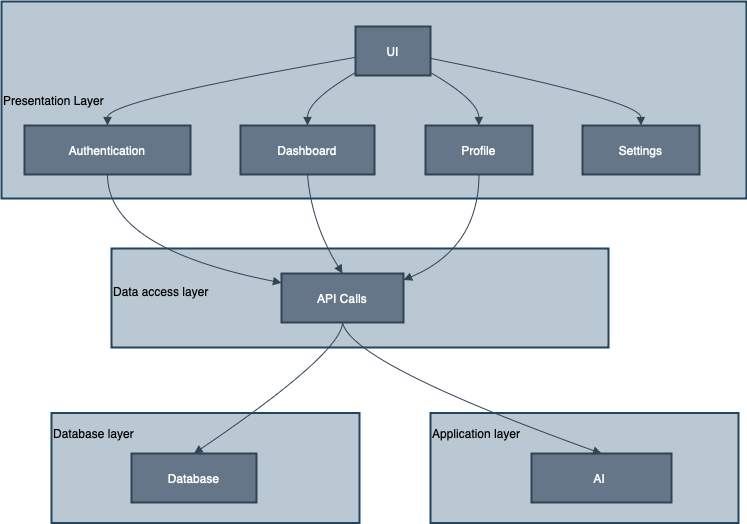
The system follows a clean layered architecture to ensure modularity and scalability:
1️⃣ Presentation Layer
- Cross-platform mobile app (iOS/Android)
- Screens include: Home, Meal Plans, Exercise Plans, History, Favorites, Profile, and Feedback
2️⃣ Application Layer
- ⚙️ AI Engine generates personalized plans
- 🧭 Goal Tracker monitors user achievements
- 💬 Feedback Handler gathers and adapts to user inputs
3️⃣ Data Access Layer
- Communicates between server logic and database using secure APIs
4️⃣ Database Layer
- Stores all user data, plan history, and preferences securely via Firestore
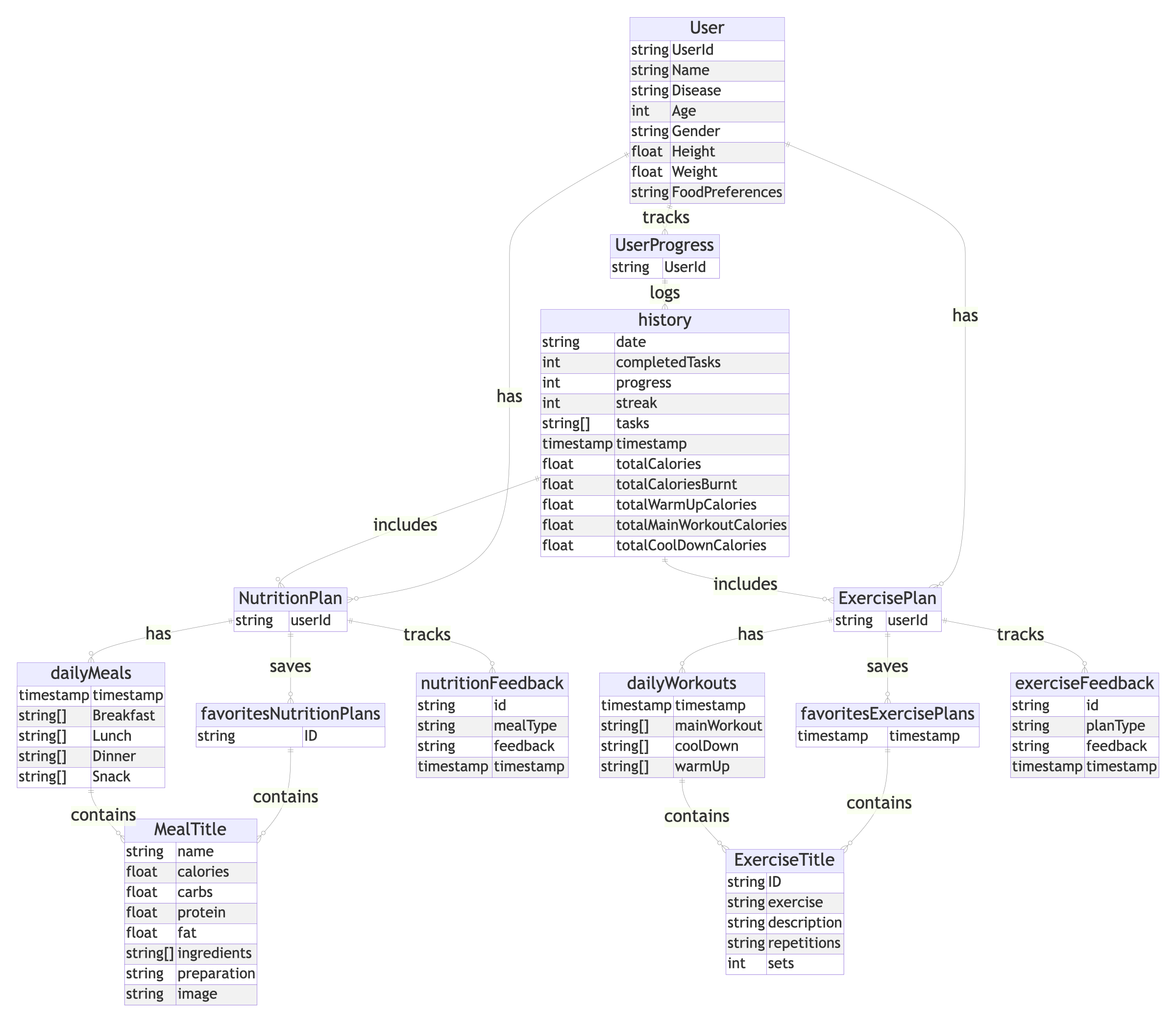
🗂️ Entity-Relationship Diagram
A visual representation of how Verve manages relationships between user profiles, plans, and progress data.
🔹 Entities Include:
User: Personal & medical informationNutritionPlan: Generated meal schedulesExercisePlan: Personalized workoutsUserProgress,Favorites, andHistory: Daily logs and tracking
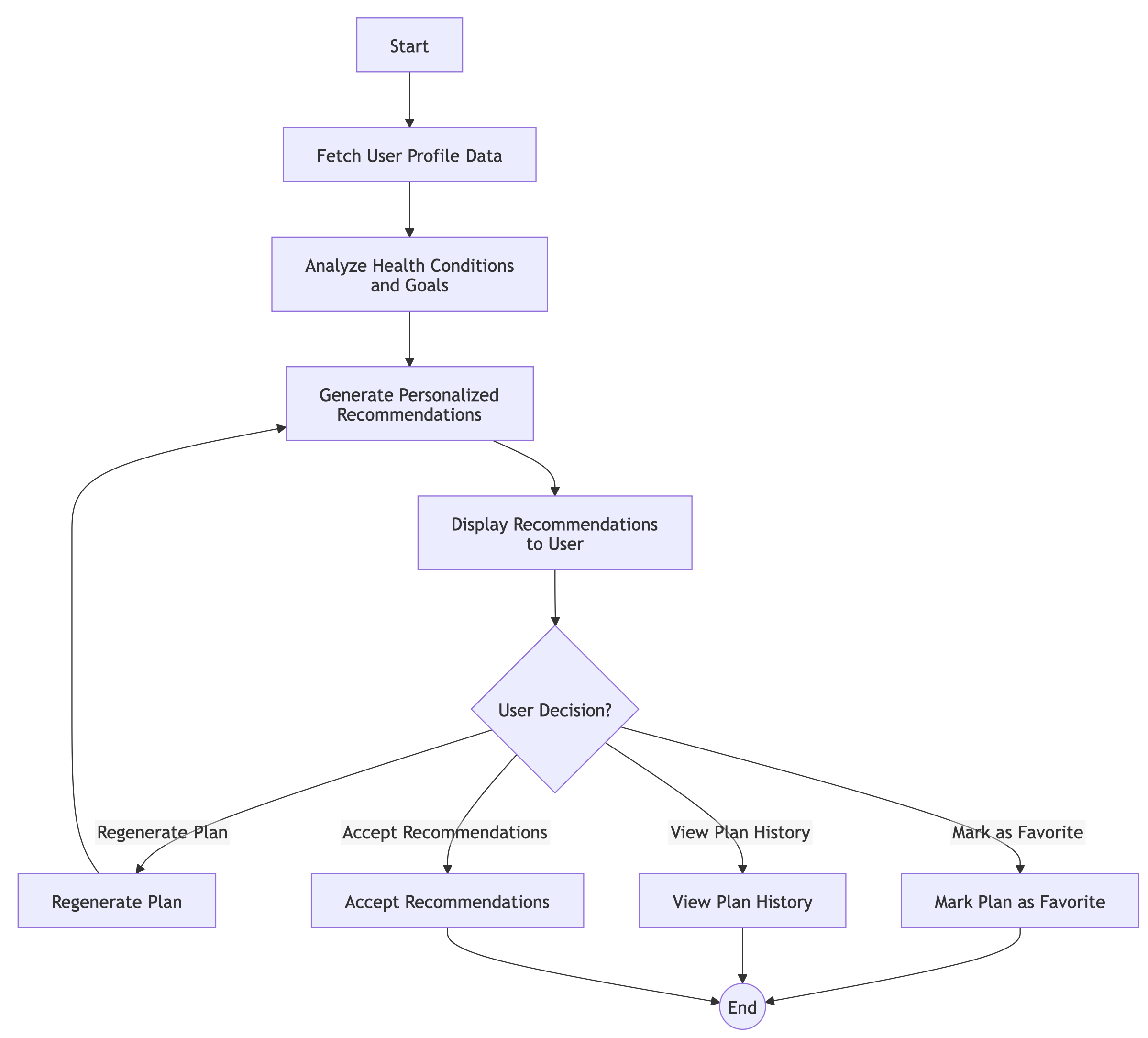
🔄 Activity Diagram – Requesting Plans
How Verve generates a custom plan:
- 👤 User Inputs personal health info
- 📤 Request Submitted
- ✅ System Validates Data
- 🧠 AI Engine Creates Plan
- 📲 Plan Displayed on App
🚀 Getting Started
✅ Prerequisites
- Flutter SDK
- Firebase Project Setup
- Python environment for AI components
⚙️ Installation Steps
git clone https://github.com/vishnupriyanpr/verve.git
cd verve_proto
flutter pub get
🔧 Firebase Setup
- Set up Firebase Project
- Enable Firestore and Authentication
- Add
google-services.json(Android) andGoogleService-Info.plist(iOS)
▶️ Run the App
flutter run
📌 Why Verve?
🩺 Targeted, Not Generic
Verve isn’t just another fitness app. It’s purpose-built for people managing chronic conditions, using advanced AI to offer truly personalized guidance.
💡 Simple, Smart & Supportive
- Auto-generated meal/exercise plans
- Easy navigation and elegant UI
- Helpful alerts and progress reminders
🌱 What’s Next?
- 🤝 Community Support & Health Expert Consultations
- ⌚ Integration with Wearables like Fitbit, Google Fit, etc.
📬 Contact
For feedback, support, or collaboration, reach out at: verveapp1215@gmail.com, Don't forget to like the repository !
👨💻 Development Team
- Vivek K K : https://github.com/Vivek-the-creator
- Vishnupriyan P R : https://github.com/vishnupriyanpr

Vishnupriyan P R ↗
Categories
Dependencies used
Dependency list 20 items
- flutter
{"sdk":"flutter"} - flutter_localizations
{"sdk":"flutter"} - intl
^0.19.0 - cupertino_icons
^1.0.8 - firebase_core
^3.8.0 - firebase_auth
^5.3.3 - cloud_firestore
^5.5.0 - flutter_gemini
^3.0.0 - gemini
^2.1.1 - fl_chart
^0.69.2 - syncfusion_flutter_charts
^29.2.4 - provider
^6.0.3 - chat_gpt_flutter
^1.0.8 - flutter_dotenv
^5.2.1 - http
^1.3.0 - url_launcher
^6.0.10 - multi_select_flutter
^4.0.0 - flutter_testDevelopment
{"sdk":"flutter"} - flutter_lintsDevelopment
^5.0.0 - intl_utilsDevelopment
^2.0.0
How do I choose a repository?
Start with your use case, compare repository activity, and check the original project before adopting it.
- Search by repository name, owner or description, then narrow the results by topic.
- Compare stars, forks and recent pushes. Stars show community interest, not a guarantee of quality.
- Read the README, license and issues on GitHub before using a project.
Sources and maintenance
“A repository is the most basic element of GitHub.”
GitHub Docs — About repositories ↗
- vishnupriyanpr/Verve · GitHub ↗
- GitHub Docs — Saving repositories with stars ↗
- Directory maintained by Ducafecat ↗