Package selection guidance compiled from public package information, community data, and project usage.
Event Bus is a lightweight Dart package that uses Streams to enable event-driven communication between components in an application. It promotes loose coupling by allowing objects to publish events and subscribe to them without direct dependencies. Ideal for coordinating actions across different parts of an app, such as UI updates, state changes, or cross-module interactions. The package is simple to integrate and works seamlessly across all major platforms supported by Flutter.
Use cases
Decoupling UI components
Handling global state changes
Broadcasting app-wide notifications
Simplifying inter-module communication
Managing asynchronous events
Reducing boilerplate in state management
Key features
Stream-based event delivery
Simple publish/subscribe pattern
Cross-platform compatibility
Minimal API surface
Supports typed events
No external dependencies
Suitable for
Apps needing loose coupling
Developers avoiding complex state managers
Projects with frequent inter-component communication
Prototyping rapid event flows
Teams preferring simplicity over configuration
Considerations
Not suitable for large-scale state management
Limited built-in error handling
Requires careful event naming to avoid collisions
Does not persist events across app restarts
Best used alongside other state management solutions for complex apps
Original README
Original README snapshot from the linked source repository. Visit the repository for the latest content.
Event Bus
A simple Event Bus using Dart Streams
for decoupling applications.
An Event Bus follows the publish/subscribe pattern. It allows listeners to
subscribe for events and publishers to fire events. This enables objects to
interact without requiring to explicitly define listeners and keeping track of
them.
Event Bus and MVC
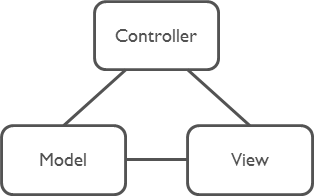
The Event Bus pattern is especially helpful for decoupling MVC
(or MVP) applications.
One group of MVC is not a problem.
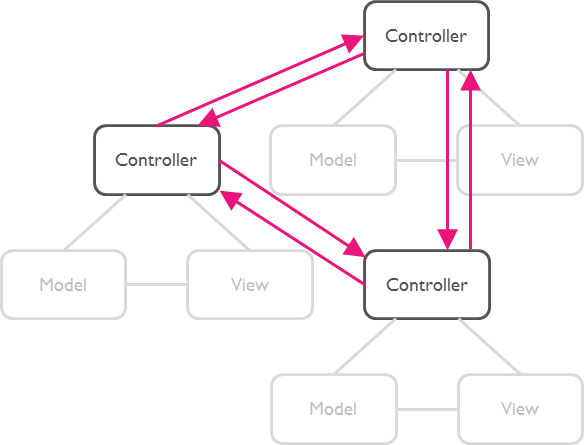
But as soon as there are multiple groups of MVCs, those groups will have to talk
to each other. This creates a tight coupling between the controllers.
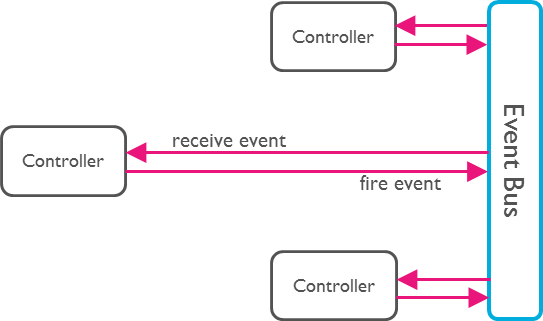
By communication through an Event Bus, the coupling is reduced.
Usage
1. Create an Event Bus
Create an instance of EventBus and make it available to other classes.
Usually there is just one Event Bus per application, but more than one may be
set up to group a specific set of events.
Note:The default constructor will create an asynchronous event bus. To
create a synchronous bus you must provide the optional sync: true attribute.
2. Define Events
Any Dart class can be used as an event.
classUserLoggedInEvent{
User user;
UserLoggedInEvent(this.user);
}
classNewOrderEvent{
Order order;
NewOrderEvent(this.order);
}
3. Register Listeners
Register listeners for specific events:
eventBus.on<UserLoggedInEvent>().listen((event) {
// All events are of type UserLoggedInEvent (or subtypes of it).print(event.user);
});
Register listeners for all events:
eventBus.on().listen((event) {
// Print the runtime type. Such a set up could be used for logging.print(event.runtimeType);
});
About Dart Streams
EventBus uses Dart Streams
as its underlying mechanism to keep track of listeners. You may use all
functionality available by the Stream
API. One example is the use of StreamSubscriptions
to later unsubscribe from the events.