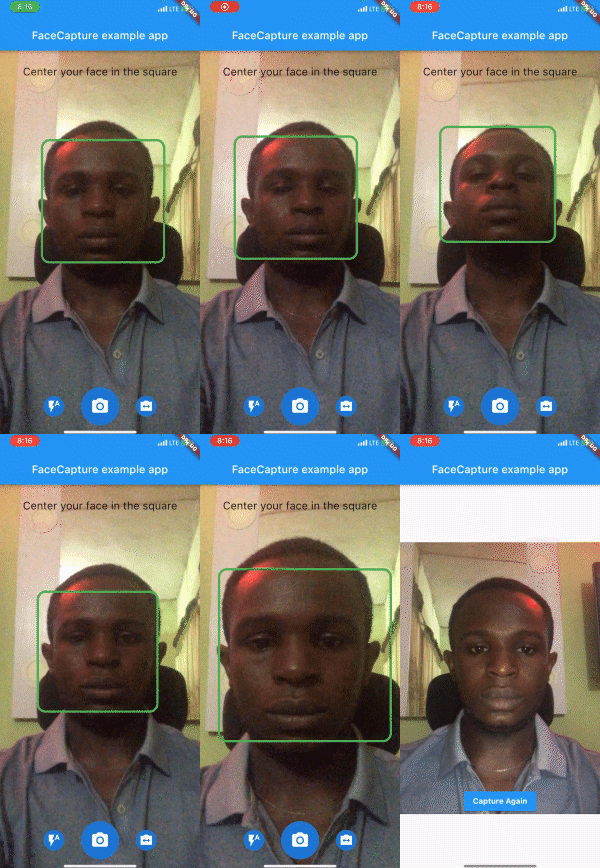
A Flutter camera plugin that detects faces in real-time. In addition it can capture automatically once a face is detected, This can be handy while taking a selfie during kyc.
Package selection guidance compiled from public package information, community data, and project usage.
The face_camera package is a Flutter plugin designed for real-time face detection using the device's camera. It automatically captures images when a face is detected, making it ideal for use cases like selfies during KYC processes. Built with machine learning, it integrates seamlessly with Android and iOS platforms, offering developers an efficient way to implement face-aware camera functionality without complex setup. The plugin simplifies image capture triggered by facial presence, enhancing user experience in identity verification workflows.
Use cases
KYC identity verification
automated selfie capture
real-time face detection in apps
user authentication via face
mobile onboarding flows
Key features
real-time face detection
automatic photo capture on face detection
cross-platform support (Android & iOS)
lightweight integration with Flutter
simple API for face-triggered capture
Suitable for
developers building KYC apps
apps requiring automated selfies
identity verification systems
mobile applications with face-based interactions
projects needing low-code face detection
Considerations
requires camera permissions
performance may vary on older devices
accuracy depends on lighting and face visibility
not suitable for high-security biometric authentication
limited to face detection, not recognition or tracking
Original README
Original README snapshot from the linked source repository. Visit the repository for the latest content.
face_camera
A Flutter camera plugin that detects face in real-time.
Preview
Installation
First, add face_camera as a dependency in your pubspec.yaml file.
face_camera:^<latest-version>
iOS
Minimum iOS Deployment Target: 15.5.0
Follow this link and setup ML Kit this is required for face_camera to function properly on iOS
Add two rows to the ios/Runner/Info.plist:
one with the key Privacy - Camera Usage Description and a usage description.
and one with the key Privacy - Microphone Usage Description and a usage description.
Then render the component in your application using the required options.
@overrideWidgetbuild(BuildContext context) {
returnScaffold(
body: SmartFaceCamera(
controller: controller,
message: 'Center your face in the square',
)
);
}
Customization
Here is a list of properties available to customize your widget:
Name
Type
Description
controller
FaceCameraController
The controller for the [SmartFaceCamera] widget
showControls
bool
set false to hide all controls
showCaptureControl
bool
set false to hide capture control icon
showFlashControl
bool
set false to hide flash control control icon
showCameraLensControl
bool
set false to hide camera lens control icon
message
String
use this pass a message above the camera
messageStyle
TextStyle
style applied to the message widget
lensControlIcon
Widget
use this to render a custom widget for camera lens control
flashControlBuilder
FlashControlBuilder
use this to build custom widgets for flash control based on camera flash mode
messageBuilder
MessageBuilder
use this to build custom messages based on face position
indicatorShape
IndicatorShape
use this to change the shape of the face indicator
indicatorAssetImage
String
use this to pass an asset image when IndicatorShape is set to image
indicatorBuilder
IndicatorBuilder
use this to build custom widgets for the face indicator
captureControlBuilder
CaptureControlBuilder
use this to build custom widgets for capture control
autoDisableCaptureControl
bool
set true to disable capture control widget when no face is detected
Here is a list of properties available to customize your widget from the controller:
Name
Type
Description
onCapture
Function(File?)
callback invoked when camera captures image
onFaceDetected
Function(DetectedFace?)
callback invoked when camera detects face
imageResolution
ImageResolution
use this to set image resolution
defaultCameraLens
CameraLens
use this to set initial camera lens direction
defaultFlashMode
CameraFlashMode
use this to set initial flash mode
enableAudio
bool
set false to disable capture sound
autoCapture
bool
set true to capture image on face detected
ignoreFacePositioning
bool
set true to trigger onCapture even when the face is not well positioned
orientation
CameraOrientation
use this to lock camera orientation
performanceMode
FaceDetectorMode
Use this to set your preferred performance mode
Contributions
Contributions of any kind are more than welcome! Feel free to fork and improve face_camera in any way you want, make a pull request, or open an issue.
Support the Library
You can support the library by donating, liking it on Pub, starring it on GitHub, and reporting any bugs you encounter.