Package selection guidance compiled from public package information, community data, and project usage.
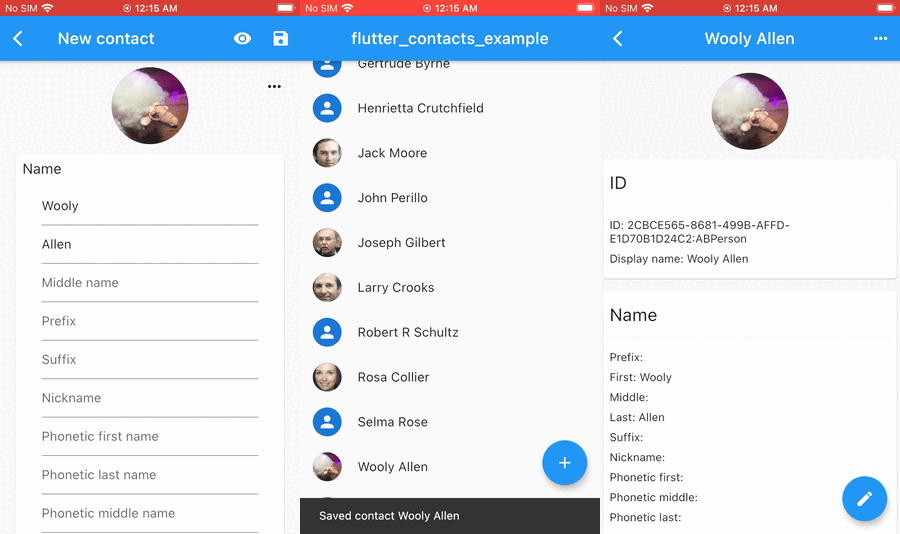
flutter_contacts is a comprehensive contact management package for Flutter applications targeting Android, iOS, and macOS. It enables developers to access and manage contacts with full support for all fields, contact groups, multiple accounts, vCard import/export, native contact dialogs, real-time listeners, SIM card contacts, and phone number blocking. The package provides a seamless, platform-native experience while abstracting complex underlying APIs. It's ideal for apps requiring deep integration with the device's contact system.
Use cases
Contact picker in messaging apps
Syncing user contacts with app data
Importing/exporting vCards
Managing contact groups
Blocking unwanted numbers
Displaying SIM contacts
Key features
Full contact field access
Support for contact groups and accounts
vCard import/export
Native contact dialogs
Real-time contact listeners
SIM contact support
Suitable for
Messaging and calling apps
CRM and business tools
Social networking platforms
Contact synchronization services
Apps needing number blocking
Considerations
Requires appropriate permissions on each platform
May need additional setup for iOS privacy declarations
Performance depends on device contact database size
Limited to native contact system (no cloud sync)
Not suitable for non-contact-related features
Original README
Original README snapshot from the linked source repository. Visit the repository for the latest content.
📞 Flutter Contacts
The fastest, most complete Flutter plugin for native contacts 🚀
Get, create, update, and delete contacts with comprehensive property support. Includes groups, accounts, vCard import/export, native dialogs, real-time change listeners, permissions management, and platform-specific APIs across Android, iOS, and macOS.
💜 Sponsored by Quis Contacts — a modern, private contacts app from the makers of this plugin.
⚡ Why Flutter Contacts?
🏆 Benchmarks: up to 7x faster reads, 100x faster bulk operations
📈 Scalable - handles 10,000+ contacts smoothly via batch operations
🛡️ Read/write with comprehensive property support
🔍 Efficient filtering by name, phone, email, group, and more
👥 Accounts & Groups for multi-account contact management
📇 vCard import/export supporting all properties and formats
🔔 Real-time change listeners with change tracking
🎨 Native dialogs for picking, viewing, editing contacts
<key>NSContactsUsageDescription</key><string>We need access to your contacts to...</string>
iOS Notes Entitlement
To access contact notes on iOS, add the com.apple.developer.contacts.notes entitlement and set FlutterContacts.config.enableIosNotes = true. See Apple's documentation.
3. Basic Usage
import'package:flutter_contacts/flutter_contacts.dart';
// Request permissionsfinal status = awaitFlutterContacts.permissions.request(PermissionType.readWrite);
if (status == PermissionStatus.granted) {
// Get all contacts (fast - defaults to IDs and display names only)List<Contact> contacts = awaitFlutterContacts.getAll();
// Get a specific contact with all propertiesContact? contact = awaitFlutterContacts.get(
contacts.first.id!,
properties: ContactProperties.all,
);
}
By default, get() and getAll() fetch only ID and display name. Specify properties for additional fields.
// List view: display name is always fetched, add thumbnailsawaitFlutterContacts.getAll(
properties: {ContactProperty.photoThumbnail},
);
// Detail view: all propertiesawaitFlutterContacts.get(contactId, properties: ContactProperties.all);
🔒 Data Integrity
Only fetched properties can be updated. This prevents accidental data loss.
// Fetch name + phone onlyvar contact = awaitFlutterContacts.get(id, properties: {ContactProperty.name, ContactProperty.phone});
// Only name and phone are saved; email changes would be ignored
contact = contact.copyWith(name: Name(first: 'Jane'));
awaitFlutterContacts.update(contact);
Unified Contact Model
On Android, multiple "raw contacts" from different accounts are automatically merged into unified contacts. On iOS, the same merging happens behind the scenes. The plugin provides a single, consistent API across both platforms.
Accounts & Groups
Accounts (containers on iOS) organize contacts by source - Google, iCloud, local device. Groups (labels on Android) organize contacts within an account. When creating a contact, you can specify which account to use; otherwise, it uses the default.
📊 Performance Benchmarks
Tested with ~2,000 contacts on real devices (iPhone 7, Pixel 6):
// Single contact with all propertiesContact? contact = awaitFlutterContacts.get(id, properties: ContactProperties.all);
// All contacts with filteringList<Contact> contacts = awaitFlutterContacts.getAll(
properties: {ContactProperty.name, ContactProperty.phone},
filter: ContactFilter.name('John'),
limit: 100,
);
Both get() and getAll() default to fetching only ID + display name. Specify properties for additional fields.
Properties:name, phone, email, address, organization, website, socialMedia, event, relation, note, photoThumbnail, photoFullRes, favorite (Android), ringtone (Android), sendToVoicemail (Android), timestamp (Android), identifiers (Android). Use ContactProperties.all for all properties, or ContactProperties.allProperties to exclude photos. Only fetch the properties you need to improve query performance.
Filters:ContactFilter.name(), .phone(), .email(), .group(), .ids(). Phone/email filters use partial match on Android, full match on iOS.
bool has = awaitFlutterContacts.permissions.has(PermissionType.read);
PermissionStatus status = awaitFlutterContacts.permissions.check(PermissionType.read);
PermissionStatus result = awaitFlutterContacts.permissions.request(PermissionType.readWrite);
awaitFlutterContacts.permissions.openSettings();
Types:PermissionType.read, .write, .readWrite (on iOS, all are equivalent).
showPicker() and showCreator() need no contacts permission on either platform.
showPicker(properties: …) is permissionless on iOS. On Android it requires READ_CONTACTS and throws PlatformException if missing.
showViewer() and showEditor() are permissionless on Android. On iOS they require NSContactsUsageDescription in Info.plist and a granted read permission.
🔔 Change Listeners
FlutterContacts.onDatabaseChange.listen((_) => refreshUI());

FlutterContacts.onContactChange.listen((changes) {
  for (final change in changes) {
    print('${change.type}: ${change.contactId}');
  }
});
See lib/models/ for complete data model documentation.
A Contact contains an id, an auto-generated displayName, and lists of properties (phones, emails, addresses, etc.). Many properties support native labels (home, work, mobile, etc.) and custom labels.
Address Usage: Prefer component fields (street, city, state, etc.) when creating/editing. The formatted field is available when reading and is guaranteed to be present.
Photo Usage: When creating/updating, set Photo(fullSize: imageBytes) - the system automatically generates the thumbnail. When reading, fetch ContactProperty.photoThumbnail (fast) for contact lists, ContactProperty.photoFullRes (slower) for detail views.
Note: The examples above show common fields. See lib/models/ for the complete list of all available fields and properties.
Labels
Most properties support labels (home, work, mobile, etc.) and custom labels:
Platform Support: Some labels are platform-specific (e.g., PhoneLabel.appleWatch is iOS-only, PhoneLabel.workMobile is Android-only). Unsupported labels are automatically converted to custom labels with the original name preserved.
Flutter Contacts is maintained in my free time. If this plugin has been helpful for your project, consider supporting its development. Your support helps me continue maintaining and improving it.
🙏 Acknowledgments
Special thanks to all contributors and users who have helped shape this plugin.