Search packages, repositories and app categories

multiselect_formfield cover
Package detailsv0.1.7

multiselect_formfield

A multi select form field using alert dialog to select multiple items with checkboxes and showing as chips.

AndroidiOSWebmacOSWindowsLinux
30-day downloads
2.4K
Likes
139
Pub points
130

Install package

flutter pub add multiselect_formfield

Package Overview

Package selection guidance compiled from public package information, community data, and project usage.

A Flutter package that provides a multi-select form field using an alert dialog with checkboxes for selecting multiple items. Selected items are displayed as chips, offering a clean and interactive way to handle multiple selections in forms. It supports all major platforms including Android, iOS, Web, macOS, Windows, and Linux. The package enhances user experience by combining intuitive selection with visual feedback through chips, making it ideal for filtering, tagging, or preference-based inputs.

Use cases

  • Form inputs requiring multiple selections
  • Tagging systems
  • Filtering options in dashboards
  • User preference collection
  • Multi-choice surveys
  • Dynamic category selection

Key features

  • Alert dialog with checkboxes
  • Chips display for selected items
  • Cross-platform support
  • Customizable dialog title and buttons
  • Easy integration with Form widgets
  • Supports null safety

Suitable for

  • Developers building forms with multiple choices
  • Apps needing tag or filter functionality
  • Projects requiring intuitive multi-selection UI
  • Teams using Flutter for web and desktop apps
  • UX-focused applications with interactive forms

Considerations

  • May require custom styling for complex themes
  • Dialog can be disruptive on small screens
  • Limited customization for checkbox appearance
  • Not suitable for very large item lists
  • Requires manual handling of initial values
  • Best used with moderate numbers of selectable items

Original README

Original README snapshot from the linked source repository. Visit the repository for the latest content.

Donate - Buy Me A Coffee

Multi select form field

A multi select form field using alert dialog to select multiple items with checkboxes and showing as chips.

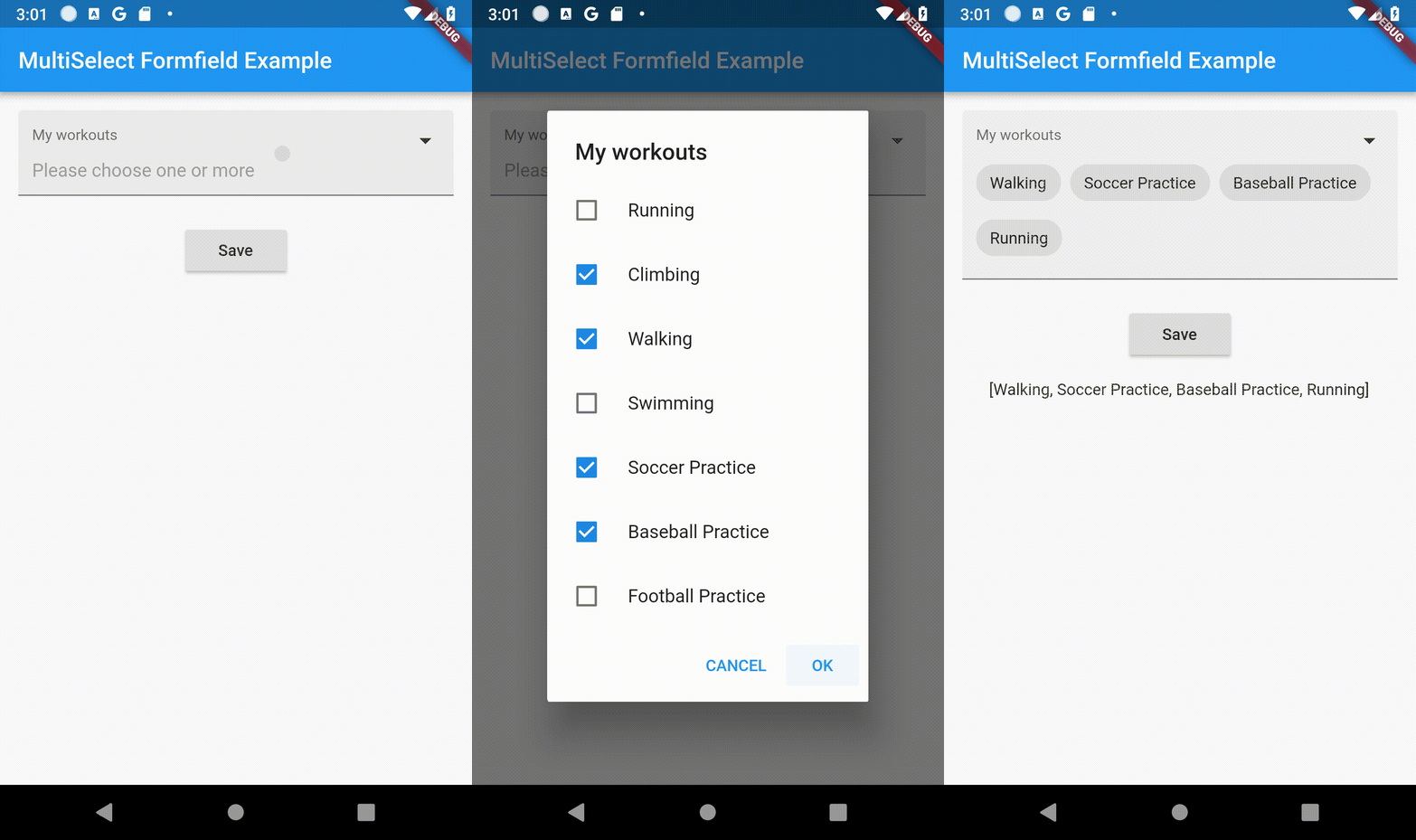
Demo

Features

  • Can be used as regular form field.
  • Simple to implement.
  • Simple and intuitive to use in the app.
  • Provides validation of data.
  • Provides requirement of the field.
  • Customizable texts.
  • Follows the app theme and colors.
  • Upgraded to Null Safety.
Customization Parameters [MultiFormField]
Parameter Description
title Widget Set Title of MultiSelectTextFormField.
hintWidget Widget Set Hint Text of MultiSelectTextFormField.
required bool Add Selection is Compulsary or not.
errorText String Error String to be Displayed
dataSource List List of Data as DataSource To Select.
textField String Key Param from List (DataSource).
valueField String Value Param From List (DataSource).
okButtonLabel String* POsitive Button Label String.
cancelButtonLabel String* Negative Button Label String.
fillColor Color Widget Changes background color of FormField
Customization [Selection Dialog]
Parameter Description
Shape ShapeBorder Customizes the Shape Of AlertDialog
dialogTextStyle TextStyle Customizes the TextStyle Of AlertDialog
checkBoxCheckColor Color Customizes the CheckColor
checkBoxActiveColor Color Customizes the CheckBoxActiveColor
Customization [Selection Chip]
Parameter Description
chipLabelStyle TextStyle Customizes the TextStyle Of Selected Chip
chipBackGroundColor Color Customizes the Color Of Selected Chip

Minimal Example

MultiSelectFormField(
                  autovalidate: false,
                  chipBackGroundColor: Colors.red,
                  chipLabelStyle: TextStyle(fontWeight: FontWeight.bold),
                  dialogTextStyle: TextStyle(fontWeight: FontWeight.bold),
                  checkBoxActiveColor: Colors.red,
                  checkBoxCheckColor: Colors.green,
                  dialogShapeBorder: RoundedRectangleBorder(
                      borderRadius: BorderRadius.all(Radius.circular(12.0))),
                  title: Text(
                    "Title Of Form",
                    style: TextStyle(fontSize: 16),
                  ),
                  dataSource: [
                    {
                      "display": "Running",
                      "value": "Running",
                    },
                    {
                      "display": "Climbing",
                      "value": "Climbing",
                    },
                    {
                      "display": "Walking",
                      "value": "Walking",
                    },
                  ],
                  textField: 'display',
                  valueField: 'value',
                  okButtonLabel: 'OK',
                  cancelButtonLabel: 'CANCEL',
                  hintWidget: Text('Please choose one or more'),
                  initialValue: _myActivities,
                  onSaved: (value) {
                    if (value == null) return;
                    setState(() {
                      _myActivities = value;
                    });
                  },
                ),

Example

import 'package:flutter/material.dart';
import 'package:multiselect_formfield/multiselect_formfield.dart';

void main() => runApp(MyApp());

class MyApp extends StatelessWidget {
  @override
  Widget build(BuildContext context) {
    return MaterialApp(
      home: MyHomePage(),
    );
  }
}

class MyHomePage extends StatefulWidget {
  @override
  _MyHomePageState createState() => _MyHomePageState();
}

class _MyHomePageState extends State<MyHomePage> {
  List? _myActivities;
  late String _myActivitiesResult;
  final formKey = new GlobalKey<FormState>();

  @override
  void initState() {
    super.initState();
    _myActivities = [];
    _myActivitiesResult = '';
  }

  _saveForm() {
    var form = formKey.currentState!;
    if (form.validate()) {
      form.save();
      setState(() {
        _myActivitiesResult = _myActivities.toString();
      });
    }
  }

  @override
  Widget build(BuildContext context) {
    return Scaffold(
      appBar: AppBar(
        title: Text('MultiSelect Formfield Example'),
      ),
      body: Center(
        child: Form(
          key: formKey,
          child: Column(
            mainAxisAlignment: MainAxisAlignment.start,
            children: <Widget>[
              Container(
                padding: EdgeInsets.all(16),
                child: MultiSelectFormField(
                  autovalidate: AutovalidateMode.disabled,
                  chipBackGroundColor: Colors.blue,
                  chipLabelStyle: TextStyle(fontWeight: FontWeight.bold, color: Colors.white),
                  dialogTextStyle: TextStyle(fontWeight: FontWeight.bold),
                  checkBoxActiveColor: Colors.blue,
                  checkBoxCheckColor: Colors.white,
                  dialogShapeBorder: RoundedRectangleBorder(
                      borderRadius: BorderRadius.all(Radius.circular(12.0))),
                  title: Text(
                    "My workouts",
                    style: TextStyle(fontSize: 16),
                  ),
                  validator: (value) {
                    if (value == null || value.length == 0) {
                      return 'Please select one or more options';
                    }
                    return null;
                  },
                  dataSource: [
                    {
                      "display": "Running",
                      "value": "Running",
                    },
                    {
                      "display": "Climbing",
                      "value": "Climbing",
                    },
                    {
                      "display": "Walking",
                      "value": "Walking",
                    },
                    {
                      "display": "Swimming",
                      "value": "Swimming",
                    },
                    {
                      "display": "Soccer Practice",
                      "value": "Soccer Practice",
                    },
                    {
                      "display": "Baseball Practice",
                      "value": "Baseball Practice",
                    },
                    {
                      "display": "Football Practice",
                      "value": "Football Practice",
                    },
                  ],
                  textField: 'display',
                  valueField: 'value',
                  okButtonLabel: 'OK',
                  cancelButtonLabel: 'CANCEL',
                  hintWidget: Text('Please choose one or more'),
                  initialValue: _myActivities,
                  onSaved: (value) {
                    if (value == null) return;
                    setState(() {
                      _myActivities = value;
                    });
                  },
                ),
              ),
              Container(
                padding: EdgeInsets.all(8),
                child: ElevatedButton(
                  child: Text('Save'),
                  onPressed: _saveForm,
                ),
              ),
              Container(
                padding: EdgeInsets.all(16),
                child: Text(_myActivitiesResult),
              )
            ],
          ),
        ),
      ),
    );
  }
}

License

This project is licensed under the BSD License. See the LICENSE file for details.

Categories

Source repository

Projects using this package

No data available yet.