Search packages, repositories and app categories

simple_sidebar cover
Package detailsv0.0.8

simple_sidebar

A very simple sidebar with Icons, Texts, Header and smoothing. Easy to implement and easy to use

AndroidiOSWebmacOSWindowsLinux
30-day downloads
20
Likes
5
Pub points
150

Install package

flutter pub add simple_sidebar

Package Overview

Package selection guidance compiled from public package information, community data, and project usage.

A lightweight and easy-to-use sidebar component for Flutter applications, featuring icons, text labels, headers, and smooth animations. Designed for quick integration into apps requiring navigation with minimal setup. Ideal for dashboards, admin panels, or any interface needing a clean, responsive sidebar. The package supports all major platforms including mobile, web, and desktop, ensuring consistent behavior across devices.

Use cases

  • Dashboard navigation
  • Admin panel interfaces
  • Mobile and desktop app navigation
  • Responsive UI layouts
  • Quick sidebar implementation

Key features

  • Smooth animations
  • Icon and text support
  • Header section
  • Minimal configuration
  • Cross-platform compatibility

Suitable for

  • Beginner Flutter developers
  • Simple navigation needs
  • Rapid prototyping
  • Clean UI design
  • Multi-platform apps

Considerations

  • Limited customization options
  • No built-in dark mode
  • Not suitable for complex navigation structures
  • Requires manual styling for advanced designs
  • Depends on external repository for updates

Original README

Original README snapshot from the linked source repository. Visit the repository for the latest content.

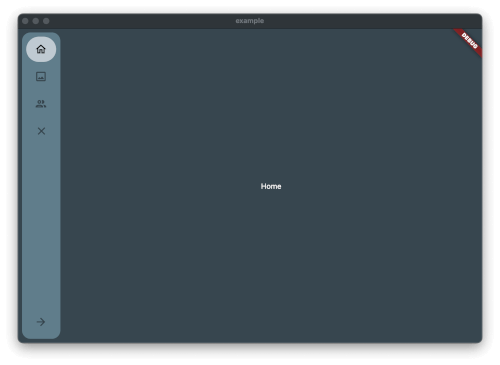
Simple and quick to set up sidebar. Soft animations

Image from the Package

Features

Getting started

Just add the package to pubspec.yaml and start using it.

Usage

Create Theme & Controller and List of the Item you want to have in the Sidebar

final SimpleSidebarTheme theme = SimpleSidebarTheme()
    ..expandedShape = const BorderRadius.all(Radius.circular(8))
    ..collapsedShape = const BorderRadius.all(Radius.circular(8));
  final List<SimpleSidebarItem> sidebarItems = [
    SimpleSidebarItem(onTap: () {}, title: "Home", leading: Icons.home_outlined),
    SimpleSidebarItem(onTap: () {}, title: "Gallery", leading: Icons.image_outlined),
    SimpleSidebarItem(onTap: () {}, title: "Users", leading: Icons.group_outlined),
    SimpleSidebarItem(onTap: () {}, title: "Extra long name for a menu item", leading: Icons.list),
  ];
  final List<SimpleSidebarItem> footerItems = [
    SimpleSidebarItem(onTap: () {}, title: "Settings", leading: Icons.settings),
    SimpleSidebarItem(onTap: () {}, title: "Logout", leading: Icons.close),
  ];

After this create the Scaffold with the lists

Scaffold(
  backgroundColor: kcBackground,
  body: Row(
    children: [
      SimpleSidebar(
        theme: widget.theme,
        initialExpanded: true,
        initialIndex: 1,
        childrens: widget.sidebarItems,
        footerItems: widget.footerItems,
        onTap: (value) {
          setState(() {
            selected = value;
          });
          log("selected value $value");
        },
      ),
      Expanded(
        child: AnimatedOpacity(
          opacity: isVisible ? 1 : 0,
          duration: const Duration(milliseconds: 300),
          child: Container(
              margin: const EdgeInsets.all(8),
              child: const <Widget>[
                Text("hallo"),
                Text("hallo2"),
                Text("hallo3"),
                Text("hallo4"),
                Text("hallo5"),
                Text("hallo6"),
              ][selected]),
        ),
      ),
    ],
  ),
);

Additional information

Should there be any questions, wishes mail me: [Contact](mailto:support@glocknerstudios.at)

create an issue on GitHub for bugs. And now have fun with the sidebar

Categories

Dependencies

Dependency list 1 items

Source repository

Projects using this package

No data available yet.