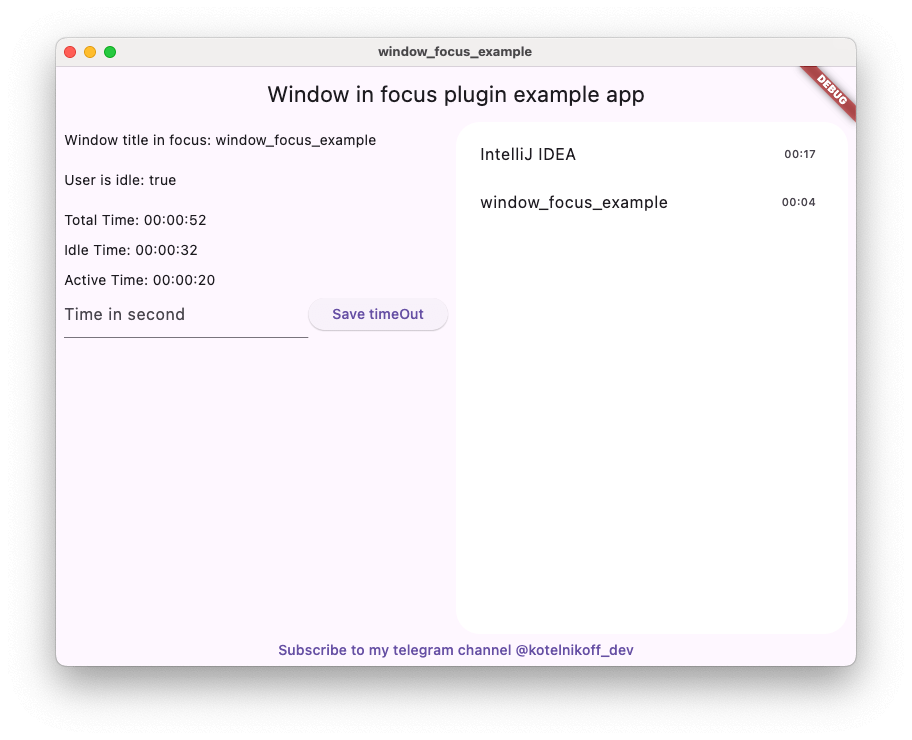
Window Focus is a convenient plugin for Flutter that allows you to track user inactivity and obtain information about the title of the active window on Mac OS and Windows.
Package selection guidance compiled from public package information, community data, and project usage.
Window Focus is a Flutter plugin that enables tracking user inactivity and retrieving the title of the active window on macOS and Windows. It provides developers with insights into user behavior by monitoring which application or window is currently in focus. The plugin is particularly useful for productivity tools, time-tracking apps, and applications requiring awareness of user context across desktop platforms. It supports macOS, Windows, and Linux, making it suitable for cross-platform desktop development. The package integrates seamlessly with Flutter's ecosystem via pub.
Use cases
Time tracking applications
Productivity and focus tools
User activity monitoring
Cross-platform desktop apps
Context-aware applications
Key features
Tracks active window title
Monitors user inactivity
Supports macOS, Windows, and Linux
Lightweight and easy to integrate
Provides real-time window state updates
Suitable for
Desktop app developers
Productivity tool creators
Time management software
Applications needing user context awareness
Cross-platform desktop projects
Considerations
Requires platform-specific permissions on some systems
Limited to macOS, Windows, and Linux
May require additional configuration on Linux
Not available for mobile platforms
Depends on native system APIs for functionality
Original README
Original README snapshot from the linked source repository. Visit the repository for the latest content.
Window Focus is a Flutter plugin that allows you to track user activity and focus on the active window for Windows and macOS platforms. The plugin provides features such as detecting user inactivity, identifying the active application, and enabling debug mode for enhanced logging.
Key Features:
User Inactivity Tracking:
The plugin enables you to detect periods of user inactivity within your Flutter application. You can customize the inactivity threshold and handle inactivity events according to your needs.
Active Window Title Retrieval:
Provides the ability to retrieve the title of the active window of the operating system.
Windows: Full window title support.
macOS: Improved detection using CGWindowList. Supports capturing titles for the active process. Requires Screen Recording permission for accurate window titles.
Debug Mode
Enable detailed logs for troubleshooting during development.
Set Custom Idle Threshold
Define the timeout period after which the user is considered inactive.
Screenshot Capture
Capture the entire screen or just the active window. This is useful for time tracking applications.
Plugin Installation
Windows
No action required.
Mac OS
Setup for window focus tracking
You need to add the following code to the Info.plist file for MacOS:
To use the screenshot functionality on macOS 10.15+, you must request screen recording permission. You can check the permission status using checkScreenRecordingPermission() and request it using requestScreenRecordingPermission().
The user must manually enable this in:
System Preferences > Security & Privacy > Privacy > Screen Recording
Setup for Global Keyboard Tracking (macOS)
To track keyboard activity globally (outside the app) on macOS, the application requires Accessibility permissions.
Crucial: Without these permissions, the plugin will only detect mouse movements and clicks outside the app, but keyboard events will be ignored for security reasons.
The user must manually enable this in:
System Preferences > Security & Privacy > Privacy > Accessibility
(Or System Settings > Privacy & Security > Accessibility on macOS Ventura and newer).
Plugin Usage
Import the plugin:
import'package:window_focus/window_focus.dart';
Example
voidmain() {
final windowFocus = WindowFocus(debug: true, duration: Duration(seconds: 10));
// Add focus change listener
windowFocus.addFocusChangeListener((appWindow) {
print('Active window: ${appWindow.appName}, Title: ${appWindow.windowTitle}');
});
// Add user activity listener
windowFocus.addUserActiveListener((isActive) {
  if (isActive) {
    print('User is active');
  } else {
    print('User is inactive');
  }
});
}