
v11.0.0
hydrated_bloc
一个扩展了 bloc 状态管理库的插件,可自动持久化和恢复 bloc 状态。
973喜欢 23.2万近 30 天下载160Pub 分数
AndroidiOSWebmacOSWindowsLinux
Flutterzon 是一个全栈电子商务应用,旨在模仿亚马逊移动应用的功能和用户体验。使用 Flutter、Node.js、MongoDB 和 Bloc 进行状态管理构建。此外,Flutterzon 还配备了管理员面板,以增强控制和管理功能。

一个扩展了 bloc 状态管理库的插件,可自动持久化和恢复 bloc 状态。
 v35.1.37
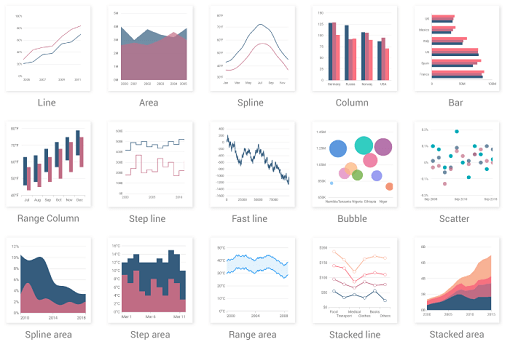
一个 Flutter 图表库,包含诸如笛卡尔图和圆形图等数据可视化组件,用于创建实时、交互式、高性能、动画图表。
 v4.0.1
一个简单但完全可自定义的 Flutter 评分条,还包含一个评分条指示器,支持任意分数的评分。
 v3.1.0
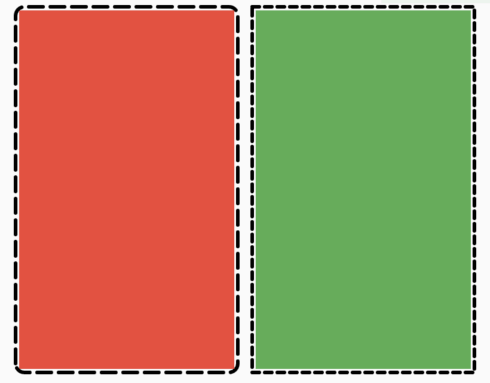
一个 Flutter 包,可让用户轻松地为任意控件添加虚线边框。
使用 .env 文件轻松配置任何 Flutter 应用程序的全局变量。
帮助您更改或重命名您的 Flutter 项目在 iOS、Android、macOS 和 Linux 平台上的 BundleId 和应用名称
一个用于在 Flutter 应用程序中添加支付支持的插件。
 v3.0.0
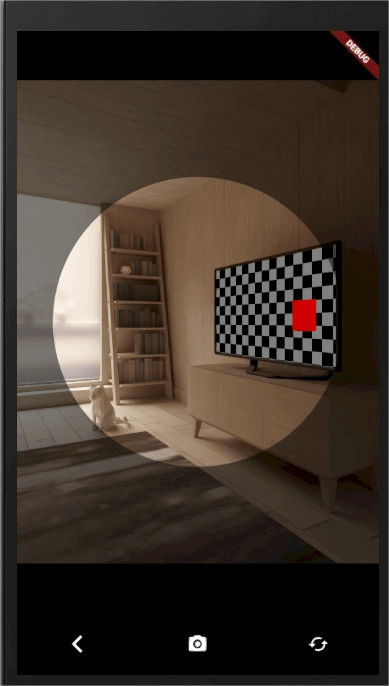
您项目中简单易用的相机插件,支持 Android 和 iOS 平台。
此包允许您直接将媒体文件上传到 Cloudinary,而无需暴露您的 apiKey 或 secretKey。
^8.1.2^3.3.0^3.0.0^4.2.1^0.21.0^1.0.2^2.1.0—^6.0.0{"sdk":"flutter"}^8.1.3^5.1.0^0.13.1^4.0.1^12.1.1^1.1.0^9.1.2^0.19.0^2.1.1^1.1.2^3.0.1^2.2.2^26.2.9^2.0.0{"sdk":"flutter"}以下为英文项目原文快照,最新内容请访问 GitHub。
Flutterzon
Flutterzon is dedicated to the creation of an Amazon clone app, functioning as a full-stack e-commerce application. The technology stack includes Flutter for the front end, Node.js for the backend, MongoDB for data storage, Bloc for efficient state management, and Cloudinary for seamless image and media management. The primary objective is to faithfully mirror the functionality and user experience found in the Amazon mobile app.
Flutterzon focuses on delivering a seamless and responsive user interface, ensuring a smooth and intuitive experience for users navigating the platform. It also has the Admin Panel, strategically integrated to enhance control and facilitate effective management. This additional component caters to administrative needs, providing ways for overseeing and optimizing various aspects of the application.
Flutterzon is a purpose-driven initiative, with the primary goal of creating an Amazon clone app that faithfully reproduces the renowned functionality and user experience of the Amazon mobile app.
Client Side
Flutter Badge Flutter
Server Side
NodeJS Express.js MongoDB MongoDB
Auth & User Data
Email & Password Authentication: Log in and manage user accounts with email and password credentials.
Persisting Auth State and User Type Redirection: Remain logged in and automatically land on the correct dashboard (user or admin) based on your user type, both when launching the app and while signing in.
User Data Persistence with Hydrated Bloc: Store user data persistently using Hydrated Bloc for seamless user experience.
Home Screen
Product Management:
Category-Wise Products: Organize products by category for easy browsing and navigation.
Product Search: Search for products efficiently using a dedicated search feature.
Product Details: View comprehensive product details, including average rating, rating count, and product recommendations based on the product category.
Product Rating System: Rate only products you have ordered, either through product details or order details screens.
Deal of the Day: Discover the highest-rated product as the "Deal of the Day."
Account Features:
Order Product: Place orders for products seamlessly.
Order Details: Check order details, including status, and receive product recommendations based on the ordered product category.
Search Orders: Easily search for specific orders.
Browsing History: Maintain a history of recently visited products for convenient access.
Wishlists: Create and manage wishlists to keep track of desired products.
Cart Management:
Cart List: View and manage products added to the cart.
Cart Actions:
Save for Later List: Manage products saved for later.
Save for Later Actions:
Product Recommendations: Receive product recommendations based on user browsing history or random recommendations if no browsing history exists.
Checkout Options:
Google Pay Checkout: Checkout using Google Pay for a secure and convenient payment experience.
Buy Now Checkout: Order selected products immediately after payment using the "Buy Now" option.
Admin Panel: Manage the e-commerce platform effectively with the comprehensive admin panel.
Admin Panel Features:
Product Management: View, add, and delete products category-wise.
Earnings Analysis: Track total earnings and category-based earnings using a visual graph.
Four Image Offer Management: View, add, and delete four image offers from the admin section.
Order Management: View order details and change order status.
Sign Out: Easily sign out of both user and admin accounts.
Some of used packages:
bloc: Leverages bloc for effective state management.
hydrated_bloc: Persists user data using hydrated_bloc for a seamless user experience.
equatable: Compares objects efficiently using equatable for enhanced performance.
syncfusion_flutter_charts package: Utilizes the syncfusion_flutter_charts package to display category-wise earnings in a comprehensive graph format.
go_router: Employs go_router for efficient page navigation throughout the application.
Home
Product
Product
Product
Order
Order
Cart
Cart
Admin
Admin
Admin
Video Link - https://drive.google.com/uc?id=1XwgXe3bwy-LK_AiMJoD60q6w9Lf8A_oj
Clone this repository
https://github.com/tejasbadone/flutterzon_bloc.git
Migrate to the root directory and install all the required dependencies by running
flutter pub get
Create MongoDB Project & Cluster
Connect to the cluster using Drivers and get the connection string.
I've created a config.env file at the root directory of the project, containing the essential details for the setup, you could also create one or update the necessary values directly, it's totally up to you. demo of config.env file -
PORT=PORTHERE
DB_USERNAME='usernameHere'
DB_PASSWORD='passwordHere'

URI='uriHere'

CLOUDINARY_CLOUDNAME='cloudname'
CLOUDINARY_UPLOADPRESET='uploadpreset'
Head to server/index.js and replace the userName, password, and connection string.
Head to lib/src/utils/constants/strings.dart and replace the uri with your IP address.
Create Cloudinary Project, and enable the unsigned operation in settings.
Head to lib/src/data/repositories/admin_repository.dart, update the cloudinaryCloudName and cloudinaryUploadPreset present in the uploadImages() method.
Now, run the following commands, to migrate to the server folder, install the necessary dependencies, and run the server locally.
cd server
npm install
npm run dev (to run index.js using nodemon)
OR
npm start (to run index.js)
Please star⭐ the repo if you like what you see😉.
Download apk - https://drive.google.com/file/d/1K1k8DbwHfyAnujwRAPgzXmcEUVABFB_p/view?usp=sharing
User
Admin
If you wish to place an order in the application, you can enroll in the Google Pay API Test Cards Allowlist. This will provide you with mock card details, allowing you to safely test the order placement functionality within a controlled environment.
For the GitHub version of Flutterzon apk provided above, please note that certain administrative features, such as the ability to delete products and offers, have been intentionally disabled to prevent unintended tampering with the actual database. The original codebase, accessible to you, includes the complete functionality, including the ability to delete products. If you wish to explore the full range of features, please refer to the original code provided.
Please be aware that the application or APIs might experience delays in providing details, as the server is hosted on a hobby plan, If there is no activity for 15 minutes, the server may go to sleep, resulting in a delay in processing the first API request. Your patience during this process is greatly appreciated.
If you are interested, there is another version of this project built using Provider and Flutter's setState. You can access it here.
This application is a personal project built with educational and learning purposes in mind. It is neither affiliated nor endorsed by Amazon in any way. While the app features product details and images inspired by Amazon, these are solely for demonstration purposes and may not represent actual products. All rights to these elements belong to their respective owners. We are using them for educational purposes only and have no intention of commercial exploitation.
Additionally, be aware that any attempts to place orders within this prototype are purely for testing purposes and will not result in actual product deliveries or charges in the real-world. This environment is designated exclusively for simulation and development purposes
This project is licensed under the MIT License - see the LICENSE.md file for details