v3.4.3
hooks_riverpod
リアクティブなキャッシュおよびデータバインディングフレームワーク。Riverpod は非同期コードの扱いを簡単にする。
931いいね 65.9万30日間ダウンロード150Pub ポイント
AndroidiOSmacOSWindowsLinux
Tachidesk-Server インスタンスからマンガを読むための無料でオープンソースのマンガリーダーアプリ。

以下は英語原文のスナップショットです。最新版は GitHub をご覧ください。







A free and open source manga reader based on Flutter to read manga from a Suwayomi-Server instance.
Sorayomi need to connect with an already hosted server.
Sorayomi supports Linux, Windows, MacOS, Web, iOS and Android.
Here is a list of current features for interaction with Sorayomi:
Note: Keep in mind that Sorayomi and Suwayomi-Server are alpha software, so it can have issues. See Support and help if it happens.
These are the versions of Suwayomi-Server that Sorayomi supports.
Download *-android-all.apk file from latest release the releases section.
Download the latest .msi file from the releases section.
if you use WINGET, you can run
winget install tachidesk-sorayomi
if you use HomeBrew, you can run
brew install --cask tachidesk-sorayomi
Download the latest deb release from the releases section.
Download the latest release from the aur.
If you use yay, you can run
yay -S tachidesk-sorayomi-bin
inside a terminal window.
Download the latest web.zip file from the releases section.
Navigation bar > more screen > Server URL.These instructions will get you a copy of the project up and running on your local machine for development and testing purposes.
You can install Flutter & Dart from Official website
  $ git clone https://github.com/Suwayomi/Tachidesk-Sorayomi.git
  $ cd Tachidesk-Sorayomi/
$ flutter pub get
$ flutter run
$ flutter gen-l10n
git config --local core.hooksPath .githooksFlutter is an open source framework by Google for building beautiful, natively compiled, multi-platform applications from a single codebase.
Flutter Riverpod - A simple way to access state while robust and testable.
Riverpod Architecture - File architecture developed by @bizz84
Find other dependencies in pubspec.yaml
The Suwayomi-server project is developed by @AriaMoradi and contributors,
The Tachidesk-Sorayomi project is developed by @DattatreyaReddy and contributors,
CI-CD for Tachidesk-Sorayomi is developed by @mahor1221 and contributors.
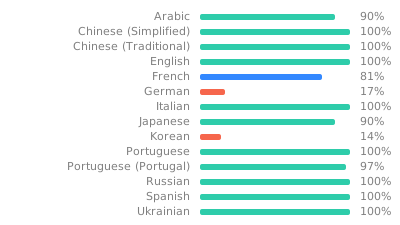
Feel free to translate the project on Weblate
A link for Tachidesk is provided here and is licensed under Mozilla Public License v2.0.
You can obtain a copy of Mozilla Public License v2.0 from https://mozilla.org/MPL/2.0/
Copyright (C) Contributors to the Suwayomi project

This Source Code Form is subject to the terms of the Mozilla Public
License, v. 2.0. If a copy of the MPL was not distributed with this
file, You can obtain one at http://mozilla.org/MPL/2.0/.
リアクティブなキャッシュおよびデータバインディングフレームワーク。Riverpod は非同期コードの扱いを簡単にする。
riverpod_generator 用のアノテーションを公開するパッケージ
Riverpod用のコードジェネレーターです。構文を簡略化し、状態付きホットリロードなどの機能を強化します。
package:go_router 用の生成された強力な型付きルートヘルパーをサポートするビルダー
純粋なDartで書かれた軽量かつ高速なキー値データベース。AES-256を使用した強力な暗号化。
Hive の拡張機能。Flutter アプリで Hive を使いやすくします。
React Hooks の Flutter 実装。コード再利用を強化した新しい種類のウィジェットを追加します。
Dart用のスタンドアロンGraphQLクライアントで、最新のGraphQLクライアントのすべての機能を1つの使いやすいパッケージに統合しています。
Flutter向けのGraphQLクライアントで、現代的なGraphQLクライアントのすべての機能を1つの使いやすいパッケージにまとめています。
ネットワークの情報を(例:Wi-Fiの詳細)検出するためのFlutterプラグイン。
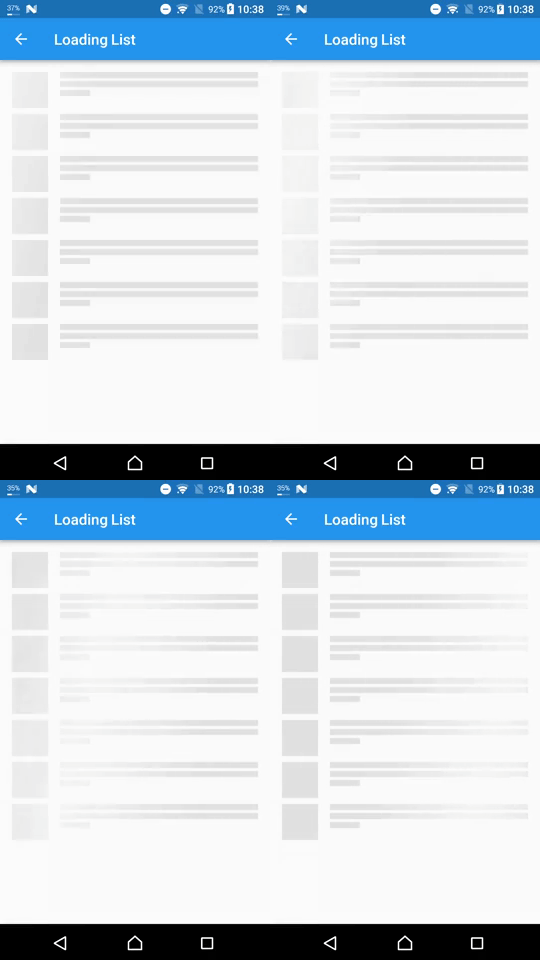
パッケージは、Flutterプロジェクトにシャイマー効果を簡単に追加する方法を提供します
アセット、フォント、カラーなどに対するFlutterコードジェネレーター — 文字列ベースのAPIをすべて削除します。
依存関係一覧 55 件
^5.1.1^3.2.2^4.0.0^1.0.5^1.0.10^8.0.0+1^8.2.0{"sdk":"flutter"}{"git":"https://github.com/DattatreyaReddy/flutter_android_volume_keydown"}^3.3.0^0.20.0{"sdk":"flutter"}^0.7.1^8.1.1^10.2.1^2.2.0^3.0.1^14.0.2^1.0.1-alpha+1730759315362^1.0.1+1^5.2.0-beta.10^5.2.0-beta.8^2.2.3^1.1.0^2.1.1^1.2.0^4.0.0^0.20.2^4.9.0^2.5.0^6.0.0^8.0.0^1.8.3^2.0.11^11.0.0^2.1.2^3.1.0+2^2.0.0^0.3.5^2.0.15^3.0.0^6.1.6^3.0.0^2.4.14^5.1.0+1^0.14.1^5.0.0^2.2.14{"sdk":"flutter"}^2.2.1^2.0.0^1.1.1^6.5.4^5.0.0^2.0.0用途で絞り込み、開発状況を比較し、採用前に元のリポジトリで要件を確認しましょう。
“A repository is the most basic element of GitHub.”
GitHub Docs — About repositories ↗