パッケージ、リポジトリ、アプリカテゴリを検索

パッケージ詳細v5.1.1

infinite_scroll_pagination

ユーザーが画面を下にスクロールするにつれて、アイテムのページを遅延して読み込み表示します。

AndroidiOSWebmacOSWindowsLinux
30日間ダウンロード
48.1万
いいね数
4050
Pub ポイント
150

パッケージをインストール

flutter pub add infinite_scroll_pagination

パッケージ概要

公開情報に基づく選定ガイドです。参考としてご利用ください。

ユーザーがスクロールする際にページネートされたコンテンツを遅延読み込みできるFlutterパッケージです。データを段階的に取得することでパフォーマンスとユーザーエクスペリエンスを向上させます。ListViewや他のスクロール可能なウィジェットとシームレスに統合され、現在のコンテンツの終端に近づいたときに自動的にページ要求をトリガーします。ソーシャルフィード、検索結果、製品カタログなどの長いリストを表示するアプリに最適です。最小限のボイラープレートでロード状態、エラー回復、空状態を処理します。

用途

  • ソーシャルメディアフィードのスクロール
  • 検索結果のページネーション
  • EC商品リスト
  • 長編記事の表示
  • ダッシュボードでの無限コンテンツの読み込み

主な機能

  • スクロール時にページを自動読み込み
  • 組み込みの読み込みおよびエラー状態
  • 複数のスクロール可能なウィジェットのサポート
  • カスタマイズ可能なページリクエストロジック
  • 遅延読み込みによる効率的なメモリ使用

適している対象

  • 大規模なデータセットを持つアプリケーション
  • スクロール可能なリストインターフェース
  • パフォーマンスに敏感なUI
  • 最小限のセットアップを求める開発者
  • スムーズな無限スクロールを必要とするプロジェクト

注意事項

  • 非同期データソースの適切な処理が必要です
  • カスタムキャッシング戦略が必要になる可能性があります
  • 小さな静的リストには適していない
  • ページトークンまたはオフセットロジックの正しく実装されていることに依存します
  • 適切に設定しない場合、過剰なデータ取得の可能性があります

元の README

関連するソースリポジトリの README 原文のスナップショットです。最新の内容はリポジトリをご覧ください。

Package Logo with Flutter Favorite Badge

Chosen as a Flutter Favorite by the Flutter Ecosystem Committee

Pub.dev Badge GitHub Build Badge Code Coverage Badge Gitter Badge Effective Dart Badge MIT License Badge Flutter Platform Badge


Infinite Scroll Pagination

Unopinionated, extensible and highly customizable package to help you lazily load and display small chunks of items as the user scrolls down the screen – known as infinite scrolling pagination, endless scrolling pagination, auto-pagination, lazy loading pagination, progressive loading pagination, etc.

Designed to feel like part of the Flutter framework.

Example Project

Tutorial

By raywenderlich.com (step-by-step, hands-on, in-depth, and illustrated).

Usage

class ListViewScreen extends StatefulWidget {
  const ListViewScreen({super.key});

  @override
  State<ListViewScreen> createState() => _ListViewScreenState();
}

class _ListViewScreenState extends State<ListViewScreen> {
  late final _pagingController = PagingController<int, Photo>(
    getNextPageKey: (state) => state.lastPageIsEmpty ? null : state.nextIntPageKey,
    fetchPage: (pageKey) => RemoteApi.getPhotos(pageKey),
  );

  @override
  void dispose() {
    _pagingController.dispose();
    super.dispose();
  }

  @override
  Widget build(BuildContext context) => PagingListener(
    controller: _pagingController,
    builder: (context, state, fetchNextPage) => PagedListView<int, Photo>(
      state: state,
      fetchNextPage: fetchNextPage,
      builderDelegate: PagedChildBuilderDelegate(
        itemBuilder: (context, item, index) => ImageListTile(item: item),
      ),
    ),
  );
}

For more usage examples, please take a look at our cookbook or check out the example project.

Features

Migration

if you are upgrading the package, please check the migration guide for instructions on how to update your code.


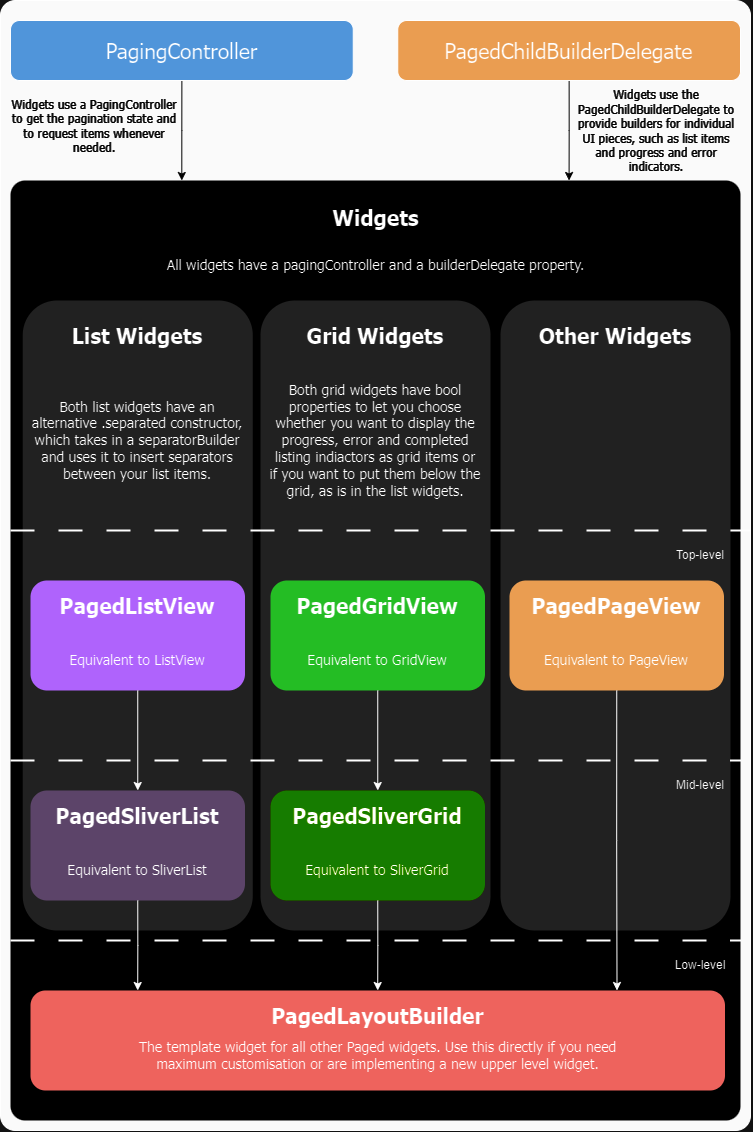
API Overview

API Diagram

カテゴリー

依存関係

依存関係一覧 4 件

ソースリポジトリ

このパッケージを使用しているプロジェクト

ランキング