
v10.0.0
bloc_test
Bloc をテストしやすくするためのテストライブラリ。Bloc の状態管理パッケージと連携して使用することを目的としています。
668いいね 122万30日間ダウンロード160Pub ポイント
AndroidiOSWebmacOSWindowsLinux
シンプルで強力な、オープンソースのSpaceX打ち上げトラッカー。

Bloc をテストしやすくするためのテストライブラリ。Bloc の状態管理パッケージと連携して使用することを目的としています。
BLoC(ビジネスロジックコンポーネント)デザインパターンを簡単に実装できるFlutterウィジェット。bloc状態管理パッケージと併用するように設計されています。
bloc 状態管理ライブラリの拡張で、状態を自動的に永続化および復元します。
 v1.1.1
ホーム画面にショートカットを作成するためのFlutterプラグインで、iOSではクイックアクション、Androidではアプリショートカットとも呼ばれます。
Mockito を参考にしたモックフレームワークで、Fakes、Mocks、振る舞いの検証、スタブの設定のためのAPIを提供しています。
 v2.0.12
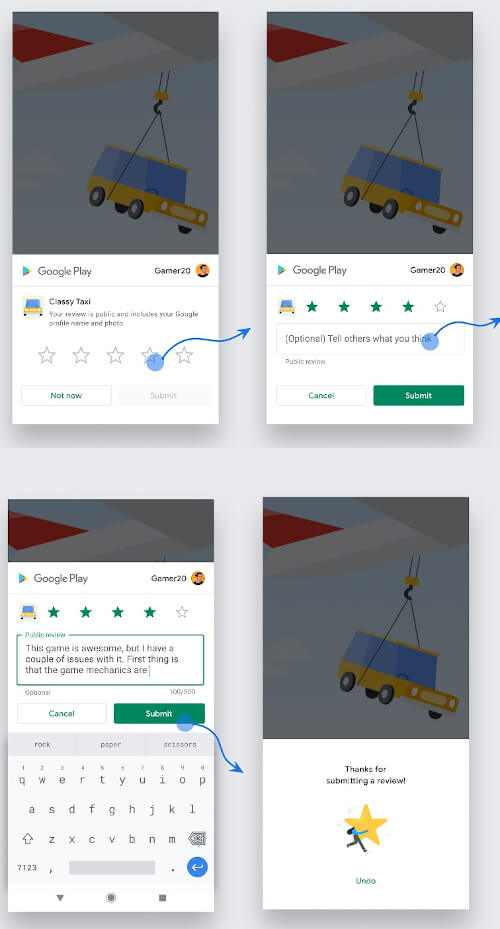
Android、iOS、MacOSでアプリ内レビュー/システム評価ポップアップを表示するためのFlutterプラグイン。ユーザーがアプリを簡単に評価できるようにします。
Dart および Flutter プロジェクト用の、主観的でコミュニティ主導の lint ルールセット。pedantic に似ているが、より厳格
Flutter用のi18nが簡単になりました。flutter_i18nを使えば、単純な.json、.xml、.yaml、または.tomlファイルだけでアプリを国際化できます!
各プラットフォームのデフォルトカレンダーにイベントを追加するための非常にシンプルなFlutterプラグインです。
Chrome Custom Tabs および SFSafariViewController を使用してウェブページを開くためのFlutterプラグインプロジェクトです。
アプリでカスタム検索体験をすばやく簡単に構築する方法
 v0.10.1
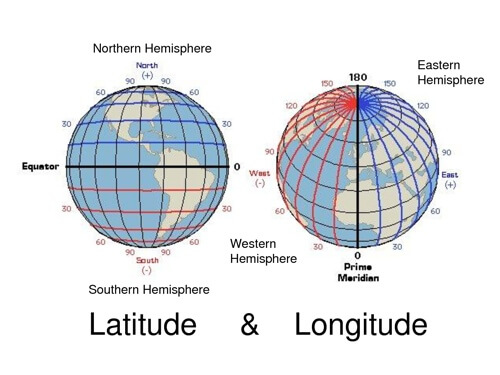
一般的な緯度経度計算のための軽量ライブラリ
{"sdk":"flutter"}^2.1.0^2.0.0^3.1.0^0.3.1^1.2.1^4.0.0^2.1.0^2.0.3^7.0.1^0.30.0^8.2.0^0.6.2^0.2.0^0.22.0^1.1.6^0.15.0^2.1.0^7.0.1^2.0.2^0.8.0^1.6.0^1.0.3^0.6.0+6^0.2.5^2.0.1^2.0.0^2.1.4^1.0.0^0.1.3{"sdk":"flutter"}^8.0.2^0.9.0^1.2.0^5.0.10以下は英語原文のスナップショットです。最新版は GitHub をご覧ください。
https://raw.githubusercontent.com/jesusrp98/spacex-go/master/screenshots/icon.png
https://img.shields.io/github/license/jesusrp98/spacex-go.svg?style=for-the-badge https://img.shields.io/github/stars/jesusrp98/spacex-go.svg?style=for-the-badge https://img.shields.io/badge/Donate-PayPal-blue.svg?style=for-the-badge https://img.shields.io/badge/Support-Patreon-orange.svg?style=for-the-badge https://img.shields.io/badge/Google-PlayStore-green.svg?style=for-the-badge
The purpose of this project is to develop the ultimate SpaceX experience in a variety of platforms. A single experience, from a single codebase.
From the start, SpaceX GO! has been developed to be light-weight, fast and easy to use. It takes all the data from the open-source r/SpaceX REST API, which can be found here.
This project has been built using the Flutter framework, which allows to build an app for mobile, desktop & web, from a single codebase.
https://raw.githubusercontent.com/jesusrp98/spacex-go/master/screenshots/0.jpg https://raw.githubusercontent.com/jesusrp98/spacex-go/master/screenshots/1.jpg https://raw.githubusercontent.com/jesusrp98/spacex-go/master/screenshots/2.jpg
First, clone the repository with the 'clone' command, or just download the zip.
$ git clone git@github.com:jesusrp98/spacex-go.git
Then, download either Android Studio or Visual Studio Code, with their respective Flutter editor plugins. For more information about Flutter installation procedure, check the official install guide.
Install dependencies from pubspec.yaml by running flutter packages get from the project root (see using packages documentation for details and how to do this in the editor).
There you go, you can now open & edit the project. Enjoy!
If you want to take the time to make this project better, please read the contributing guides first. Then, you can open an new issue, of a pull request.
This project is licensed under the GNU GPL v3 License - see the LICENSE.md file for details.