パッケージ、リポジトリ、アプリカテゴリを検索

decorated_icon のカバー
パッケージ詳細v1.2.1

decorated_icon

軽量で効率的なアイコンウィジェットで、影効果のリストをサポートしています。

AndroidiOSWebmacOSWindowsLinux
30日間ダウンロード
2790
いいね数
80
Pub ポイント
150

パッケージをインストール

flutter pub add decorated_icon

パッケージ概要

公開情報に基づく選定ガイドです。参考としてご利用ください。

DecoratedIcon は、カスタマイズ可能な影効果を備えたアイコンを表示するように設計された軽量で効率的な Flutter ウィジェットです。標準の Icon ウィジェットを拡張し、複数の影を適用できるようにすることで、視覚的な奥行きとデザインの柔軟性を向上させます。パフォーマンスのオーバーヘッドなしに視覚的に魅力的な UI 要素を作成するのに最適であり、Android、iOS、Web、macOS、Windows、Linux などの主要プラットフォームをすべてサポートしています。pub add を通じて簡単に統合でき、クリーンで最小限のコードでメンテナンスされています。繊細なまたは劇的な影効果を持つスタイリッシュなアイコンが必要なアプリに最適です。

用途

  • 影付きのスタイリッシュなアイコンを追加
  • 視覚的に豊かなUIコンポーネントの作成
  • アプリケーションインターフェースにおけるアイコンの外観の向上
  • カスタムボタンアイコンのデザイン
  • ダッシュボードにおけるビジュアル階層の向上

主な機能

  • 複数のシャドウ効果をサポート
  • 軽量でパフォーマンスに優れる
  • pub add を通じた簡単な統合
  • クロスプラットフォーム互換性
  • 標準の Icon ウィジェットを拡張します
  • カスタマイズ可能な影のプロパティ

適している対象

  • 視覚的な魅力を求めるUIデザイナー
  • 現代的なアプリケーションインターフェースを構築する開発者
  • 繊細なアイコンの改善を必要とするプロジェクト
  • 高いビジュアルデザイン基準を持つアプリ
  • パフォーマンスとシンプルさを重視するチーム

注意事項

  • シャドウ効果のみに制限
  • 組み込みのアニメーションサポートなし
  • マニュアルなシャドウ設定が必要です
  • 複雑なアイコン変換には適していません
  • シンプルなアイコンテーマと併用するのが最適です

元の README

関連するソースリポジトリの README 原文のスナップショットです。最新の内容はリポジトリをご覧ください。

pub package

Decorated Icon

The best-performing shadowed icon widget for Flutter!

DecoratedIcon is a super lightweight Icon that supports shadow decorations.

No complicated hacks or multiple widgets, just List<Shadow> shadows like a TextStyle!

This widget is able to achieve the most efficient implementation of an icon with a shadow because it is uses a single Text widget to display the icon and apply the shadows.

It even supports debugging and Semantics.

One thing to keep in mind when using multiple shadows is the order of stacking by Flutter: the first shadow in the list will be painted at the bottom. (Similar to how the Stack widget draws its children.)

Also note that due to Flutter's current limitation, achieving an "outer glow" effect is not currently possible. You can read more here.

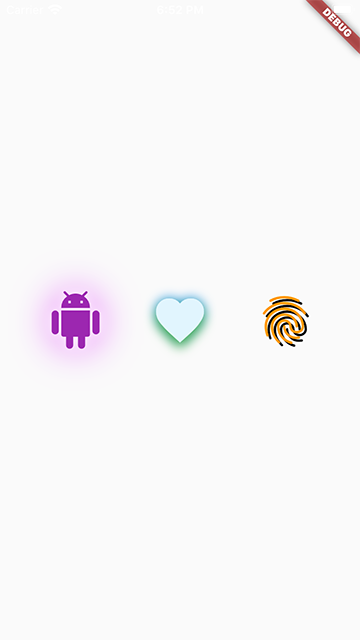
Usage

To use this package, add decorated_icon as a dependency in your pubspec.yaml file.

Example

snapshot

Import the library.

import 'package:decorated_icon/decorated_icon.dart';

Then use DecoratedIcon as you would an Icon:

final decoratedIcons = Row(
  mainAxisAlignment: MainAxisAlignment.spaceEvenly,
  children: const [
    DecoratedIcon(
      Icons.android,
      color: Colors.purple,
      size: 60.0,
      shadows: [
        BoxShadow(
          blurRadius: 42.0,
          color: Colors.purpleAccent,
        ),
        BoxShadow(
          blurRadius: 12.0,
          color: Colors.white,
        ),
      ],
    ),
    DecoratedIcon(
      Icons.favorite,
      color: Colors.lightBlue.shade50,
      size: 60.0,
      shadows: [
        BoxShadow(
          blurRadius: 12.0,
          color: Colors.blue,
        ),
        BoxShadow(
          blurRadius: 12.0,
          color: Colors.green,
          offset: Offset(0, 6.0),
        ),
      ],
    ),
    DecoratedIcon(
      Icons.fingerprint,
      color: Colors.orange,
      size: 60.0,
      shadows: [
        BoxShadow(
          color: Colors.black,
          offset: Offset(3.0, 3.0),
        ),
      ],
    ),
  ],
);

カテゴリー

ソースリポジトリ

このパッケージを使用しているプロジェクト