
 v1.0.0+2
kanban_board
Flutter용 사용자 정의 및 드래그 가능한 칸반 보드 위젯입니다. 부드러운 드래그 앤 드롭과 유연한 작업 관리로 티렐로와 유사한 작업 보드를 구축하세요.
44좋아요 16030일 다운로드140Pub 점수
AndroidiOSmacOSWindowsLinux
Flutter용 사용자 정의 및 드래그 가능한 칸반 보드 위젯입니다. 부드러운 드래그 앤 드롭과 유연한 작업 관리로 티렐로와 유사한 작업 보드를 구축하세요.

의존성 목록 6 개
{"sdk":"flutter"}^2.3.6^2.1.0^4.5.1{"sdk":"flutter"}^2.0.0아래는 영문 원문 스냅샷입니다. 최신 내용은 GitHub에서 확인하세요.
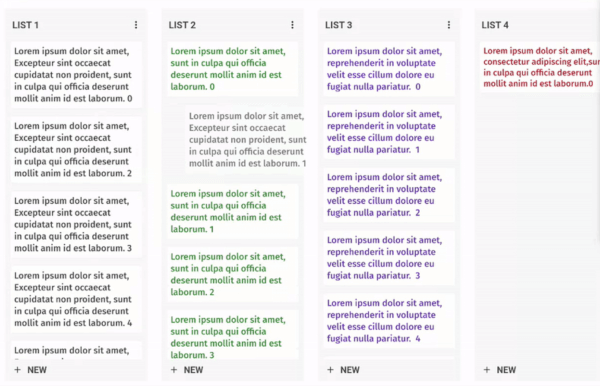
A fully customizable and draggable Kanban Board widget for Flutter. Perfect for building Kanban tools like Trello, it offers smooth drag-and-drop interactions and flexible task management for an intuitive workflow experience.
Example
Just add kanban_board to the pubspec.yaml file.
Let's define our KanbanGroupItem which can hold custom properties, and can be done by extending KanbanBoardGroupItem.
  class KanbanGroupItem extends KanbanBoardGroupItem {
  final String itemId;
  final String title;

  KanbanGroupItem({
    required this.itemId,
    required this.title,
  });

  @override
  String get id => itemId;

}
Then let's generate some random tasks:
import 'dart:math' as math;

List<KanbanBoardGroup<String,KanbanGroupItem>> kanbanGroups = List.generate(
_kanbanData.length,
  (index) => KanbanBoardGroup(
    id: "group_$index",
    name: "Group $index",
    items: List.generate(
      math.Random().nextInt(10),
      (itemIndex) => KanbanGroupItem(
         itemId: "group_item_$itemIndex",
         title: "Item $itemIndex",
      ),
    ),
  ),
);
And, Here comes the Kanban Board:
void main() {
  runApp(MaterialApp(home: KanbanBoardPage()));
}

class KanbanBoardPage extends StatelessWidget {
  final _controller = KanbanBoardController();

  @override
  Widget build(BuildContext context) {
    return Scaffold(
      appBar: AppBar(title: const Text("Flutter Kanban Board")),
      body: KanbanBoard(
        controller: _controller,
        groups: kanbanGroups,
        groupItemBuilder: groupItemBuilder,
        onGroupItemMove:
            (oldGroupIndex, oldItemIndex, newGroupIndex, newItemIndex) {},
        onGroupMove: (oldGroupIndex, newGroupIndex) {},
      ),
    );
  }

  BoxConstraints get groupConstraints => const BoxConstraints(
        minWidth: 300,
        maxWidth: 300,
      );

  Widget groupItemBuilder(context, groupId, itemIndex) {
    final groupItem = kanbanGroups
        .firstWhere((element) => element.id == groupId)
        .items[itemIndex];
    return Container(
      padding: const EdgeInsets.all(10),
      decoration: BoxDecoration(
        borderRadius: BorderRadius.circular(8),
      ),
      child: Text(groupItem.title),
    );
  }
}
Make it uniquely yours with extensive customization options by exploring range of customization properties in KanbanBoard, including:
image
Tailor the scrolling experience to match your application's feel:
KanbanBoard(
   ...
   boardScrollConfig: BoardScrollConfig(
        curve: // The animation curve
        farBoundary: Boundary(
          boundary: // The distance from the edge of the board at which auto-scrolling starts when dragging near the edge.
          offset: // The amount of scroll movement when the draggable reaches this boundary.
          duration: // The time duration for each scroll step when within this boundary.
        ),
        midBoundary: Boundary( ... ), // A middle-range boundary that triggers auto-scrolling at a moderate speed.
        nearBoundary: Boundary( ... ), // The closest range to the edge, where scrolling is most responsive.
   ),
   ...
);
Check out the example app to see all features in action.
Join our community of developers:
git checkout -b amazing-featuregit commit -m 'Add some amazing feature'git push origin amazing-featureThis project is licensed under the MIT License - see the LICENSE file for details.