패키지, 저장소 및 앱 카테고리 검색

dotted_border 표지
패키지 상세v3.1.0

dotted_border

어떤 위젯에도 쉽게 점선 테두리를 추가할 수 있도록 해주는 플러터 패키지입니다.

AndroidiOSWebmacOSWindowsLinux
30일 다운로드
92.4만
좋아요
1.7천
Pub 점수
160

패키지 설치

flutter pub add dotted_border

패키지 개요

공개 정보를 바탕으로 생성한 선택 가이드입니다.

dotted_border 패키지는 플러터의 어떤 위젯에도 점선 테두리를 추가하는 간단한 방법을 제공합니다. 색상, 선 두께, 점선 길이, 간격 길이 등의 옵션을 통해 테두리의 외관을 사용자 정의할 수 있습니다. 이 패키지는 입력 필드, 버튼, 컨테이너와 같이 점선 또는 파선 윤곽이 필요한 시각적으로 매력적인 UI 요소를 만들기에 이상적입니다. Android, iOS, 웹, macOS, Windows, Linux 등 모든 주요 플랫폼을 지원하여 기기 간 일관된 스타일을 보장합니다.

사용 사례

  • 입력 필드에 점선 테두리 추가
  • 스타일링된 컨테이너 테두리 만들기
  • 인터랙티브 버튼 하이라이트 설계
  • 폼 요소 시각 피드백 향상
  • 점선 테두리로 사용자 지정 UI 컴포넌트 만들기

주요 기능

  • 사용자 정의 가능한 점 크기 및 간격
  • 다중 테두리 측면 지원
  • 기존 위젯과의 간편한 통합
  • 크로스 플랫폼 호환성
  • 유연한 색상 및 선 두께 설정

적합한 대상

  • 장식용 테두리를 찾는 UI 디자이너
  • 폼 인터페이스를 구축하는 개발자
  • 포커스 상태에서 시각적 피드백이 필요한 앱
  • 다양한 플랫폼 간에 일관된 점선 스타일이 필요한 프로젝트
  • 다중 플랫폼 앱을 위한 플러터 사용 팀

고려 사항

  • 많은 중첩된 테두리가 있는 경우 성능에 영향을 미칠 수 있습니다
  • 테두리 장식에만 제한됨(콘텐츠 클리핑 없음)
  • 다른 장식품과의 테두리 겹침을 수동으로 처리해야 합니다
  • 기본 사각형을 초과하는 복잡한 모양의 테두리에는 적합하지 않습니다
  • 부드러운 렌더링을 유지하려면 가벼운 위젯과 함께 사용하는 것이 가장 좋습니다

원본 README

연결된 소스 저장소의 README 원문 스냅샷입니다. 최신 내용은 저장소에서 확인하세요.

Dotted Border

pub package

A flutter package to easily add dotted borders around widgets.

Installing

To use this package, add dotted_border as a dependency in your pubspec.yaml file.

Usage

Wrap DottedBorder widget around the child widget

DottedBorder(
  child: Text(
    'Rectangular Border',
    style: TextStyle(
      fontWeight: FontWeight.bold,
    ),
  ),
)
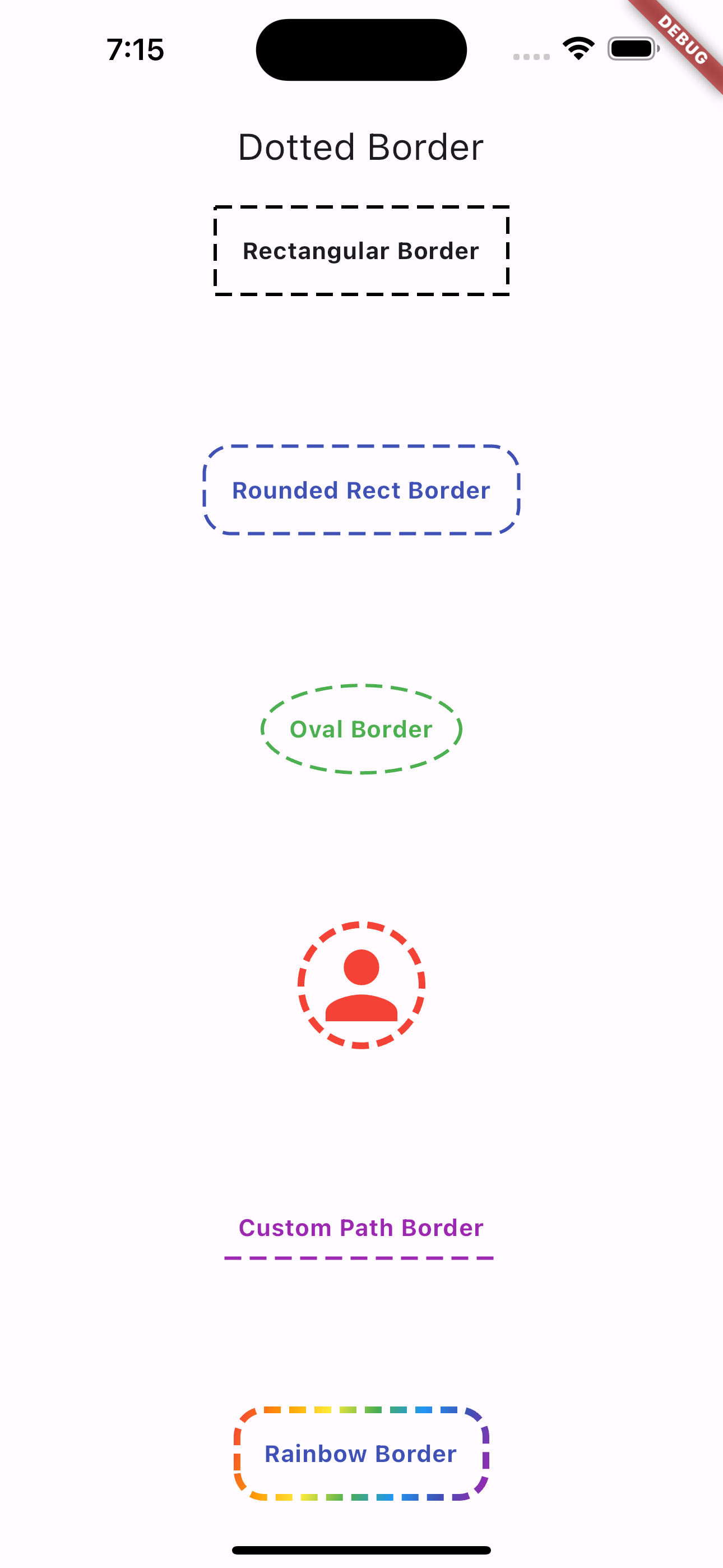
BorderTypes

This package supports the following border options

  • CustomPath
  • RoundedRect
  • Rect
  • Circular
  • Oval
Example
DottedBorder(
  options: RectDottedBorderOptions(
    dashPattern: [10, 5],
    strokeWidth: 2,
    padding: EdgeInsets.all(16),
  ),
  child: Text(
    'Rectangular Border',
    style: TextStyle(
      fontWeight: FontWeight.bold,
    ),
  ),
)
Dash Pattern

You can also specify the Dash Sequence by passing in an Array of Doubles

Example
RectDottedBorderOptions(
  dashPattern: [10, 5],
  strokeWidth: 2,
  padding: EdgeInsets.all(16),
)

The above code block will render a dashed border with the following pattern:

  • 10 pixel wide dash
  • 5 pixel wide space
Custom Path Border

You can also specify a customPath property and it will draw it for you using the provided dash pattern.

Example
DottedBorder(
  options: CustomPathDottedBorderOptions(
    padding: const EdgeInsets.all(8),
    color: Colors.purple,
    strokeWidth: 2,
    dashPattern: [10, 5],
    customPath: (size) => Path()
      ..moveTo(0, size.height)
      ..relativeLineTo(size.width, 0),
  ),
  child: const Text(
    'Custom Path Border',
    style: TextStyle(
      color: Colors.purple,
      fontWeight: FontWeight.bold,
    ),
  ),
)
Output

Flutter dotted border image

Credits

카테고리

소스 저장소

이 패키지를 사용하는 프로젝트

순위