
 v0.0.8
stickereditor
경계에 따라 텍스트와 이미지를 수정하고 이동할 수 있는 위젯입니다.
58좋아요 2030일 다운로드60Pub 점수
플랫폼 정보 없음
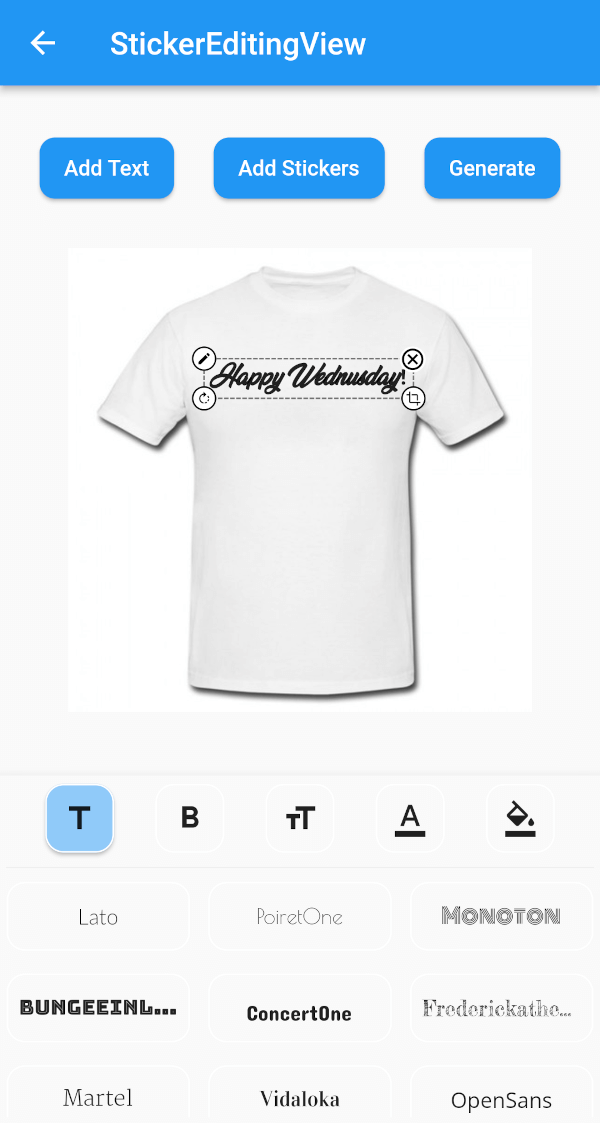
화면에서 드래그하고 확대/축소할 수 있는 스티커 위젯을 만들 수 있도록 도와주는 플러터 패키지입니다.

{"sdk":"flutter"}{"sdk":"flutter"}^4.3.8^2.0.0+1^1.2.3^2.0.5{"sdk":"flutter"}^1.0.0아래는 영문 원문 스냅샷입니다. 최신 내용은 GitHub에서 확인하세요.
A flutter plugin for iOS, Android and Mac for Rotate, Scaling, Moving and Editing Text, Photo, Stickers
https://github.com/Harsh-Radadiya/sticker_editor/raw/master/assets/readme/demo.gif
| Sticker Editor | |
|---|---|
| https://github.com/Harsh-Radadiya/sticker_editor/raw/master/assets/readme/text_editor_box.png | https://github.com/Harsh-Radadiya/sticker_editor/raw/master/assets/readme/sticker_editor_box.png |
| Only Text | Only Photo |
|---|---|
| https://github.com/Harsh-Radadiya/sticker_editor/raw/master/assets/readme/only_text.png | https://github.com/Harsh-Radadiya/sticker_editor/raw/master/assets/readme/only_picture.png |
A flutter package Sticker Editor which will help you to create editable and scalable text or sticker widget that can be dragged around the area you given in screen.
First, add stickereditor as a dependency in your pubspec.yaml file.
Fore NetworkImage, macOS needs you to request a specific entitlement in order to access the network. To do that open macos/Runner/DebugProfile.entitlements and add the following key-value pair.
<key>com.apple.security.network.client</key>
<true/>
StickerEditingView(
  isnetwork: false,
  height: 300,
  width: 300,
  imgUrl: backgroundImageUrl,
  fonts: fonts,
  palletColor: colorPallet,
  assetList: stickerList,
),
Container(
  height: 300,
  width: 300,
  color: Colors.blue,
  child: Stack(
    children: [
      TextEditingBox(
        fonts: fonts,
        boundHeight: 200,
        boundWidth: 100,
        isSelected: true,
        palletColor: colorPallet,
        newText: TextModel(
            name: 'Text EditingBox',
            textStyle:
                GoogleFonts.pacifico(fontSize: 25, color: Colwhite),
            top: top,
            isSelected: true,
            textAlign: TextAlign.center,
            scale: 1,
            left: left),
      ),
    ],
  ),
),
Container(
  height: 300,
  width: 300,
  color: Colors.blue,
  child: Stack(
    children: [
      StickerEditingBox(
          boundHeight: 200,
          boundWidth: 200,
          pictureModel: PictureModel(
            isNetwork: true,
            isSelected: false,
            left: 50,
            top: 50,
            scale: 1,
            stringUrl:
                'https://raw.githubusercontent.com/Harsh-Radadiya/sticker_editor/master/assets/t-shirt.jpeg',
          )),
    ],
  ),
)
Run the example app in the exmaple folder to find out more about how to use it.