
v11.0.0
hydrated_bloc
bloc 상태 관리 라이브러리의 확장으로, 상태를 자동으로 저장하고 복원합니다.
973좋아요 23.2만30일 다운로드160Pub 점수
AndroidiOSWebmacOSWindowsLinux
Flutterzon은 아마존 모바일 앱의 기능과 사용자 경험을 모방하려는 풀스택 전자상거래 애플리케이션입니다. Flutter, Node.js, MongoDB 및 상태 관리를 위한 Bloc을 사용하여 구축되었습니다. 또한 Flutterzon에는 제어 및 관리를 강화하는 관리자 패널이 있습니다.

bloc 상태 관리 라이브러리의 확장으로, 상태를 자동으로 저장하고 복원합니다.
 v35.1.37
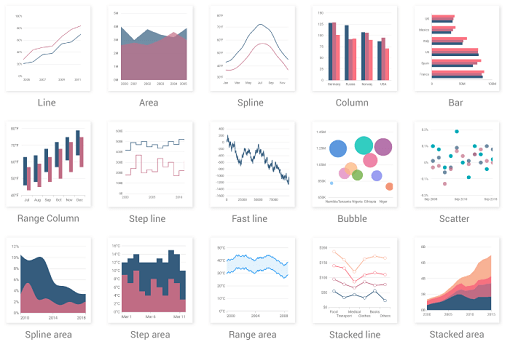
카르테시안 및 원형 차트와 같은 데이터 시각화 위젯을 포함하는 플러터 차트 라이브러리로 실시간, 상호작용 가능하고 고성능이며 애니메이션 효과가 있는 차트를 생성할 수 있습니다.
 v4.0.1
Flutter용 간단하지만 완전히 사용자 정의 가능한 평점 바이며, 임의의 분수 평점을 지원하는 평점 바 인디케이터도 포함되어 있습니다.
 v3.1.0
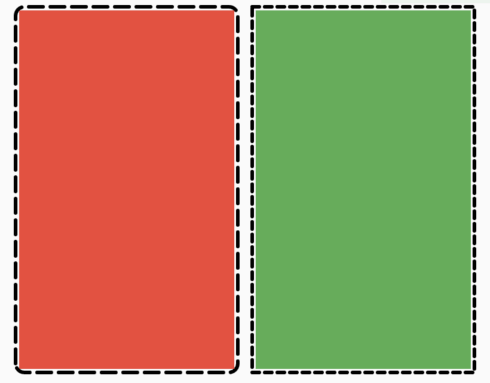
어떤 위젯에도 쉽게 점선 테두리를 추가할 수 있도록 해주는 플러터 패키지입니다.
.env 파일을 사용하여 어떤 플러터 애플리케이션도 전역 변수로 쉽게 구성할 수 있습니다.
iOS, Android, MacOS 및 Linux 플랫폼용으로 Flutter 프로젝트의 번들 ID 및 앱 이름을 변경하거나 이름을 바꾸는 데 도움을 줍니다
Flutter 애플리케이션에서 결제 지원을 추가하기 위한 플러그인입니다.
 v3.0.0
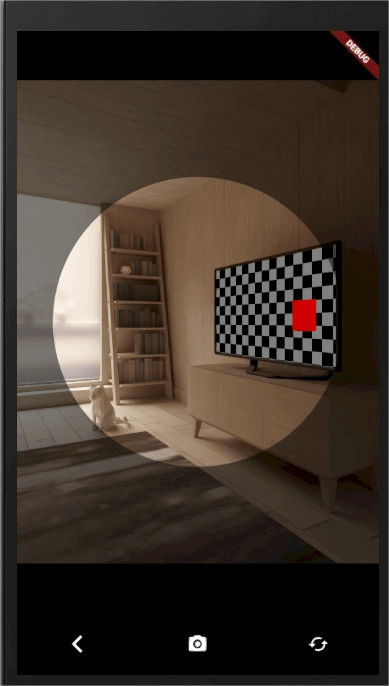
프로젝트용 간편한 플러그인 카메라, 플랫폼은 안드로이드 및 iOS입니다.
이 패키지는 API 키나 시크릿 키를 노출하지 않고도 미디어 파일을 직접 Cloudinary에 업로드할 수 있도록 해줍니다.
^8.1.2^3.3.0^3.0.0^4.2.1^0.21.0^1.0.2^2.1.0—^6.0.0{"sdk":"flutter"}^8.1.3^5.1.0^0.13.1^4.0.1^12.1.1^1.1.0^9.1.2^0.19.0^2.1.1^1.1.2^3.0.1^2.2.2^26.2.9^2.0.0{"sdk":"flutter"}아래는 영문 원문 스냅샷입니다. 최신 내용은 GitHub에서 확인하세요.
Flutterzon
Flutterzon is dedicated to the creation of an Amazon clone app, functioning as a full-stack e-commerce application. The technology stack includes Flutter for the front end, Node.js for the backend, MongoDB for data storage, Bloc for efficient state management, and Cloudinary for seamless image and media management. The primary objective is to faithfully mirror the functionality and user experience found in the Amazon mobile app.
Flutterzon focuses on delivering a seamless and responsive user interface, ensuring a smooth and intuitive experience for users navigating the platform. It also has the Admin Panel, strategically integrated to enhance control and facilitate effective management. This additional component caters to administrative needs, providing ways for overseeing and optimizing various aspects of the application.
Flutterzon is a purpose-driven initiative, with the primary goal of creating an Amazon clone app that faithfully reproduces the renowned functionality and user experience of the Amazon mobile app.
Client Side
Flutter Badge Flutter
Server Side
NodeJS Express.js MongoDB MongoDB
Auth & User Data
Email & Password Authentication: Log in and manage user accounts with email and password credentials.
Persisting Auth State and User Type Redirection: Remain logged in and automatically land on the correct dashboard (user or admin) based on your user type, both when launching the app and while signing in.
User Data Persistence with Hydrated Bloc: Store user data persistently using Hydrated Bloc for seamless user experience.
Home Screen
Product Management:
Category-Wise Products: Organize products by category for easy browsing and navigation.
Product Search: Search for products efficiently using a dedicated search feature.
Product Details: View comprehensive product details, including average rating, rating count, and product recommendations based on the product category.
Product Rating System: Rate only products you have ordered, either through product details or order details screens.
Deal of the Day: Discover the highest-rated product as the "Deal of the Day."
Account Features:
Order Product: Place orders for products seamlessly.
Order Details: Check order details, including status, and receive product recommendations based on the ordered product category.
Search Orders: Easily search for specific orders.
Browsing History: Maintain a history of recently visited products for convenient access.
Wishlists: Create and manage wishlists to keep track of desired products.
Cart Management:
Cart List: View and manage products added to the cart.
Cart Actions:
Save for Later List: Manage products saved for later.
Save for Later Actions:
Product Recommendations: Receive product recommendations based on user browsing history or random recommendations if no browsing history exists.
Checkout Options:
Google Pay Checkout: Checkout using Google Pay for a secure and convenient payment experience.
Buy Now Checkout: Order selected products immediately after payment using the "Buy Now" option.
Admin Panel: Manage the e-commerce platform effectively with the comprehensive admin panel.
Admin Panel Features:
Product Management: View, add, and delete products category-wise.
Earnings Analysis: Track total earnings and category-based earnings using a visual graph.
Four Image Offer Management: View, add, and delete four image offers from the admin section.
Order Management: View order details and change order status.
Sign Out: Easily sign out of both user and admin accounts.
Some of used packages:
bloc: Leverages bloc for effective state management.
hydrated_bloc: Persists user data using hydrated_bloc for a seamless user experience.
equatable: Compares objects efficiently using equatable for enhanced performance.
syncfusion_flutter_charts package: Utilizes the syncfusion_flutter_charts package to display category-wise earnings in a comprehensive graph format.
go_router: Employs go_router for efficient page navigation throughout the application.
Home
Product
Product
Product
Order
Order
Cart
Cart
Admin
Admin
Admin
Video Link - https://drive.google.com/uc?id=1XwgXe3bwy-LK_AiMJoD60q6w9Lf8A_oj
Clone this repository
https://github.com/tejasbadone/flutterzon_bloc.git
Migrate to the root directory and install all the required dependencies by running
flutter pub get
Create MongoDB Project & Cluster
Connect to the cluster using Drivers and get the connection string.
I've created a config.env file at the root directory of the project, containing the essential details for the setup, you could also create one or update the necessary values directly, it's totally up to you. demo of config.env file -
PORT=PORTHERE
DB_USERNAME='usernameHere'
DB_PASSWORD='passwordHere'

URI='uriHere'

CLOUDINARY_CLOUDNAME='cloudname'
CLOUDINARY_UPLOADPRESET='uploadpreset'
Head to server/index.js and replace the userName, password, and connection string.
Head to lib/src/utils/constants/strings.dart and replace the uri with your IP address.
Create Cloudinary Project, and enable the unsigned operation in settings.
Head to lib/src/data/repositories/admin_repository.dart, update the cloudinaryCloudName and cloudinaryUploadPreset present in the uploadImages() method.
Now, run the following commands, to migrate to the server folder, install the necessary dependencies, and run the server locally.
cd server
npm install
npm run dev (to run index.js using nodemon)
OR
npm start (to run index.js)
Please star⭐ the repo if you like what you see😉.
Download apk - https://drive.google.com/file/d/1K1k8DbwHfyAnujwRAPgzXmcEUVABFB_p/view?usp=sharing
User
Admin
If you wish to place an order in the application, you can enroll in the Google Pay API Test Cards Allowlist. This will provide you with mock card details, allowing you to safely test the order placement functionality within a controlled environment.
For the GitHub version of Flutterzon apk provided above, please note that certain administrative features, such as the ability to delete products and offers, have been intentionally disabled to prevent unintended tampering with the actual database. The original codebase, accessible to you, includes the complete functionality, including the ability to delete products. If you wish to explore the full range of features, please refer to the original code provided.
Please be aware that the application or APIs might experience delays in providing details, as the server is hosted on a hobby plan, If there is no activity for 15 minutes, the server may go to sleep, resulting in a delay in processing the first API request. Your patience during this process is greatly appreciated.
If you are interested, there is another version of this project built using Provider and Flutter's setState. You can access it here.
This application is a personal project built with educational and learning purposes in mind. It is neither affiliated nor endorsed by Amazon in any way. While the app features product details and images inspired by Amazon, these are solely for demonstration purposes and may not represent actual products. All rights to these elements belong to their respective owners. We are using them for educational purposes only and have no intention of commercial exploitation.
Additionally, be aware that any attempts to place orders within this prototype are purely for testing purposes and will not result in actual product deliveries or charges in the real-world. This environment is designated exclusively for simulation and development purposes
This project is licensed under the MIT License - see the LICENSE.md file for details