

 v1.0.3+4
flutter_instagram_stories
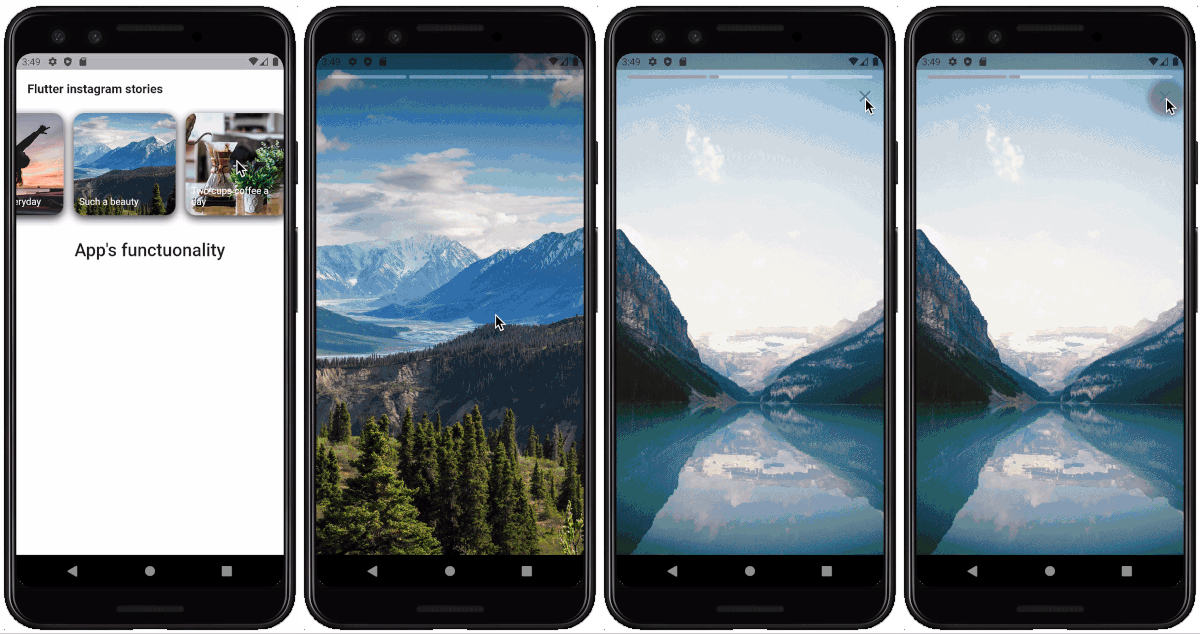
WhatsApp 및 인스타그램처럼 스토리(비디오 및 이미지)를 표시합니다.
176좋아요 6930일 다운로드80Pub 점수
플랫폼 정보 없음
인스타그램의 스토리처럼 각 스토리는 여러 이미지와 비디오를 포함할 수 있습니다. 패키지는 비디오, 제목 및 사전 캐싱을 지원합니다.

아래는 영문 원문 스냅샷입니다. 최신 내용은 GitHub에서 확인하세요.

A Flutter package for displaying stories just like Whatsapp & Instagram. Built-in groups (multiple stories with one icon), cache, video, gifs.
The package can be used in any app for displaying news, educational content and etc. Look the sample app here.
Note: This package is under active development, and there are some known bugs and a lot of features to implement. Please, add issues or feature requests here: issue
The project was initially copied from https://github.com/blackmann/story_view - great thanks for this excellent package. In case, you need more flexible functionality, you can check the original repository.

Important notes:
Look how to install here https://pub.dev/packages/flutter_instagram_stories#-installing-tab-
Now in your Dart code, you can use:
import 'package:flutter_instagram_stories/flutter_instagram_stories.dart';
For playing video, the package uses official video_player https://pub.dev/packages/video_player
From documentation:
Warning: The video_player plugin doesn’t work on iOS simulators. You must test videos on real iOS devices.
For iOS, add the following to the Info.plist file found at /ios/Runner/Info.plist.
<key>NSAppTransportSecurity</key>
  <dict>
    <key>NSAllowsArbitraryLoads</key>
    <true/>
  </dict>
You can find a complete working example here https://github.com/awaik/flutter_instagram_stories/tree/master/example
Dart code
Connect to the collection where you keep stories
    static String collectionDbName = 'instagram_stories_db';
    CollectionReference dbInstance =
      Firestore.instance.collection(collectionDbName);
And add stories full functionality to your app.
    FlutterInstagramStories(
        collectionDbName: collectionDbName,
        showTitleOnIcon: true,
        backFromStories: () {
          _backFromStoriesAlert();
        },
        iconTextStyle: TextStyle(
          fontSize: 14.0,
          color: Colors.white,
        ),
        iconImageBorderRadius: BorderRadius.circular(15.0),
        iconBoxDecoration: BoxDecoration(
          borderRadius: BorderRadius.all(Radius.circular(15.0)),
          color: Color(0xFFffffff),
          boxShadow: [
            BoxShadow(
              color: Color(0xff333333),
              blurRadius: 10.0,
              offset: Offset(
                0.0,
                4.0,
              ),
            ),
          ],
        ),
        iconWidth: 150.0,
        iconHeight: 150.0,
        textInIconPadding:
            EdgeInsets.only(left: 8.0, right: 8.0, bottom: 12.0),
        //how long story lasts in seconds
        imageStoryDuration: 7,
        progressPosition: ProgressPosition.top,
        repeat: true,
        inline: false,
        languageCode: 'en',
        backgroundColorBetweenStories: Colors.black,
        closeButtonIcon: Icon(
          Icons.close,
          color: Colors.white,
          size: 28.0,
        ),
        closeButtonBackgroundColor: Color(0x11000000),
        sortingOrderDesc: true,
        lastIconHighlight: true,
        lastIconHighlightColor: Colors.deepOrange,
        lastIconHighlightRadius: const Radius.circular(15.0),
        captionTextStyle: TextStyle(
          fontSize: 22,
          color: Colors.white,
        ),
        captionMargin: EdgeInsets.only(
          bottom: 50,
        ),
        captionPadding: EdgeInsets.symmetric(
          horizontal: 24,
          vertical: 8,
        ),
      ),
Firestore database
The package works with Firestore database and package https://pub.dev/packages/cloud_firestore already included into the package.
You can use example with the sample database in the example folder, or, create your own database.
Steps to create:

Important! Pay attention to array, map types. Otherwise you will have a null error https://github.com/awaik/flutter_instagram_stories/issues/20

That's it! Now your app has instagram stories with caching and other powerful features.
App for Android and iOS - https://lifext.app/

의존성 목록 13 개
{"sdk":"flutter"}^0.28.0^2.8.3^3.3.1^3.3.0^3.10.0^5.6.1anyanyanyanyanyany사용 목적에 따라 검색하고 개발 활동을 비교한 뒤 원본 저장소에서 요구 사항을 확인하세요.
“A repository is the most basic element of GitHub.”
GitHub Docs — About repositories ↗