Buscar pacotes, repositórios e categorias de apps

Capa de animated_fab_button_menu
Detalhes do pacotev0.0.2

animated_fab_button_menu

Pacote Flutter para implementar um FAB animado com um menu rolável.

AndroidiOSWebmacOSWindowsLinux
Downloads em 30 dias
61
Curtidas
27
Pontos Pub
150

Instalar pacote

flutter pub add animated_fab_button_menu

Visão geral do pacote

Orientação gerada a partir de informações públicas. Apenas para referência.

Um pacote Flutter que permite a criação de um botão flutuante animado (FAB) com um menu rolável. Ele melhora a interação do usuário ao expandir suavemente o FAB em um menu personalizável, ideal para aplicativos que precisam de acesso intuitivo a várias ações. O menu suporta rolagem, tornando-o adequado para listas de opções que ultrapassam o espaço da tela. Projetado para interfaces modernas, integra-se perfeitamente entre plataformas com comportamento consistente.

Casos de uso

  • Melhorando a navegação do aplicativo móvel
  • Criando centros de ação interativos
  • Melhorar o acesso a múltiplas funções
  • Design de interfaces responsivas
  • Adicionando transições dinâmicas aos FABs

Principais recursos

  • Expansão animada suave
  • Suporte a menu rolável
  • Compatibilidade multiplataforma
  • Itens de menu personalizáveis
  • Integração de design responsivo

Indicado para

  • Desenvolvedores de aplicativos móveis
  • designers de UI/UX
  • Construtores de protótipos interativos
  • Iniciantes do Flutter
  • Aplicativos com fluxos de trabalho de ação complexos

Considerações

  • Pode ser necessário estilos adicionais para personalização
  • Impacto no desempenho com menus grandes
  • Limitado a interações baseadas em FAB
  • Não adequado para conjuntos de ações não roláveis
  • Depende do tratamento de gestos específico da plataforma

README original

Snapshot do README original do repositório-fonte vinculado. Consulte o repositório para o conteúdo mais recente.

Animated FAB Menu

Animated FAB Menu package lets you add an animated floating action button to your Flutter app that open a list of menu items.

Features

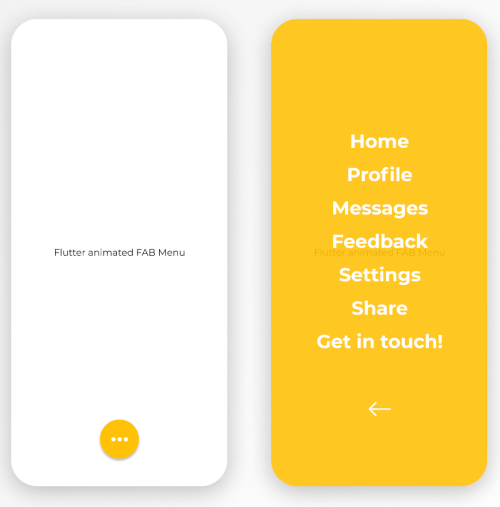
The FabMenu widget is built to be placed in the Scaffold.floatingActionButton argument, replacing the FloatingActionButton widget. Its position is set by the fabAlignment property so you don't need to set it with the Scaffold.floatingActionButtonLocation argument. By default the position is set to bottomCenter, but you can change it by the fabAlignment property to place the button anywhere in the screen. By using the fabIcon and fabBackgroundColorproperties, you can change the icon and the color of the button to whatever you like.

  • Menu

By pressing the floating action button, a page containing a menu list will be opening with some cool animation. This menu contains items that you can specify by the children list property. Every child inside the list takes a title for the item name, style for the text widget of the name, onTap function to provide the logic of the on tap action on each child. On top of that, you have an overlayColor property to change the color of the background opened page, overlayOpacity to change the opacity of the background color and closeMenuButton to choose your own back button widget.

The package will handle the animation by itself.

animated_fab_menu


Getting started

  1. Add the latest version of package to your pubspec.yaml (and run dart pub get):
dependencies:
  animated_fab_button_menu: ^0.0.2
  1. Import the package and use it in your Flutter App.
import 'package:animated_fab_button_menu/animated_fab_button_menu.dart';

Usage

There are a number of properties that you can modify:

  • fabIcon
  • fabBackgroundColor
  • fabAlignment
  • overlayColor (Color of the background menu)
  • overlayOpacity (Opacity of the background menu color)
  • elevation
  • closeMenuButton (Button that close the menu item)
  • children (Items of the menu)
  • title (Name of the child menu)
  • style (Text style for the child menu)
  • onTap (onTap function for the child menu)

Example Usage ( complete with all params ):

class MyHomePage extends StatefulWidget {
  const MyHomePage({Key? key}) : super(key: key);

  @override
  _MyHomePageState createState() => _MyHomePageState();
}

class _MyHomePageState extends State<MyHomePage> {
  @override
  Widget build(BuildContext context) {
    return Scaffold(
      floatingActionButton: FabMenu(
          fabBackgroundColor: Colors.amber,
          elevation: 2.0,
          fabAlignment: Alignment.bottomCenter,
          fabIcon: const Icon(Icons.more_horiz),
          closeMenuButton: const Icon(
            Icons.arrow_back,
            color: Colors.white,
          ),
          overlayOpacity: 0.5,
          overlayColor: Colors.amber,
          children: [
            MenuItem(
              title: 'Home',
              onTap: () {},
              style: const TextStyle(
                  color: Colors.white,
                  fontSize: 24,
                  fontWeight: FontWeight.bold),
            ),
            MenuItem(
              title: 'Profile',
              onTap: () {},
              style: const TextStyle(
                  color: Colors.white,
                  fontSize: 24,
                  fontWeight: FontWeight.bold),
            ),
            MenuItem(
              title: 'Messages',
              onTap: () {},
              style: const TextStyle(
                  color: Colors.white,
                  fontSize: 24,
                  fontWeight: FontWeight.bold),
            ),
            MenuItem(
              title: 'Feedback',
              onTap: () {},
              style: const TextStyle(
                  color: Colors.white,
                  fontSize: 24,
                  fontWeight: FontWeight.bold),
            ),
            MenuItem(
              title: 'Settings',
              onTap: () {},
              style: const TextStyle(
                  color: Colors.white,
                  fontSize: 24,
                  fontWeight: FontWeight.bold),
            ),
            MenuItem(
              title: 'Share',
              onTap: () {},
              style: const TextStyle(
                  color: Colors.white,
                  fontSize: 24,
                  fontWeight: FontWeight.bold),
            ),
            MenuItem(
              title: 'Get in touch!',
              onTap: () {},
              style: const TextStyle(
                  color: Colors.white,
                  fontSize: 24,
                  fontWeight: FontWeight.bold),
            ),
          ]),
      body: const Center(
        child: Text('Flutter animated FAB Menu'),
      ),
    );
  }
}
Here's what it looks like:

https://user-images.githubusercontent.com/68671238/134640734-751456fa-686b-4e77-bc8d-04ba3a324baf.mp4


Next Goals

We are working on some improvements including:

  • [x] Change color and opacity for menu background. Change color and opacity by specifying overlayColor and overlayOpacity properties.
  • [ ] Make the distance between menu items customizable.
  • [ ] Change opening animation with more smooth and user friendly one.

Issues & Feedback

Please file an issue! to send feedback or report a bug. Thank you!

Categorias

Repositório-fonte

Projetos que usam este pacote

Ainda não há dados.