Buscar pacotes, repositórios e categorias de apps

Capa de animated_read_more_text
Detalhes do pacotev0.0.6

animated_read_more_text

Pacote animado do Flutter para funcionalidade 'Leia mais/Leia menos', melhorando o manuseio de texto e interações do usuário.

AndroidiOSWebmacOSWindowsLinux
Downloads em 30 dias
667
Curtidas
69
Pontos Pub
155

Instalar pacote

flutter pub add animated_read_more_text

Visão geral do pacote

Orientação gerada a partir de informações públicas. Apenas para referência.

Um pacote Flutter que fornece funcionalidade suave e animada de 'Ler mais/Ler menos' para texto. Melhora a experiência do usuário ao expandir e colapsar dinamicamente o texto com animações elegantes. Ideal para exibir conteúdo longo de forma limpa e interativa. O pacote é compatível com múltiplas plataformas e se integra perfeitamente em interfaces existentes. Ele lida com excesso de texto de forma elegante e permite personalizar a duração da animação, cores e rótulos.

Casos de uso

  • Exibindo trechos de artigos longos
  • Melhorar o engajamento do usuário em blogs
  • Melhorando a legibilidade nas descrições de aplicativos
  • Gerenciando espaço de tela limitado
  • Criando cartões de conteúdo interativos
  • Simplificando a expansão de conteúdo no mobile e na web

Principais recursos

  • Animações suaves de expansão/diminuição
  • rótulos personalizáveis de ler mais/menos
  • Suporte para texto multilinha
  • Duração de animação configurável
  • Compatibilidade multiplataforma
  • Integração fácil com widgets Text

Indicado para

  • Aplicativos com conteúdo intenso
  • Leitores de blogs e notícias
  • Descrições de produtos de comércio eletrônico
  • Seções do perfil do usuário
  • Componentes de interface interativa

Considerações

  • Pode afetar o desempenho com textos muito longos
  • Requer estilização cuidadosa para corresponder ao design
  • O comportamento da animação pode variar levemente entre plataformas
  • Limitado a conteúdo somente de texto
  • Não é ideal para conteúdo altamente dinâmico ou frequentemente atualizado
  • Depende do correto envolvimento de texto e restrições de layout

README original

Snapshot do README original do repositório-fonte vinculado. Consulte o repositório para o conteúdo mais recente.

AnimatedReadMoreText

A Flutter package that provides a customizable widget for displaying text with an optional "Read more/Read less" button, enhancing the user experience for text-heavy content.

Overview

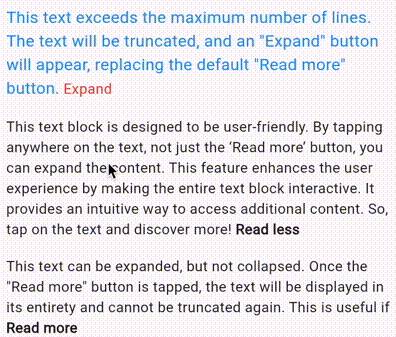
The AnimatedReadMoreText widget is a Flutter package that provides a user-friendly and visually appealing way to present lengthy text content. It dynamically adapts text length based on a predefined maximum line count, ensuring optimal readability on various screen sizes. The widget's key feature is its ability to seamlessly expand or collapse text based on user interaction. This functionality enhances readability by allowing users to focus on specific sections of text without being overwhelmed by lengthy passages. Additionally, the widget's subtle yet impactful animations add a touch of elegance to the user interface, further enhancing the overall reading experience.

AnimatedReadMoreText

Features

  • Lightweight and easy to use
  • Displays text with a specified maximum number of lines.
  • Set custom labels for the "Read more" and "Read less" buttons to match your app's branding and enhance the user experience.
  • Customizable appearance and behavior.
  • Supports optional styling for the text and button.
  • Smooth and customizable animations for text expansion and collapse.

Usage

To use this package, include it in your pubspec.yaml file:

dependencies:
  animated_read_more_text: ^0.0.6

Import the package in your Dart file:

import 'package:animated_read_more_text/animated_read_more_text.dart';

Use the AnimatedReadMoreText widget in your Flutter application:

AnimatedReadMoreText(
  yourLongText,
  maxLines: 3,
  // Set a custom text for the expand button. Defaults to Read more
  readMoreText: 'Expand',
  // Set a custom text for the collapse button. Defaults to Read less
  readLessText: 'Collapse',
  // Set a custom text style for the main block of text
  textStyle: TextStyle(
    fontSize: 16,
    color: Colors.red,
  ),
  // Set a custom text style for the expand/collapse button
  buttonTextStyle: TextStyle(
    fontSize: 16,
    fontWeight: FontWeight.bold,
  ),
)

Set custom animation curve and duration

AnimatedReadMoreText(
  yourLongText,
  // Set the curve of the animation
  animationCurve: Curves.easeInOut,
  // Set the duration of the animation
  animationDuration: Duration(milliseconds: 500),
)

Contributions

Contributions and bug reports are welcome! Please feel free to create an issue or submit a pull request.

License

This package is licensed under the MIT License - see the LICENSE file for details.

Categorias

Repositório-fonte

Projetos que usam este pacote

Ainda não há dados.