Buscar pacotes, repositórios e categorias de apps

Detalhes do pacotev1.1.1

awesome_shake_widget

Um widget Flutter que fornece animação de balanço e efeitos opcionais de vibração, excelente para formulários inválidos, alertas de atenção e feedback de interação do usuário.

AndroidiOS
Downloads em 30 dias
1,1 mil
Curtidas
21
Pontos Pub
160

Instalar pacote

flutter pub add awesome_shake_widget

Visão geral do pacote

Orientação gerada a partir de informações públicas. Apenas para referência.

Um widget Flutter que adiciona animações de balanço e feedback de vibração opcional a elementos da interface. Ideal para chamar atenção para entradas de formulário inválidas, incentivar ações do usuário ou fornecer feedback interativo. O widget é fácil de integrar e suporta tanto Android quanto iOS. Melhora a experiência do usuário ao oferecer respostas visuais e táteis com configuração mínima. Projetado para simplicidade e eficácia em cenários comuns de interação.

Casos de uso

  • Alertas de validação de formulário
  • prompts de entrada do usuário
  • Feedback interativo do botão
  • Notificações de estado de erro
  • Orientação de entrada

Principais recursos

  • efeito de animação de balanço
  • Suporte opcional de vibração
  • Compatibilidade multiplataforma
  • Integração simples da API
  • Duração de animação personalizável
  • Suporte a design responsivo

Indicado para

  • Desenvolvedores construindo formulários interativos
  • Designers de UX aprimorando mecanismos de feedback
  • Aplicativos que exigem pistas chamativas
  • Aplicativos móveis direcionados para Android e iOS
  • Projetos focados em interações intuitivas do usuário

Considerações

  • Pode causar distração se usado em excesso
  • Vibração requer permissão em alguns dispositivos
  • O desempenho da animação depende das capacidades do dispositivo
  • Não adequado para componentes críticos de acessibilidade
  • Melhor usado com moderação para manter a clareza da UX

README original

Snapshot do README original do repositório-fonte vinculado. Consulte o repositório para o conteúdo mais recente.

🚀 awesome_shake_widget

A customizable Flutter widget that adds shake animations with haptic and vibration feedback. Perfect for invalid forms, error indicators, or drawing attention to UI components.

Pub Version Platform License


✨ Features

  • Shake any widget on demand
  • Built-in presets: light, medium, heavy
  • Optional vibration (custom or haptic)
  • Fully customizable offset, pattern & intensities
  • Easy to trigger using a GlobalKey

📦 Installation

dependencies:
  awesome_shake_widget: ^1.0.1

Run:

flutter pub get

🧪 Usage

1️⃣ Standard (Shake + Vibration)

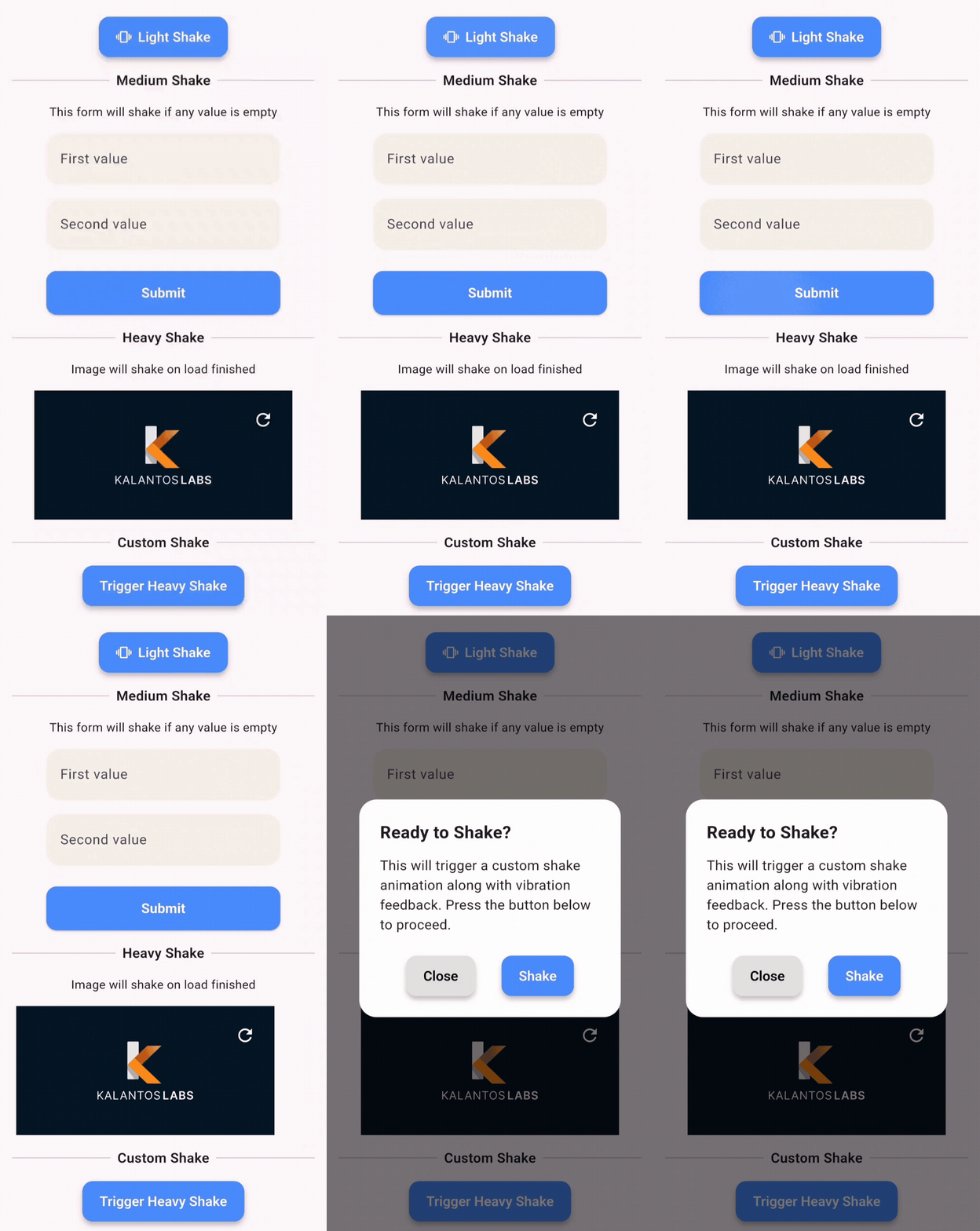
By using the built-in presets — light, medium, heavy and custom — you can quickly apply different vibration intensities and patterns, perfectly paired with UI shake animations for a dynamic and responsive user experience.

final shakeKey = GlobalKey<ShakeWidgetState>();

ShakeWidget(
  key: shakeKey,
  preset: ShakePreset.medium,
  child: Text("Tap Me"),
);

// Somewhere else, e.g., on button press:
shakeKey.currentState?.shake();

2️⃣ Shake Only (No Vibration)

If you only want the visual shake effect without vibration, you can set vibrationType to VibrationType.none using the ShakeConfig. To customize the intensity of the shake, adjust the offset value — higher values will produce a stronger visual effect.

ShakeWidget(
  key: shakeKey,
  customConfig: ShakeConfig(
    offset: 20,
    vibrationType: VibrationType.none,
  ),
  child: Icon(Icons.info),
);

3️⃣ Advanced Configuration: Full Control Over Visual and Vibration Effects

You can also create custom vibration patterns by setting vibrationType to VibrationType.custom, and providing your own pattern and intensities. This gives you full control over the vibration behavior.

ShakeWidget(
key: shakeKey,
customConfig: ShakeConfig(
offset: 32,
pattern: [0, 50, 100, 50],
intensities: [255, 0, 255, 0],
vibrationType: VibrationType.custom,
),
child: Text("Custom Shake!"),
);

Trigger it via:

shakeKey.currentState?.shake();

🎥 Demo

This demo shows how you can apply shake animations to:

  • ✅ Buttons
  • 💬 Dialogs
  • 🖼️ Images
  • ✏️ Text fields
  • 📦 Any widget

🧩 API Reference

Enum: ShakePreset
Value Offset Vibration
light 8 Haptic
medium 16 Haptic
heavy 24 Patterned Vibe
custom User-defined Custom

Enum: VibrationType
  • none – no vibration
  • haptic – system haptic feedback
  • custom – vibration with pattern/intensity (Android only)

ShakeConfig
ShakeConfig({
  required double offset,
  List<int>? pattern,
  List<int>? intensities,
  VibrationType vibrationType = VibrationType.haptic,
});

💡 Example App

Clone and run the example:

cd example
flutter run

Example main.dart:

import 'package:flutter/material.dart';
import 'package:awesome_shake_widget/shake_widget.dart';

void main() => runApp(const MyApp());

class MyApp extends StatelessWidget {
  const MyApp({super.key});

  @override
  Widget build(BuildContext context) {
    return MaterialApp(
      home: ShakeDemo(),
    );
  }
}

class ShakeDemo extends StatelessWidget {
  final shakeKey = GlobalKey<ShakeWidgetState>();

  @override
  Widget build(BuildContext context) {
    return Scaffold(
      appBar: AppBar(title: const Text('Shake Demo')),
      body: Center(
        child: Column(
          mainAxisAlignment: MainAxisAlignment.center,
          children: [
            ShakeWidget(
              key: shakeKey,
              preset: ShakePreset.heavy,
              child: const Icon(Icons.warning, size: 64),
            ),
            const SizedBox(height: 32),
            ElevatedButton(
              onPressed: () => shakeKey.currentState?.shake(),
              child: const Text("Shake it!"),
            ),
          ],
        ),
      ),
    );
  }
}

📄 License

MIT © Juanma Del Boca

Categorias

Dependências

Lista de dependências 1 itens

Repositório-fonte

Projetos que usam este pacote

Ainda não há dados.