Snapshot do README original do repositório-fonte vinculado. Consulte o repositório para o conteúdo mais recente.
Country Calling Code Kit
A sleek, customizable Flutter package for picking country calling codes — complete with flags, country names, and dial
codes. Present it as a dialog or a bottom sheet, tailor it to your app's design, and ship to every Flutter platform.



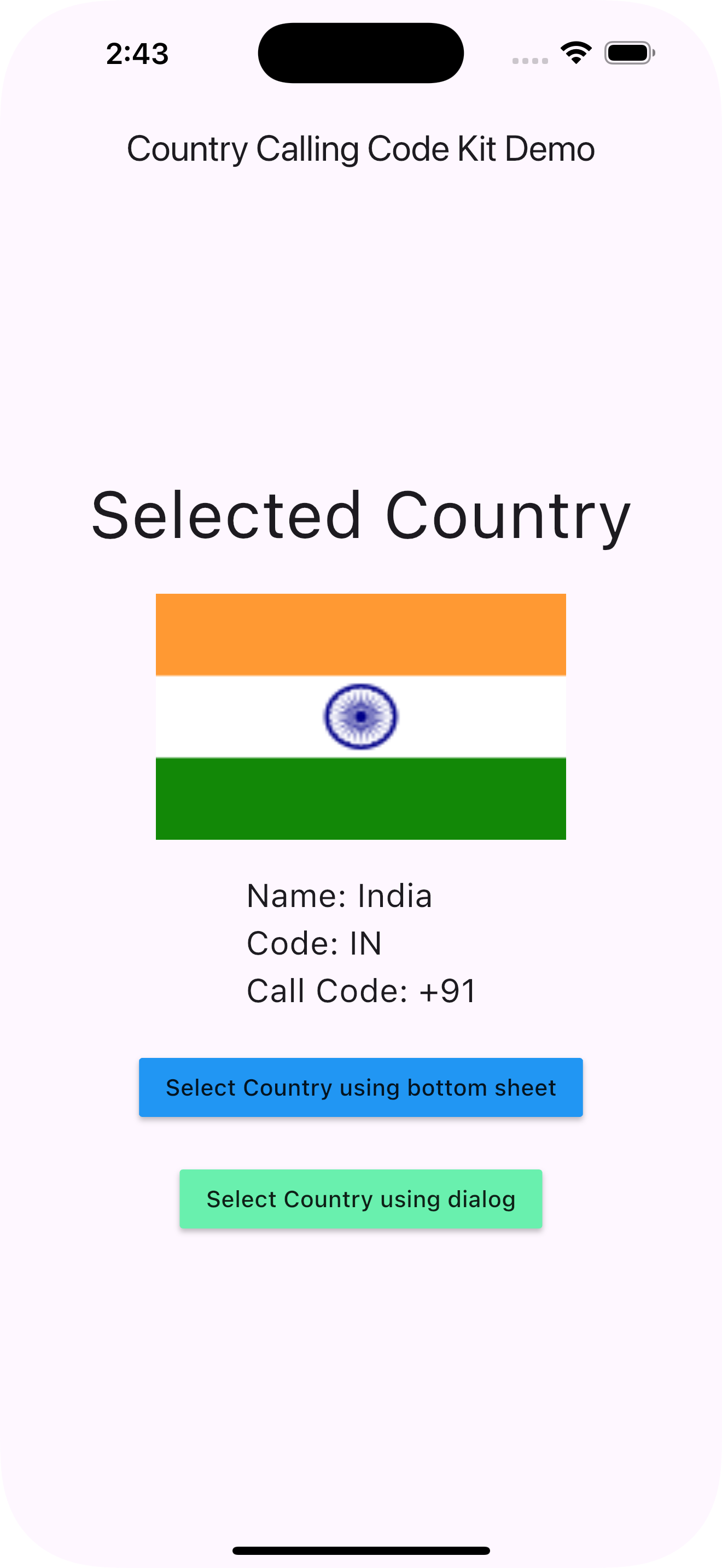
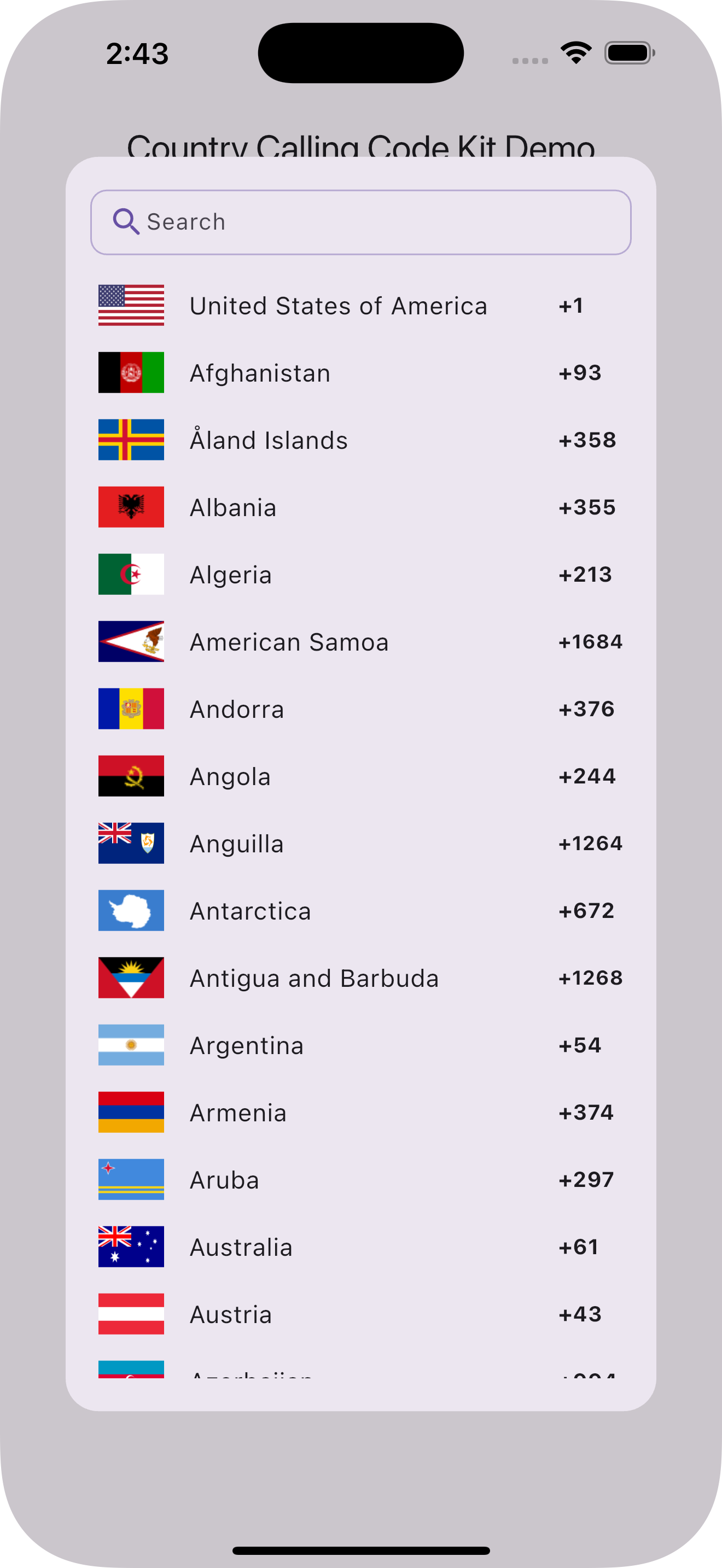
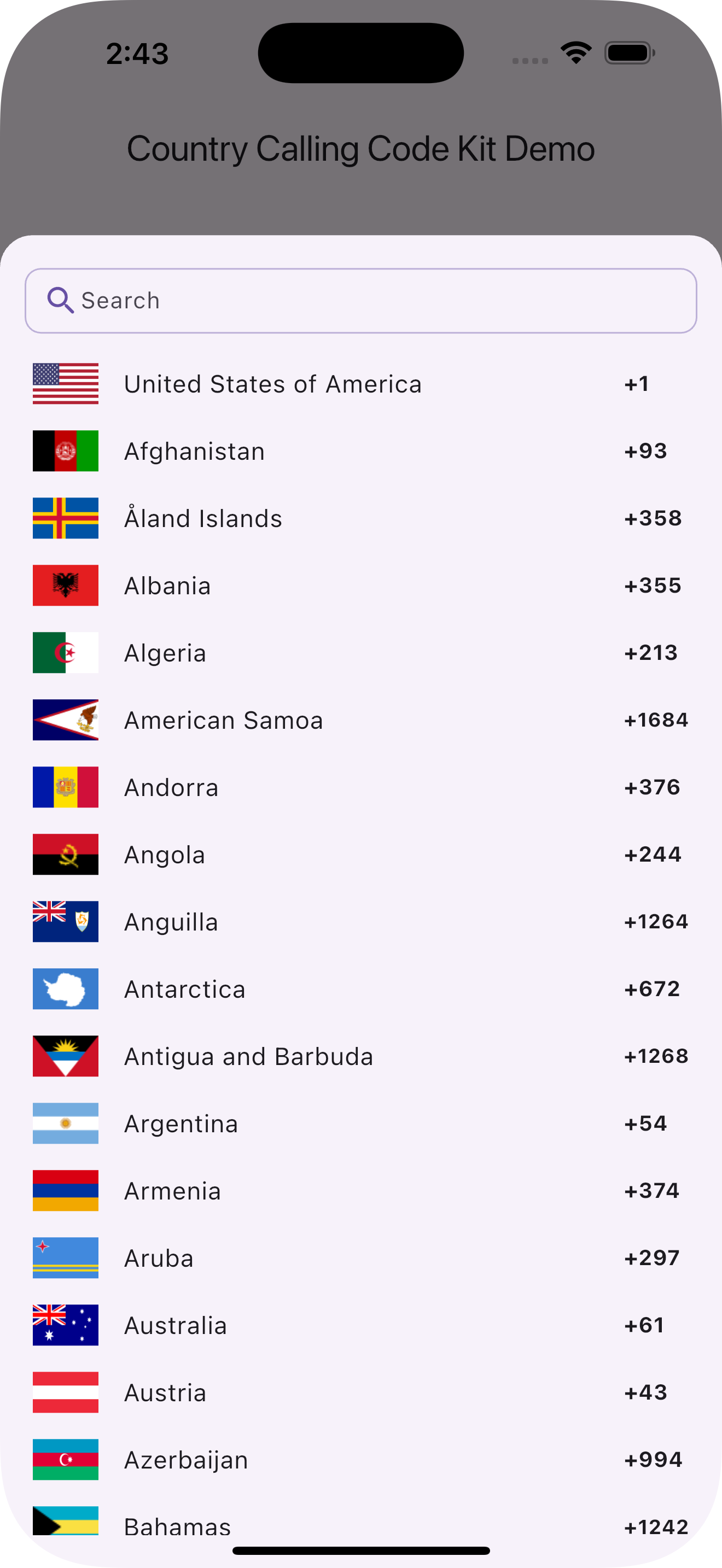
Features
- Dialog or bottom sheet — present the picker in whichever style fits your flow.
- Automatic default country — detects the user's region from the device locale, no plugins or permissions required.
- Built-in search — filter by country name, ISO code, or calling code.
- Rich display — country flags, names, and dial codes in a clean, ready-to-use UI.
- Highly customizable — text styles, colors, flag size, corner radii, dimensions, and shape.
- Universal platform support — Android, iOS, Web, macOS, Linux, and Windows, with WebAssembly (WASM) compatibility.
- Zero non-SDK dependencies — pure Dart and Flutter under the hood.
Installation
Add the package with the Flutter CLI:
flutter pub add country_calling_code_kit
Or add it to your pubspec.yaml manually:
dependencies:
  country_calling_code_kit: ^2.0.0
Then import it:
import 'package:country_calling_code_kit/country_calling_code_kit.dart';
Migrating to 2.0.0
Version 2.0.0 removes the native device_region dependency in favor of pure-Dart, locale-based detection. This makes
the package WASM-compatible and available on all six platforms, but changes how the default country is resolved.
What changed: getDefaultCountry() now derives the region from the device/browser locale instead of the SIM card,
and returns null when the locale has no region component (previously it fell back to the first country in the list).
What to do: provide your own fallback when the region can't be determined.
Future<void> loadDefaultCountry() async {
final Country country = await getDefaultCountry() ?? countries.first;
}
No other APIs changed. If you never called getDefaultCountry(), no migration is required.
Usage
Show a country picker dialog
Future<void> pickCountry(BuildContext context) async {
final Country? country = await showCountryPickerDialog(context: context);
if (country != null) {
print('Name: ${country.name}');
print('Country code: ${country.countryCode}');
print('Calling code: ${country.callCode}');
}
}
Show a country picker bottom sheet
Future<void> pickCountry(BuildContext context) async {
final Country? country = await showCountryPickerModalSheet(context: context);
if (country != null) {
}
}
Detect the default country
Returns the [Country] matching the device's locale region, or null if it cannot be determined.
Future<void> loadDefaultCountry() async {
  final Country? defaultCountry = await getDefaultCountry();
  final Country country = defaultCountry ?? countries.first;
}
Look up a country by code
void findIndia() {
  final Country? india = getCountryByCountryCode(CountryCode.in_);
}
Access the full country list
void printCountries() {
  for (final country in countries) {
    print('${country.name} (${country.callCode})');
  }
}
Customization
Both showCountryPickerDialog and showCountryPickerModalSheet accept the following optional parameters:
| Parameter |
Type |
Description |
countryNameTextStyle |
TextStyle? |
Text style for country names. |
countryCallCodeTextStyle |
TextStyle? |
Text style for calling codes. |
imageSize |
Size? |
Size of the flag images (default 40 × 25). |
splashColor |
Color? |
Splash color for list items. |
hoverColor |
Color? |
Hover color for list items (web/desktop). |
searchFilter |
List<Country> Function(String)? |
Custom search/filter logic. |
preferredCountries |
List<CountryCode>? |
Countries pinned to the top of the list. |
showCallCode |
bool |
Whether to show calling codes (default true). |
search |
bool |
Whether to show the search bar (default true). |
flagCornerRadius |
double? |
Corner radius for flag images (default 0). |
itemBorderRadius |
double? |
Corner radius for each list item (default 10). |
maxWidth |
double? |
Maximum width of the dialog/sheet. |
maxHeight |
double? |
Maximum height of the dialog/sheet (default 80% / 85% of screen). |
shape |
ShapeBorder? |
Shape border of the dialog/sheet (default rounded corners). |
Example:
Future<void> pickCountry(BuildContext context) async {
  final country = await showCountryPickerModalSheet(
    context: context,
    preferredCountries: [CountryCode.us, CountryCode.gb, CountryCode.in_],
    showCallCode: true,
    flagCornerRadius: 4,
    itemBorderRadius: 12,
    maxWidth: 480,
    shape: const RoundedRectangleBorder(
      borderRadius: BorderRadius.vertical(top: Radius.circular(28)),
    ),
  );
}
Using the widget directly
For full control over layout, embed CountryPicker yourself instead of using the dialog/sheet helpers:
Widget buildPicker() {
return CountryPicker(
onSelected: (country) {
},
preferredCountries: [CountryCode.us, CountryCode.gb],
showCallCode: true,
);
}
Data model
Each result is a Country:
| Field |
Type |
Description |
name |
String |
Full country name. |
flag |
String |
Asset path to the country's flag image. |
countryCode |
CountryCode |
ISO 3166-1 alpha-2 code (as an enum value). |
callCode |
String |
International calling code (e.g. +1). |
CountryCode is an enum of ISO 3166-1 alpha-2 codes. Values that collide with Dart keywords use a trailing underscore
(for example CountryCode.in_). Use CountryCode.fromString('in') to parse a code and code.toString() to get its
string form.
Example
A complete, runnable example is available in the
/example directory.
import 'package:country_calling_code_kit/country_calling_code_kit.dart';
import 'package:flutter/material.dart';

class CountryPickerDemo extends StatefulWidget {
  const CountryPickerDemo({super.key});

  @override
  State<CountryPickerDemo> createState() => _CountryPickerDemoState();
}

class _CountryPickerDemoState extends State<CountryPickerDemo> {
  Country? country;

  @override
  void initState() {
    super.initState();
    _initCountry();
  }

  Future<void> _initCountry() async {
    country = await getDefaultCountry() ?? countries.first;
    if (mounted) setState(() {});
  }

  @override
  Widget build(BuildContext context) {
    return Scaffold(
      appBar: AppBar(title: const Text('Country Picker Demo')),
      body: Center(
        child: Column(
          mainAxisAlignment: MainAxisAlignment.center,
          children: [
            if (country != null) ...[
              Image.asset(country!.flag, width: 100, height: 60),
              const SizedBox(height: 16),
              Text('Name: ${country!.name}'),
              Text('Code: ${country!.countryCode.toString().toUpperCase()}'),
              Text('Call Code: ${country!.callCode}'),
              const SizedBox(height: 24),
            ],
            ElevatedButton(
              onPressed: () async {
                final selected =
                await showCountryPickerDialog(context: context);
                if (selected != null) {
                  setState(() => country = selected);
                }
              },
              child: const Text('Select Country'),
            ),
          ],
        ),
      ),
    );
  }
}
Resources
Credits
Inspired by and with credit to country_calling_code_picker.
Contributing
Contributions are welcome!
If this package helps you, please consider giving it a ⭐️ on GitHub and a 👍 on pub.dev.
License
Released under the MIT License.

