Buscar pacotes, repositórios e categorias de apps

Capa de curved_nav_bar
Detalhes do pacotev0.1.0

curved_nav_bar

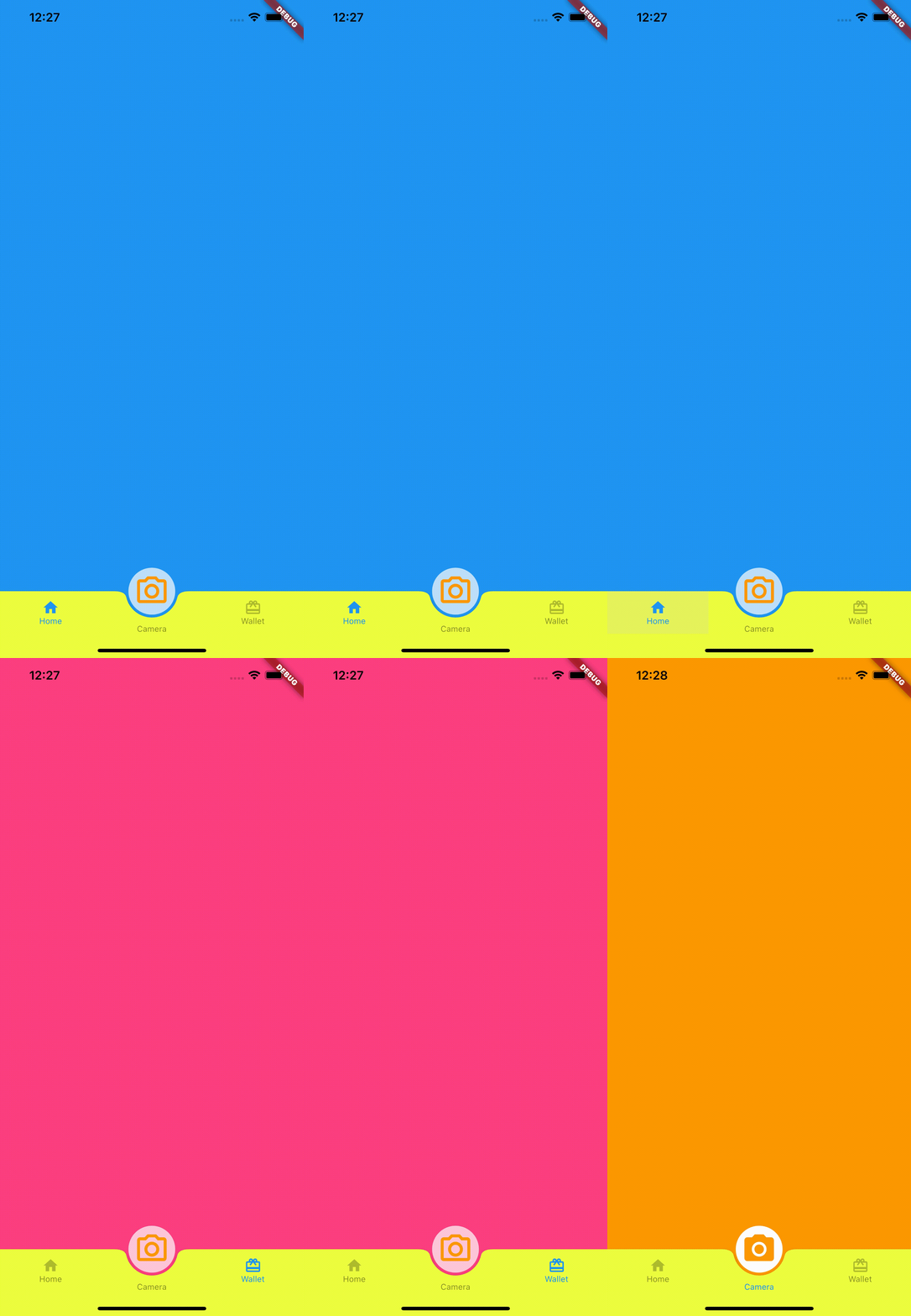
Barra de navegação inferior com FAB, você pode usar o FAB como uma guia central ou realizar outras operações, como abrir um pop-up ou abrir a câmera.

AndroidiOSWebmacOSWindowsLinux
Downloads em 30 dias
466
Curtidas
33
Pontos Pub
160

Instalar pacote

flutter pub add curved_nav_bar

Visão geral do pacote

Orientação gerada a partir de informações públicas. Apenas para referência.

CurvedNavBar é um pacote Flutter que fornece uma barra de navegação inferior personalizável com design curvado, incluindo um botão flutuante de ação (FAB) posicionado no centro. O FAB pode atuar como uma aba central ou acionar ações como abrir pop-ups ou iniciar a câmera. Suporta múltiplas plataformas, incluindo Android, iOS, Web, macOS, Windows e Linux, oferecendo animações suaves e layouts responsivos. Ideal para aplicativos que precisam de uma experiência de navegação elegante e moderna com elementos interativos.

Casos de uso

  • Navegação de aplicativo móvel
  • Guia inferior aprimorada com FAB
  • Disparadores de câmera ou pop-up
  • Consistência da interface do usuário multiplataforma
  • Design de aplicativo moderno
  • gestos de navegação interativa

Principais recursos

  • Navegação inferior curva
  • Posição personalizável do FAB
  • Suporte para múltiplas plataformas
  • Animações suaves
  • Tratamento de ação extensível
  • Design responsivo

Indicado para

  • Desenvolvedores procurando interfaces modernas
  • Aplicativos que exigem FABs interativos
  • Aplicativos móveis multiplataforma
  • Projetos do Flutter com foco em design
  • Usuários que querem barras de navegação animadas

Considerações

  • Requer planejamento cuidadoso de layout
  • Pode ser necessário estilização personalizada para designs complexos
  • Limitado ao caso de uso da navegação inferior
  • O comportamento específico da plataforma pode variar
  • Não adequado para cenários não de navegação inferior
  • A lógica de interação do FAB deve ser implementada separadamente

README original

Snapshot do README original do repositório-fonte vinculado. Consulte o repositório para o conteúdo mais recente.

curved_nav_bar

Bottom nav bar with FAB and center text, You can use FAB as a middle tab or perform other operations like, open popup or open camera (pub.dev).

Screenshots

Usage

Example

To use this package :

dependencies:
   flutter:
     sdk: flutter
   curved_nav_bar:

Getting started

To start, import the dependency in your code:

import 'package:curved_nav_bar/curved_bar/curved_action_bar.dart';
import 'package:curved_nav_bar/fab_bar/fab_bottom_app_bar_item.dart';
import 'package:curved_nav_bar/flutter_curved_bottom_nav_bar.dart';

The following options are available for CurvedNavBar:

Property Type Description
appBarItems List List of FABBottomAppBarItem,length of appBarItems should be equal to the length of bodyItems
bodyItems List List of Widget,length of bodyItems should be equal to the length of appBarItems
extendBody bool extendBody default value always true
actionButton CurvedActionBar Typically a FloatingActionButton
activeColor Color Color of selected tab activeColor default value always Colors.black
inActiveColor Color Color of unselected tab inActiveColor default value always Colors.black26
navBarBackgroundColor Color background Color of navigation bar navBarBackgroundColor default value always Colors.white
actionBarView Widget Set as scaffold body when actionButton selected

Options for FABBottomAppBarItem are:

Property Type Description
activeIcon Widget selected icon of navigation bar item
inActiveIcon Widget unselected icon of navigation bar item
text String label of navigation bar item

Options for CurvedActionBar are:

Property Type Description
activeIcon Widget selected icon for actionButton
inActiveIcon Widget unselected icon of actionButton
text String text label for actionButton
onTab ValueChanged return bool value when tab on actionButton
How to use
import 'package:flutter/material.dart';
import 'package:curved_nav_bar/curved_bar/curved_action_bar.dart';
import 'package:curved_nav_bar/fab_bar/fab_bottom_app_bar_item.dart';
import 'package:curved_nav_bar/flutter_curved_bottom_nav_bar.dart';
void main() {
  runApp(MyApp());
}

class MyApp extends StatelessWidget {
  @override
  Widget build(BuildContext context) {
    return MaterialApp(
      title: 'Flutter Demo',
      theme: ThemeData(
        primarySwatch: Colors.blue,
      ),
      home: MyHomePage(title: 'Flutter Demo Home Page'),
    );
  }
}

class MyHomePage extends StatefulWidget {
  MyHomePage({Key? key, required this.title}) : super(key: key);

  final String title;

  @override
  _MyHomePageState createState() => _MyHomePageState();
}

class _MyHomePageState extends State<MyHomePage> {
  @override
  Widget build(BuildContext context) {
    return CurvedNavBar(
      actionButton: CurvedActionBar(
          onTab: (value) {
            /// perform action here
            print(value);
          },
          activeIcon: Container(
            padding: EdgeInsets.all(8),
            decoration:
                BoxDecoration(color: Colors.white, shape: BoxShape.circle),
            child: Icon(
              Icons.camera_alt,
              size: 50,
              color: Colors.orange,
            ),
          ),
          inActiveIcon: Container(
            padding: EdgeInsets.all(8),
            decoration:
                BoxDecoration(color: Colors.white70, shape: BoxShape.circle),
            child: Icon(
              Icons.camera_alt_outlined,
              size: 50,
              color: Colors.orange,
            ),
          ),
          text: "Camera"),
      activeColor: Colors.blue,
      navBarBackgroundColor: Colors.limeAccent,
      inActiveColor: Colors.black45,
      appBarItems: [
        FABBottomAppBarItem(
            activeIcon: Icon(
              Icons.home,
              color: Colors.blue,
            ),
            inActiveIcon: Icon(
              Icons.home,
              color: Colors.black26,
            ),
            text: 'Home'),
        FABBottomAppBarItem(
            activeIcon: Icon(
              Icons.wallet_giftcard,
              color: Colors.blue,
            ),
            inActiveIcon: Icon(
              Icons.wallet_giftcard,
              color: Colors.black26,
            ),
            text: 'Wallet'),
      ],
      bodyItems: [
        Container(
          height: MediaQuery.of(context).size.height,
          color: Colors.blue,
        ),
        Container(
          height: MediaQuery.of(context).size.height,
          color: Colors.pinkAccent,
        )
      ],
      actionBarView: Container(
        height: MediaQuery.of(context).size.height,
        color: Colors.orange,
      ),
    );
  }
}

Pull Requests

Pull requests are most welcome. It usually will take me within 24-48 hours to respond to any issue or request.

  1. Please keep PR titles easy to read and descriptive of changes, this will make them easier to merge :)
  2. Pull requests must be made against develop branch. Any other branch (unless specified by the maintainers) will get rejected.
Created & Maintained By

Boffin Coders Pvt. Ltd.

If you found this project helpful or you learned something from the source code and want to thank me, consider buying me a cup of :coffee:

License

Copyright 2018 Boffin Coders Pvt. Ltd.

Licensed under the Apache License, Version 2.0 (the "License");
you may not use this file except in compliance with the License.
You may obtain a copy of the License at

   http://www.apache.org/licenses/LICENSE-2.0

Unless required by applicable law or agreed to in writing, software
distributed under the License is distributed on an "AS IS" BASIS,
WITHOUT WARRANTIES OR CONDITIONS OF ANY KIND, either express or implied.
See the License for the specific language governing permissions and
limitations under the License.

Categorias

Repositório-fonte

Projetos que usam este pacote

Ainda não há dados.