Orientação gerada a partir de informações públicas. Apenas para referência.
O EasyRichText simplifica o uso do RichText no Flutter ao lidar automaticamente com a segmentação de texto e formatação sem exigir divisão manual de strings. Permite que desenvolvedores apliquem estilos, cores e widgets diferentes diretamente em uma única string de texto usando uma sintaxe simples. Ideal para exibir textos formatados com estilos mistos, como links, menções ou emojis, reduzindo o código repetitivo e melhorando a legibilidade. O pacote suporta todas as principais plataformas, incluindo móvel, web e desktop.
Casos de uso
Exibindo texto formatado com formatação mista
Criando texto rico com links embutidos
Destacando palavras-chave no texto
Renderização de conteúdo gerado pelo usuário com estilos
Adicionando emojis dentro de texto formatado
Principais recursos
Segmentação automática de texto
Suporte para estilização em linha
Sintaxe simples para formatação complexa
Compatibilidade multiplataforma
Código de boilerplate mínimo
Indicado para
Desenvolvedores procurando renderização fácil de texto rico
Aplicativos com conteúdo dinâmico ou gerado pelo usuário
Interfaces de bate-papo ou mensagens
Sistemas de documentação ou ajuda com texto formatado
Considerações
Limitado a estilos básicos em comparação com o RichText completo
Pode ter impacto no desempenho com textos muito grandes
Requer manipulação cuidadosa de widgets aninhados
Não ideal para layouts altamente complexos
Depende de atualizações da biblioteca externa para novos recursos
README original
Snapshot do README original do repositório-fonte vinculado. Consulte o repositório para o conteúdo mais recente.
easy_rich_text
The EasyRichText widget makes the RichText widget easy. You do not have to split the string manually.
This widget use regular expression to effectively split the string based on the patterns defined in the list of EasyRichTextPattern.
The EasyRichTextPattern is a class defines the text pattern you want to format.
targetString can be a String or a List<String>.
By default matchWordBoundaries:true is set to match the whole word. If you want to match substring in a word, set matchWordBoundaries:false
GestureRecognizer and url_launcher are integrated.
If you find this package useful, I would appreciate it if you can give me a star on Github and a like on pub.dev
EasyRichText(
  "I want blue font. I want bold font. I want italic font.",
  patternList: [
    EasyRichTextPattern(
      targetString: 'blue',
      style: TextStyle(color: Colors.blue),
    ),
    EasyRichTextPattern(
      targetString: 'bold',
      style: TextStyle(fontWeight: FontWeight.bold),
    ),
    EasyRichTextPattern(
      targetString: 'italic',
      style: TextStyle(fontStyle: FontStyle.italic),
    ),
  ],
),
Trademark Example
EasyRichText(
  "ProductTM is a superscript trademark symbol. This TM is not a trademark.",
  patternList: [
    EasyRichTextPattern(
      targetString: 'TM',
      superScript: true,
      stringBeforeTarget: 'Product',
      matchWordBoundaries: false,
      style: TextStyle(color: Colors.blue),
    ),
  ],
),
Default Style:
EasyRichText(
  "This is a EasyRichText example with default grey font. I want blue font here.",
  defaultStyle: TextStyle(color: Colors.grey),
  patternList: [
    EasyRichTextPattern(
      targetString: 'blue',
      style: TextStyle(color: Colors.blue),
    ),
    EasyRichTextPattern(
      targetString: 'bold',
      style: TextStyle(fontWeight: FontWeight.bold),
    ),
  ],
),
Conditional Match
EasyRichText(
  "I want blue color here. I want no blue font here. I want blue invalid here.",
  patternList: [
    EasyRichTextPattern(
      targetString: 'blue',
      stringBeforeTarget: 'want',
      stringAfterTarget: "color",
      style: TextStyle(color: Colors.blue),
    ),
  ],
),
Match Option
matchOption can be a string or a list. default is 'all'.
string: 'all', 'first', 'last'
List:'first', 'last', and any integer index
For example, [0, 1, 'last'] will match the first, second, and last one.
EasyRichText(
  "blue 1, blue 2, blue 3, blue 4, blue 5",
  patternList: [
    EasyRichTextPattern(
      targetString: 'blue',
      //matchOption: 'all'
      matchOption: [0, 1, 'last'],
      style: TextStyle(color: Colors.blue),
    ),
  ],
),
Superscript and Subscript.
EasyRichText(
  "I want superscript font here. I want subscript here",
  patternList: [
    EasyRichTextPattern(
        targetString: 'superscript', superScript: true),
    EasyRichTextPattern(
        targetString: 'subscript', subScript: true),
  ],
),
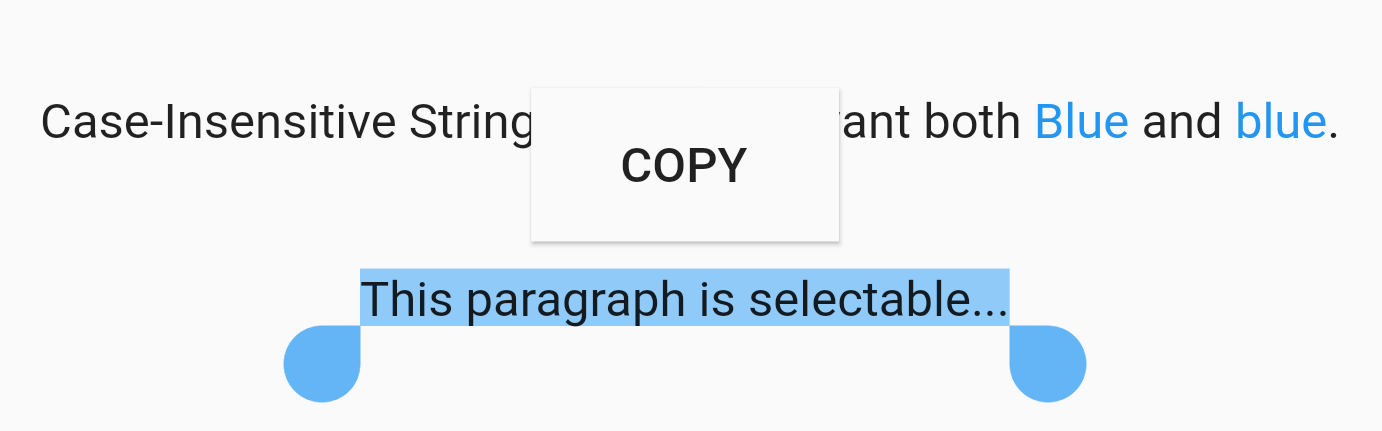
Case Sensitivity
EasyRichText(
  "Case-Insensitive String Matching. I want both Blue and blue. This paragraph is selectable.",
  caseSensitive: false,
  selectable: true,
  patternList: [
    EasyRichTextPattern(
      targetString: 'Blue',
      style: TextStyle(color: Colors.blue),
    ),
  ],
),
Selectable Text
EasyRichText(
  "This paragraph is selectable...",
  selectable: true,
),
Regular Expression
EasyRichText(
  "Regular Expression. I want blue bluea blue1 but not blueA",
  patternList: [
    EasyRichTextPattern(
      targetString: 'bl[a-z0-9]*',
      style: TextStyle(color: Colors.blue),
    ),
  ],
),
Url Launcher
Integrated with url_launcher. Web url, email url, and telephone url are supported.
Set urlType : 'web', 'email', or 'tel'.
EasyRichText provides regular expression formula to match common urls.
EasyRichText(
  "Here is a website https://pub.dev/packages/easy_rich_text. Here is a email address test@example.com. Here is a telephone number +852 12345678.",
  patternList: [
    EasyRichTextPattern(
      targetString: 'https://pub.dev/packages/easy_rich_text',
      urlType: 'web',
      style: TextStyle(
        decoration: TextDecoration.underline,
      ),
    ),
    EasyRichTextPattern(
      targetString: EasyRegexPattern.emailPattern,
      urlType: 'email',
      style: TextStyle(
        decoration: TextDecoration.underline,
      ),
    ),
    EasyRichTextPattern(
      targetString: EasyRegexPattern.webPattern,
      urlType: 'web',
      style: TextStyle(
        decoration: TextDecoration.underline,
      ),
    ),
    EasyRichTextPattern(
      targetString: EasyRegexPattern.telPattern,
      urlType: 'tel',
      style: TextStyle(
        decoration: TextDecoration.underline,
      ),
    ),
  ],
),
GestureRecognizer
///GestureRecognizer, not working when superscript, subscript, or urlType is set.///TapGestureRecognizer, MultiTapGestureRecognizer, etc.EasyRichText(
"Tap recognizer to print this sentence.",
patternList: [
EasyRichTextPattern(
targetString: 'recognizer',
recognizer: TapGestureRecognizer()
..onTap = () {
print("Tap recognizer to print this sentence.");
},
style: TextStyle(
decoration: TextDecoration.underline,
),
),
],
),
//if the targetString contains the following special characters \[]()^*+?EasyRichText(
"Received 88+ messages. Received 99+ messages",
patternList: [
//set hasSpecialCharacters to trueEasyRichTextPattern(
targetString: '99+',
hasSpecialCharacters: true,
style: TextStyle(color: Colors.blue),
),
//or if you are familiar with regular expressions, then use \\ to skip itEasyRichTextPattern(
targetString: '88\\+',
style: TextStyle(color: Colors.blue),
),
],
),