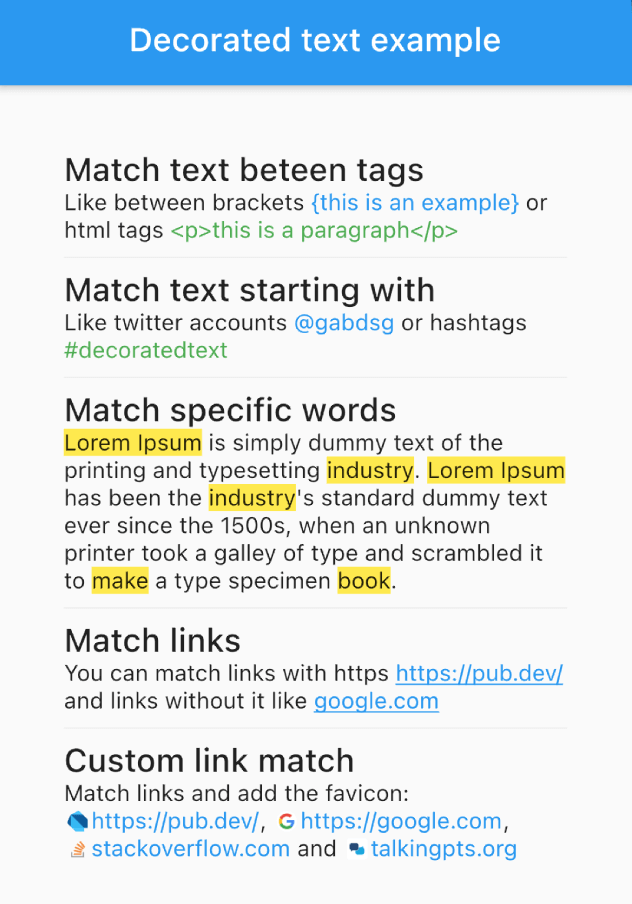
Um widget para estilizar e interagir com partes de um texto com base em regras. Corresponda palavras, frases ou padrões e aplique estilos ou ações personalizadas.
Orientação gerada a partir de informações públicas. Apenas para referência.
Um pacote Flutter que permite estilizar e interagir com partes específicas do texto usando regras definidas. Permite encontrar palavras, frases ou padrões e aplicar estilos personalizados ou ações como eventos onTap. Ideal para criar exibições de texto rico com formatação dinâmica, como destacar palavras-chave, incorporar links ou adicionar animações a certos trechos de texto. Funciona em todas as principais plataformas, incluindo móvel, web e desktop.
Casos de uso
Destacando palavras-chave no texto
Criando texto interativo com ações de toque
Incorporar links com estilo em parágrafos
Adicionando animações a segmentos específicos de texto
Exibindo conteúdo formatado com regras dinâmicas
Renderização de texto rico em aplicativos de chat ou artigos
Principais recursos
Correspondência de texto baseada em padrões
Aplicação de estilo personalizado por correspondência
Callbacks interativos (por exemplo, onTap)
Suporte a múltiplas regras simultaneamente
Compatibilidade multiplataforma
Integração fácil com widgets Text existentes
Indicado para
Desenvolvedores construindo interfaces de texto rico
Aplicativos que exigem destaque de palavras-chave
Aplicativos de bate-papo ou mensagens
Aplicativos educacionais ou de notícias ricos em conteúdo
Necessidades de interfaces com formatação dinâmica de texto
Projetos que precisam de elementos de texto interativos
Considerações
O desempenho pode afetar blocos grandes de texto
Padrões de expressão regular complexos exigem testes cuidadosos
Suporte limitado a emojis embutidos além do estilo básico
Requer compreensão de correspondência de padrões de texto
Pode ser necessário lógica adicional para correspondências aninhadas ou sobrepostas
Não destinado a editores de texto rico com recursos completos
README original
Snapshot do README original do repositório-fonte vinculado. Consulte o repositório para o conteúdo mais recente.
Flutter DecoratedText
The DecoratedText widget allows you to style and interact with different parts of a text string based on predefined rules. It's versatile, easy-to-use, and can handle different scenarios such as matching specific words, phrases, or patterns, allowing you to style the matched text differently.
Features
Selectable Text: Enable the selectable property (selectable: true) to allow text selection in the DecoratedText widget.
Predefined Rules: These are used to match different elements within the text. These rules include:
Matching words.
Matching text starting with a particular prefix.
Matching text between specific tags.
Matching links (URLs).
Interactive: Each rule can include an onTap callback, which returns the matched text, allowing you to implement interactive behavior such as opening a link when a URL is tapped.
Performance Optimized: RegExp patterns are cached internally, decoration results are memoized in text controllers, and tag deduplication uses an efficient O(n log n) algorithm.
Usage Examples
Match Text Between Tags
DecoratedText(
    text: "Like between brackets {this is an example} or html tags <p>this is a paragraph</p>",
    rules: [
        DecoratorRule.between(
            start: "{",
            end: "}",
            style: TextStyle(
                color: Colors.blue,
            ),
        ),
        DecoratorRule.between(
            start: "<p>",
            end: "</p>",
            style: TextStyle(
                color: Colors.green,
            ),
        ),
    ],
);
DecoratedText(
    text: "Lorem Ipsum is simply dummy text of the printing and typesetting industry. Lorem Ipsum has been the industry's standard dummy text ever since the 1500s, when an unknown printer took a galley of type and scrambled it to make a type specimen book.",
    rules: [
        DecoratorRule.words(
            words: ["lorem ipsum", "industry", "book", "make"],
            onTap: (match) {
                print(match);
            },
            style: TextStyle(
                background: Paint()..color = Colors.yellow,
            ),
        ),
    ],
);
Match URLs
DecoratedText(
    text: "You can match links with https https://pub.dev/ and links without it like google.com",
    rules: [
        DecoratorRule.url(
            onTap: (url) {
                print(url);
            },
            style: TextStyle(
                color: Colors.blue,
                decoration: TextDecoration.underline,
            ),
        ),
    ],
);
DecoratedText(
text: "I love Flutter! 😍",
rules: [
DecoratorRule(
regExp: RegExp(r'(\p{Emoji_Presentation})', unicode: true),
style: constTextStyle(
fontSize: 30.0,
),
onTap: (emoji) {
debugPrint('You tapped on the emoji: $emoji');
},
),
],
);
Performance Tips
For best performance when using custom RegExp patterns, cache them outside the build() method:
// Cache at the class or file level — avoid creating inside build()final _myRegExp = RegExp(r'my-pattern');
@overrideWidgetbuild(BuildContext context) {
returnDecoratedText(
text: "...",
rules: [
DecoratorRule(regExp: _myRegExp, style: TextStyle(...)),
],
);
}
Built-in rules like DecoratorRule.words(), DecoratorRule.url(), etc. handle caching automatically.
Remember, with the DecoratedText widget, you can style your text based on predefined rules, add interactivity, and handle complex matching scenarios with ease. Happy coding!