Buscar pacotes, repositórios e categorias de apps

Capa de flutter_event_calendar
Detalhes do pacotev1.0.0

flutter_event_calendar

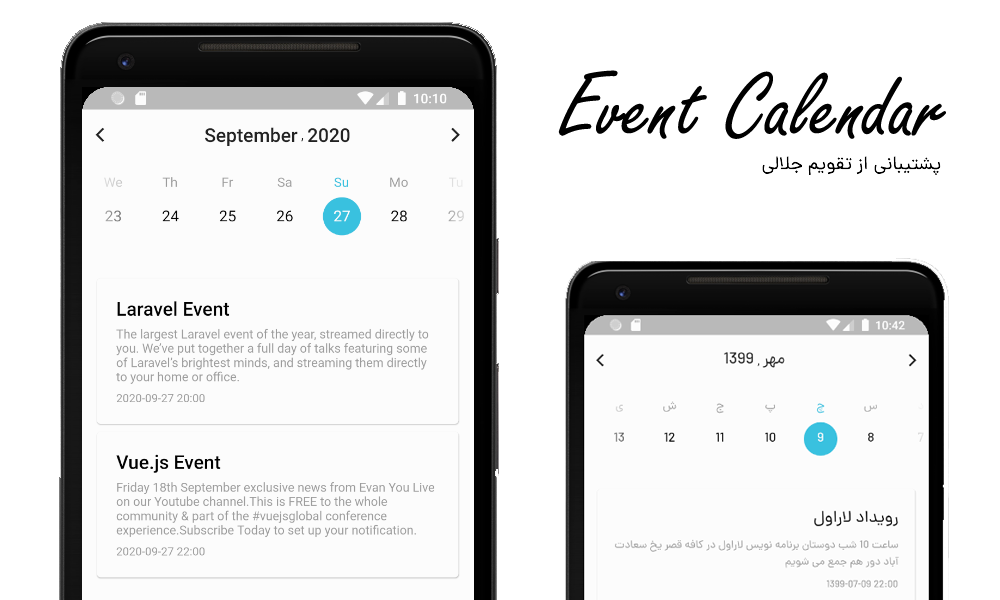
Calendário de eventos Gregoriano e Jalali para Flutter com opções para mudar o estilo

AndroidiOSWebmacOSWindowsLinux
Downloads em 30 dias
145
Curtidas
66
Pontos Pub
120

Instalar pacote

flutter pub add flutter_event_calendar

Visão geral do pacote

Orientação gerada a partir de informações públicas. Apenas para referência.

Um pacote Flutter para exibir calendários gregoriano e jaleli com suporte a eventos, oferecendo opções personalizáveis de estilização. Permite que desenvolvedores integrem funcionalidade de calendário duplo em seus aplicativos, suportando tanto sistemas de data internacionais quanto persas. O pacote foi projetado para facilitar o uso com personalização flexível da interface, sendo ideal para aplicativos de agendamento, planejamento ou baseados em compromissos em múltiplas plataformas.

Casos de uso

  • Agendamento de consultas
  • Gerenciando eventos em formatos de calendário duplos
  • Construindo planejadores pessoais
  • Exibindo calendários de feriados
  • Criando painéis ricos em eventos

Principais recursos

  • Suporte para calendários gregoriano e jalali
  • Estilo de calendário personalizável
  • Integração e exibição de eventos
  • Compatibilidade multiplataforma
  • API fácil de usar
  • design responsivo

Indicado para

  • Desenvolvedores de aplicativos de calendário
  • Aplicativos que exigem suporte a sistema de data dupla
  • Ferramentas de agendamento voltadas para a interface do usuário
  • Projetos direcionados a usuários falantes de persa
  • Aplicações multiplataforma do Flutter

Considerações

  • Requer gerenciamento manual de dados de evento
  • A personalização de estilo pode exigir conhecimento semelhante ao CSS
  • Localização embutida limitada além dos calendários compatíveis
  • Sem manipulação nativa de fuso horário
  • Depende de código-fonte externo para atualizações
  • Pode exigir gerenciamento de estado adicional para interações complexas

README original

Snapshot do README original do repositório-fonte vinculado. Consulte o repositório para o conteúdo mais recente.

flutter Event Calendar Package

Pub License: MIT


Event Calendar

How to install :

Add this to your package's pubspec.yaml file:

dependencies:
  flutter_event_calendar: ^1.0.0

Then You can install packages from the command line:

$ pub get

or

$ flutter pub get

Alternatively, your editor might support flutter pub get. Check the docs for your editor to learn more.

Now in your Dart code, you can use:

import 'package:flutter_event_calendar/flutter_event_calendar.dart';

flutter Event Calendar Package

Basic Usage :

You can load a full calendar with events .

    return EventCalendar(
      calendarType: CalendarType.JALALI,
      calendarLanguage: 'fa',
      events: [
        Event(
          child: const Text('Laravel Event'),
          dateTime: CalendarDateTime(
            year: 1401,
            month: 5,
            day: 12,
            calendarType: CalendarType.JALALI,
          ),
        ),
      ],
    );

flutter Event Calendar Package

Options :

You have many option for changes in : style , locale and structure.

Option Type
calendarType CalendarType ( JALALI or GREGORIAN )
middleWidget Widget
events List
calendarOptions CalendarOptions
headerOptions HeaderOptions
eventOptions EventOptions
dayOptions DayOptions
showLoadingForEvent bool
specialDays List
calendarLanguage String(fa,en,pt,de)
Events
Name Description
onInit Called when Event Calendar object is inserted into the tree.
onChangeDateTime Return a string of new date selected like (year-month-day)
onMonthChanged When the month changes return a string of CalendarDateTime (year-month-day hour:minute:second)
onYearChanged When the year changes return a string of CalendarDateTime (year-month-day hour:minute:second)
onDateTimeReset When clicking on the reset button return a string of current CalendarDateTime (year-month-day hour:minute:second)
onChangeViewType When clicking on the toggleViewType return ViewType

CalendarOptions :

Option Type Description
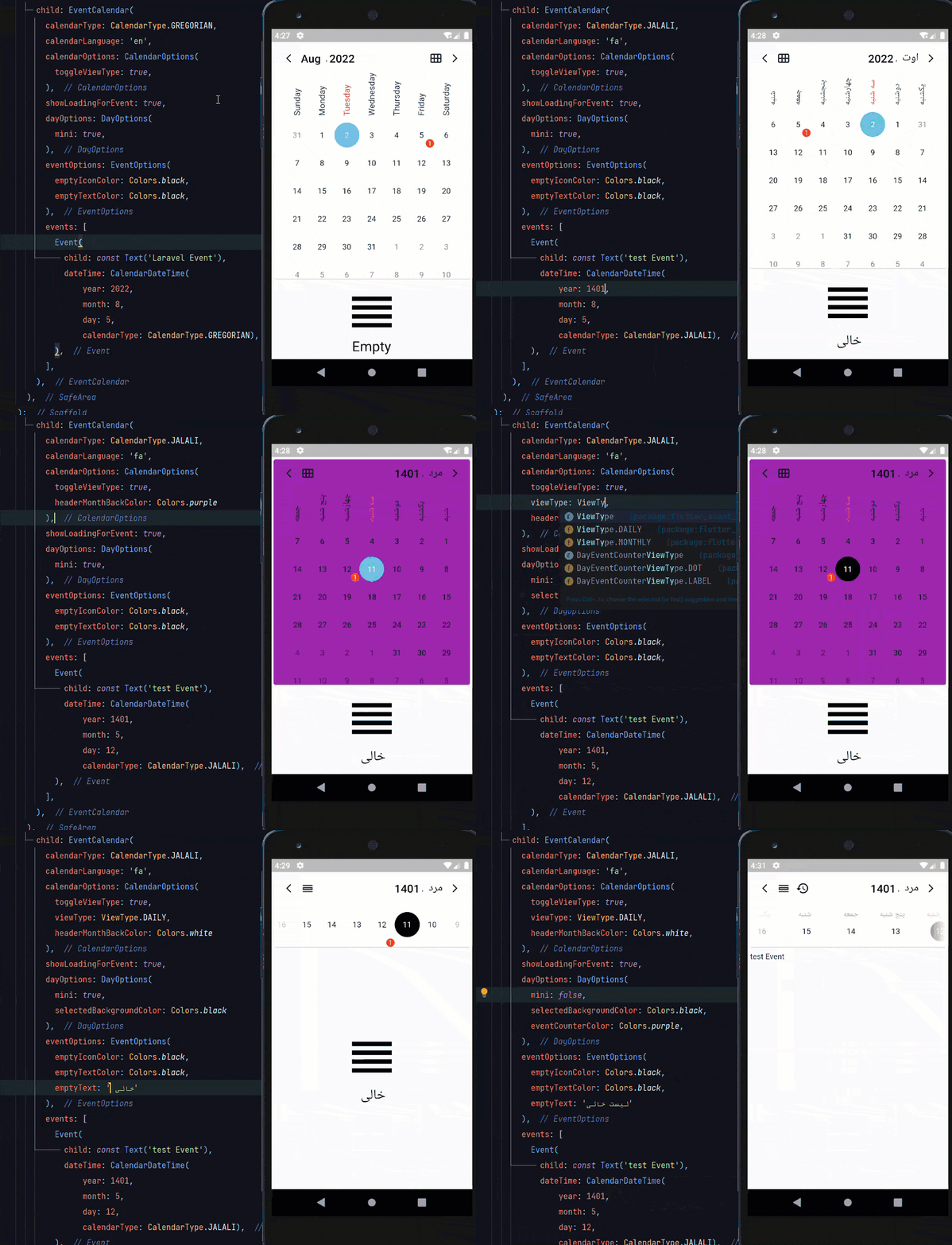
toggleViewType bool Whether user can toggle view type between monthly and daily or not
viewType ViewType Default view type of Calendar Daily or Monthly
font String Name of your font
headerMonthBackColor Color The background color of Calendar card
headerMonthShadowColor Color The shadow color of Calendar card
headerMonthElevation double The elevation of shadow color Calendar card
headerMonthShape ShapeBorder The shape of Calendar card like(RoundedRectangleBorder)
bottomSheetBackColor Color The background color of select month and year bottom sheet)
HeaderOptions :
Option Type Description
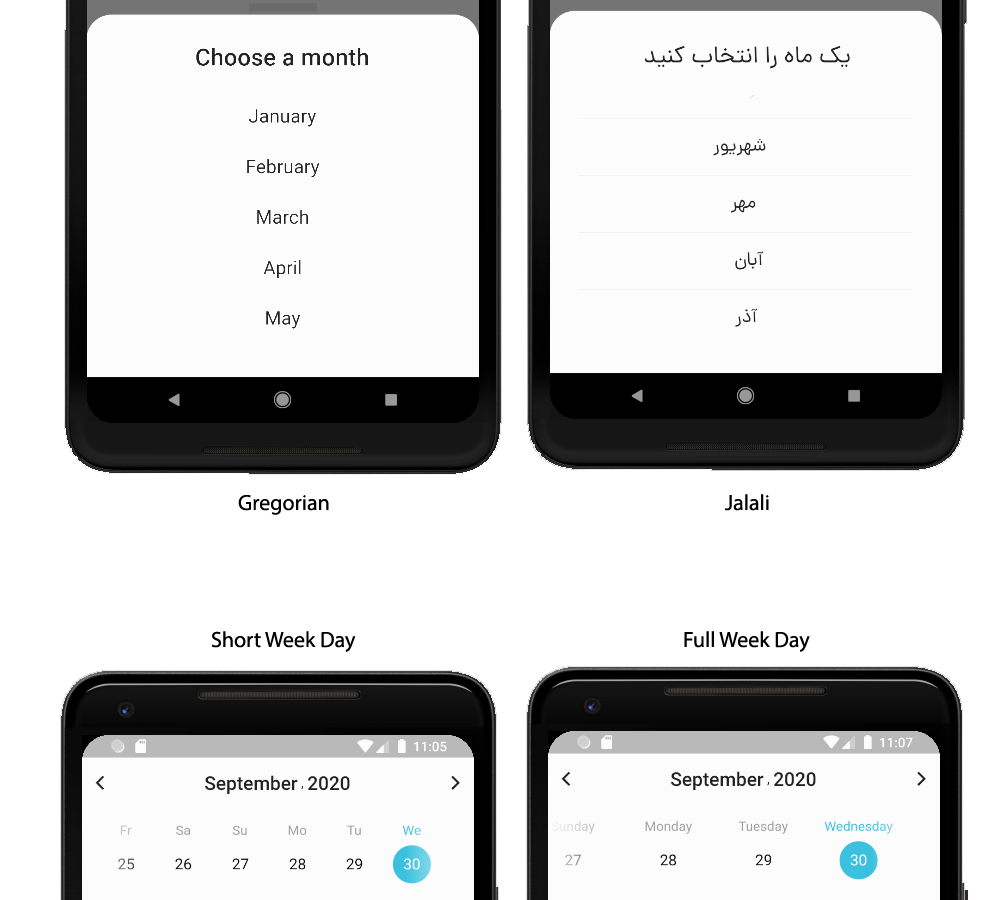
weekDayStringType WeekDayStringTypes Day names FULL or SHORT
MonthStringTypes MonthStringTypes Month names FULL or SHORT
headerTextColor Color The color of Header Text
navigationColor Color The color of Header navigation icons
resetDateColor Color The color of reset date icon
EventOptions :
Option Type Description
emptyText String if it doesn't have any event, this text will display
emptyTextColor Color The color of empty text
emptyIcon IconData if it doesn't have any event, this icon will display
emptyIconColor Color The color of empty icon
DayOptions :
Option Type Description
weekDaySelectedColor Color The color of the Selected weekday
weekDayUnselectedColor Color The color of the UnSelected weekday
showWeekDay bool Whether weekdays show or not
compactMode bool Whether the Calendar card is compact or not
selectedBackgroundColor Color The background color of the selected day
unselectedBackgroundColor Color The background color of the unselected day
selectedTextColor Color The text color of the selected day
disabledTextColor Color The text color of the disabled day
unselectedTextColor Color The text color of the unselected day
eventCounterColor Color The background color of the event counter
eventCounterViewType DayEventCounterViewType The view type of event counter
eventCounterTextColor Color The text color of the event Counter
disableFadeEffect bool Whether days before now has fade effect or not
disableDaysBeforeNow bool Whether days before now Disabled or not
Event Structure
Option Type
child Widget
dateTime CalendarDateTime
onTap Function
onLongPress Function

Locales :

Event Calendar supports two types of calendar now . Gregorian , and Jalali .

Contribute :

You can help us and contribute for :

  • New options
  • More locales
  • Better exceptions

Categorias

Dependências

Lista de dependências 3 itens

Repositório-fonte

Projetos que usam este pacote

Ainda não há dados.