Buscar pacotes, repositórios e categorias de apps

Capa de flutter_gradient_animation_text
Detalhes do pacotev1.0.2

flutter_gradient_animation_text

Crie um texto com gradiente animado de forma muito fácil, fornecendo como entradas o texto, as cores e a duração da animação.

AndroidiOSWebmacOSWindowsLinux
Downloads em 30 dias
1,1 mil
Curtidas
42
Pontos Pub
140

Instalar pacote

flutter pub add flutter_gradient_animation_text

Visão geral do pacote

Orientação gerada a partir de informações públicas. Apenas para referência.

Um pacote Flutter que permite aos desenvolvedores criar facilmente texto com gradiente animado especificando o conteúdo do texto, as cores do gradiente e a duração da animação. Simplifica o processo de adicionar efeitos visuais atraentes e dinâmicos ao texto em aplicativos em múltiplas plataformas. O pacote é leve e se integra perfeitamente em projetos existentes do Flutter com configuração mínima. Ideal para melhorar interfaces com tipografia envolvente sem animações personalizadas complexas.

Casos de uso

  • Adicionando títulos com gradiente animado
  • Criando cabeçalhos de aplicativos chamativos
  • Melhorando telas de inicialização
  • Design de elementos de interface interativa
  • Texto animado em fluxos de introdução

Principais recursos

  • API simples com entradas de texto e cor
  • Duração de animação personalizável
  • Suporte multiplataforma
  • Transições suaves de gradiente
  • Código de boilerplate mínimo

Indicado para

  • Designers de UI em busca de charme visual
  • Desenvolvedores construindo interfaces de aplicativos modernas
  • Projetos que exigem tipografia animada
  • Iniciantes aprendendo animações no Flutter
  • Aplicativos com elementos de texto dinâmicos ou interativos

Considerações

  • Impacto no desempenho com muitos textos animados
  • Personalização limitada além do gradiente e da duração
  • Pode exigir otimização para dispositivos de baixo custo
  • O comportamento da animação pode variar levemente entre plataformas
  • Não adequado para designs de texto estático

README original

Snapshot do README original do repositório-fonte vinculado. Consulte o repositório para o conteúdo mais recente.

Static Badge Static Badge Static Badge Static Badge

This package lets you make animated gradient texts without any hassle. Just pass the text, colors, the duration of the animation and you're done! Using the transform and reverse, you can achieve amazing effects. For More info read the docs below.

Getting started

Install the package using the following command:

flutter pub add flutter_gradient_animation_text

Import the package in your dart file using the following code:

import 'package:flutter_gradient_animation_text/flutter_gradient_animation_text.dart';

And you are good to go!

Usage

Create your animated gradient text. The 3 required arguments are:

  1. text(Text): The text.
  2. colors(List<Colors>): List of colors you want in your gradient.
  3. duration(Duration): Duration for which a single gradient animation runs.
// rainbow text
GradientAnimationText(
    text: Text(
        'Rainbow Text 1',
        style: TextStyle(
            fontSize: 50,
        ),
    ),
    colors: [
        Color(0xff8f00ff),  // violet
        Colors.indigo,
        Colors.blue,
        Colors.green,
        Colors.yellow,
        Colors.orange,
        Colors.red,
    ],
    duration: Duration(seconds: 5),
),

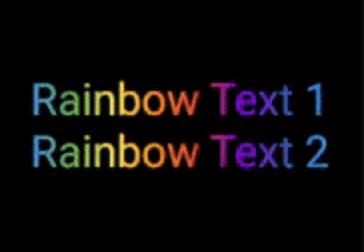
Rainbow Text 1

Reverse the animation. This plays the animation backwards when a single iteration of the forward animation is completed. You set reverse to true to enable this.

// rainbow text with reverse
GradientAnimationText(
    text: Text(
        'Rainbow Text 1',
        style: TextStyle(
            fontSize: 50,
        ),
    ),
    colors: [
        Color(0xff8f00ff),  // violet
        Colors.indigo,
        Colors.blue,
        Colors.green,
        Colors.yellow,
        Colors.orange,
        Colors.red,
    ],
    duration: Duration(seconds: 5),
    reverse: true,  // reverse
),

Rainbow Text 2

Play with colors. It is possible to use the same color more than once to increase the area it covers. Gold Text Example: The following 2 Gold Text animations have different number of Colors.amber color.

// gold text 1
GradientAnimationText(
    text: Text(
        'Gold Text 1',
        style: TextStyle(
            fontSize: 50,
            fontWeight: FontWeight.bold,
        ),
    ),
    colors: [
        Colors.amber,   // 1
        Colors.white,
    ],
    duration: Duration(seconds: 5),
    reverse: true,
),
// gold text 2
GradientAnimationText(
    text: Text(
        'Gold Text 2',
        style: TextStyle(
            fontSize: 50,
            fontWeight: FontWeight.bold,
        ),
    ),
    colors: [
        Colors.amber,   // 1
        Colors.amber,   // 2
        Colors.amber,   // 3
        Colors.white,
    ],
    duration: Duration(seconds: 5),
    reverse: true,
),

Gold Text

Transform your gradient. You can transform your gradient using transform property. Use GradientTranform classes such as SweepGradient, and GradientRotation to tranform.

// Tranform Text
GradientAnimationText(
    text: Text(
    'Tranform Text',
        style: TextStyle(
            fontSize: 90,
            fontWeight: FontWeight.bold,
        ),
    ),
    colors: [
        Color(0xFF061A9C),
        Color(0xff92effd),
    ],
    duration: Duration(seconds: 5),
    transform: GradientRotation(math.pi / 4),   // tranform
),

Tranform Text

Available Properties

Property Type Description
text Text The text to be used in the animation.
colors List Colors of the animation.
duration Duration Duration for which a single gradient animation runs.
reverse bool? If you want to reverse the animation.
transform GradientTransform? You can transform your gradient.

Author

This package is developed by Sahil Shah.

Categorias

Repositório-fonte

Projetos que usam este pacote

Ainda não há dados.