Orientação gerada a partir de informações públicas. Apenas para referência.
Um pacote Flutter que permite analisar texto para converter automaticamente padrões específicos — como URLs, e-mails ou hashtags — em widgets de texto interativos. Simplifica o processo de renderização de texto formatado com elementos clicáveis, melhorando a experiência do usuário em aplicativos que exibem conteúdo dinâmico. O pacote é compatível com múltiplas plataformas e se integra perfeitamente em projetos Flutter existentes. É ideal para interfaces de chat, feeds de mídia social ou qualquer UI que exija análise avançada de texto.
Casos de uso
Analisando URLs em mensagens de chat
Destacando hashtags e menções
Criando links de e-mail clicáveis
Renderização de texto rico em feeds sociais
Exibindo conteúdo gerado pelo usuário formatado
Principais recursos
Detecção automática de URLs, emails e hashtags
Estilo personalizável para texto analisado
Suporta múltiplos destinos de plataforma
Integração fácil com widgets Text existentes
sistema de correspondência de padrões extensível
Indicado para
Aplicativos de bate-papo e mensagens
Aplicativos de redes sociais
Interfaces de usuário ricas em conteúdo com texto dinâmico
Aplicativos que precisam de elementos de texto interativos
Desenvolvedores procurando análise leve de texto
Considerações
Pode exigir expressão regular personalizada para padrões avançados
Impacto no desempenho com textos muito longos
Suporte interno limitado a formatação complexa
Requer manipulação cuidadosa de estruturas de texto aninhadas
Não otimizado para texto em streaming em tempo real
README original
Snapshot do README original do repositório-fonte vinculado. Consulte o repositório para o conteúdo mais recente.
🔗 Flutter Parsed text
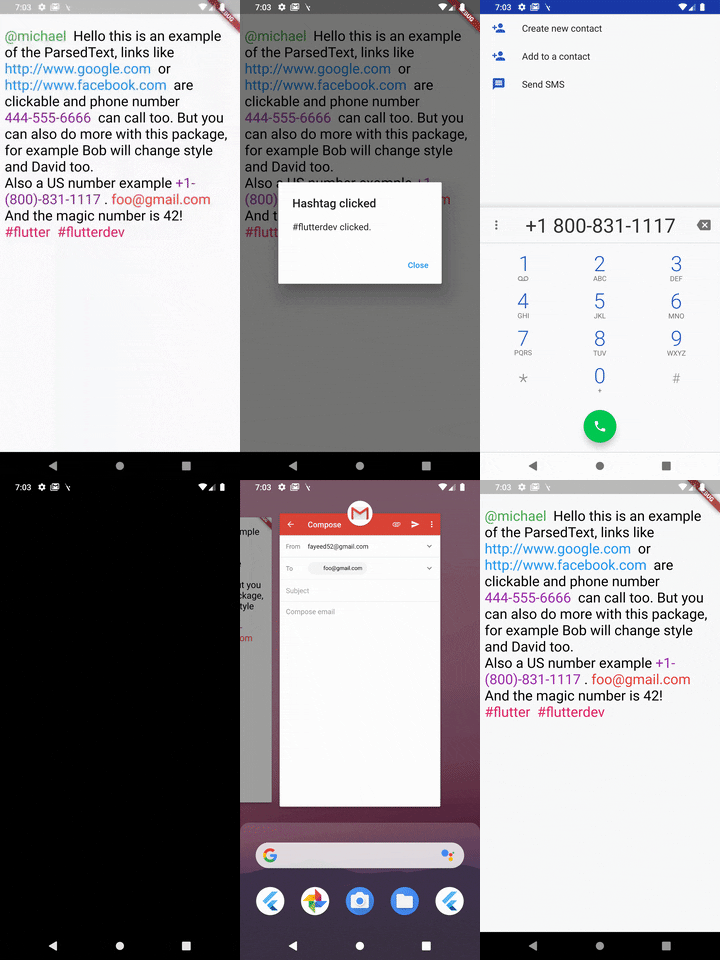
A Flutter package to parse text and extract parts using predefined types like url, phone and email and also supports Regex.
ParsedText can receive this paramters & all the RichText parameters:
text: Text that will be parsed and rendered.
style: It takes a TextStyle object as it's property to style all the non links text objects.
parse: Array of MatchText object - used for defining structure for pattern matching .
MatchText(
  type: ParsedType.EMAIL, // predefined type can be any of this ParsedTypes
  style: TextStyle(
    color: Colors.red,
    fontSize: 24,
  ), // custom style to be applied to this matched text
  onTap: (url) {
    // do something here with passed url
  }, // callback funtion when the text is tapped on
),
You can also define a custom pattern like this:
MatchText(
  pattern: r"\B#+([\w]+)\b", // a custom pattern to match
  style: TextStyle(
    color: Colors.pink,
    fontSize: 24,
  ), // custom style to be applied to this matched text
  onTap: (url) async {
  // do something here with passed url
  }, // callback funtion when the text is tapped on
)
You can also set RegexOption for the custom regex pattern like so:
MatchText(
  pattern: r"\B#+([\w]+)\b", // a custom pattern to match
  regexOptions: RegexOptions(
    multiLine : false,
    caseSensitive : false,
    unicode : false,
    dotAll : false
  ),
  style: TextStyle(
    color: Colors.pink,
    fontSize: 24,
  ), // custom style to be applied to this matched text
  onTap: (url) async {
  // do something here with passed url
  }, // callback funtion when the text is tapped on
)
A boolean that show a diffrent text and passes a diffrent text to the callback
eg: Your str is "Mention [@michel:5455345]" where 5455345 is ID of this user which will be passed as parameter to the callback funtion and @michel the value to display on interface. Your pattern for ID & username extraction : /\[(@[^:]+):([^\]]+)\]/i
Displayed text will be : Mention ^^@michel^^
MatchText(
pattern: r"\[(@[^:]+):([^\]]+)\]",
style: TextStyle(
color: Colors.green,
fontSize: 24,
),
// you must return a map with two keys// [display] - the text you want to show to the user// [value] - the value underneath it
renderText: ({String str, String pattern}) {
Map<String, String> map = Map<String, String>();
RegExp customRegExp = RegExp(pattern);
Match match = customRegExp.firstMatch(str);
map['display'] = match.group(1);
map['value'] = match.group(2);
return map;
},
onTap: (url) {
// do something here with passed url
},
),
ParsedText(
  text:
    "[@michael:51515151] Hello this is an example of the ParsedText, links like http://www.google.com or http://www.facebook.com are clickable and phone number 444-555-6666 can call too. But you can also do more with this package, for example Bob will change style and David too. foo@gmail.com And the magic number is 42! #react #react-native",
  parse: <MatchText>[
    MatchText(
      type: ParsedType.EMAIL,
      style: TextStyle(
        color: Colors.red,
        fontSize: 24,
      ),
      onTap: (url) {
        launch("mailto:" + url);
      },
    ),
  ],
)
Found this project useful? ❤️
If you found this project useful, then please consider giving it a ⭐️ on Github and sharing it with your friends via social media.