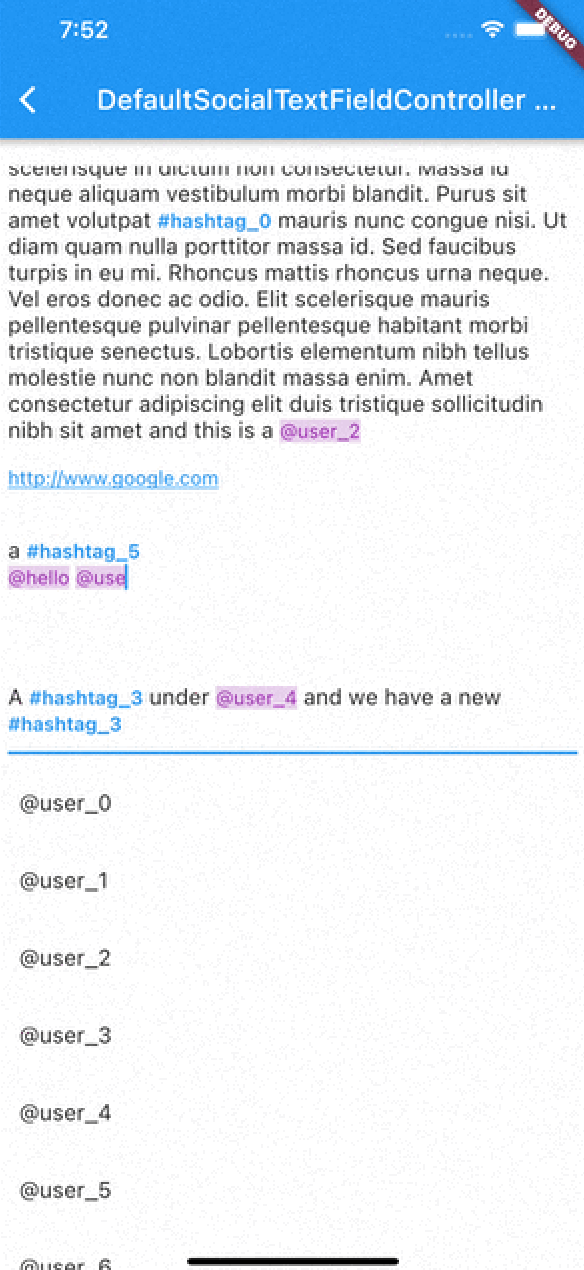
TextEditingController e construtor RichText / TextSpan com detecção de hashtags, URLs e menções usando expressões regulares. Também com suporte a toque.
Orientação gerada a partir de informações públicas. Apenas para referência.
Um pacote Flutter que aprimora a entrada de texto com recursos do estilo redes sociais, incluindo detecção automática e formatação de hashtags, URLs e menções usando expressões regulares. Integra-se com TextEditingController e suporta interações por toque para esses elementos por meio de RichText e TextSpan. Ideal para aplicativos de bate-papo, plataformas sociais ou qualquer aplicativo que exija edição de texto rico com conteúdo interativo. Funciona em todas as principais plataformas: Android, iOS, Web, macOS, Windows e Linux.
Casos de uso
comentários de aplicativo de mídia social
Aplicativos de bate-papo com links clicáveis
Marcação de usuários em mensagens
Entrada de texto rico com estilização dinâmica
Ferramentas de criação de conteúdo com destaque de metadados
Principais recursos
Detecção e formatação de hashtags
Linkagem automática de URL e menções
trechos de texto clicáveis
Integração com RichText
análise baseada em expressões regulares
Compatibilidade multiplataforma
Indicado para
Desenvolvedores de aplicativos sociais
Equipes que precisam de entrada de texto rico
Aplicativos com conteúdo gerado pelo usuário
Interfaces de mensagens interativas
Editores de texto personalizáveis
Considerações
Requer ajuste cuidadoso de expressões regulares para casos extremos
Pode ser necessário otimização de desempenho para textos longos
Limitado a formatação básica sem estilos avançados
Nenhum seletor de emojis embutido
Depende da lógica externa de expressão regular para precisão
README original
Snapshot do README original do repositório-fonte vinculado. Consulte o repositório para o conteúdo mais recente.
flutter_social_textfield
A Flutter plugin that helps detection of common social media contents.
The current position of the cursor is used for detecting content.
Current detection types are:
HashTag (#): Texts start with #
Mention (@): Text start with @ sign
Web Links: Can detect web links
Emojis: can detect emojis [thanks @moazh]
You can see the supported detection types from DetectedType enum
enum DetectedType{
    mention, //By Default texts starting with @sign
    hashtag,  //By default, texts starting with #hashtag
    url, //By default texts starting with http://xxx.yyy or https://aaa.bbb
    plain_text //Any other type falls into this.
}
One of the main reasons that i want to create this plugin was that i needed to listen detection events from different widgets.
So flutter_social_textfield provides a stream for detections so you can subscribe and listen events when needed.
The Stream Subscriptoin returns SocialContentDetection class:
class SocialContentDetection{
    final DetectedType type; //mention, url, hashtag, plan_text
    final TextRange range; //range of detected content
    final String text; //detected content
    SocialContentDetection(this.type, this.range, this.text);

    @override
    String toString() {
        return 'SocialContentDetection{type: $type, range: $range, text: $text}';
    }
}
DefaultSocialTextFieldController
I've implemented an experimental widget for ease of use. DefaultSocialTextFieldController puts the main content inside a Stack and allows users to show relevant content when curser comes over a detected content
As with version 0.0.9 There are 2 different types of presentation of detection content:
Detection Presentation Mode
DetectionPresentationMode.split_screen : Shows detection view but moving from bottom to determined widget size. useful for full screen textfields like text editors
DetectionPresentationMode.above_text_field : Useful for showing detection view from above the textfield. The location of textfield is detected from the FocusNode automatically.
Please notice the 'scrollPhysics' property of the TextField;
An example usage of the DefaultSocialTextFieldController can be seen in the example project.
The main goal is to provide an easy way to implement features that have been seen in most of the social media applications.
SocialTextSpanBuilder
flutter_social_textfield uses SocialTextSpanBuilder for rendering the text inside the attached textfield.
So if you just want to show formatted text content instead of using inside an editor you can use it like this:
With version 0.0.3 you can also implement onTapDetection function for adding tap gestures to detected strings.
void initBuilder(){
    final Map<DetectedType, RegExp> _regularExpressions = {
        DetectedType.mention:atSignRegExp,
        DetectedType.hashtag:hashTagRegExp,
        DetectedType.url:urlRegex
    };

    final Map<DetectedType, TextStyle> _detectionTextStyles = {
        DetectedType.mention:TextStyle(...)
    };

    final TextStyle _defaultTextStyle = TextStyle();

    final _textSpanBuilder = SocialTextSpanBuilder(regularExpressions: _regularExpressions,defaultTextStyle:_defaultTextStyle,detectionTextStyles: _detectionTextStyles, onTapDetection: (detection){print("Tapped on detection: $detection");});
}

//And you can return RichText content bu calling build(context) method afterwards.
@override
    Widget build(BuildContext context) {
        var height = MediaQuery.of(context).size.height * 0.4;
        return Scaffold(
            appBar: AppBar(
                title: Text(widget.title),
            ),
        body: Container(
           child:RichText(
              text:_textSpanBuilder.build(context)
            )
        )// This trailing comma makes auto-formatting nicer for build methods.
    );
}
Acknowledgements
Thanks https://github.com/Bhupesh-V (@Bhupesh-V) for his contribution to url regex 👌
This widget's default regular expressions taken from this wonderful widget: