Buscar pacotes, repositórios e categorias de apps

Capa de flutter_stripe_payment
Detalhes do pacotev0.0.18

flutter_stripe_payment

Adicione o Stripe ao seu aplicativo Flutter para aceitar pagamentos com cartão usando Payment Intents com conformidade forte SCA 3DS.

AndroidiOS
Downloads em 30 dias
85
Curtidas
57
Pontos Pub
125

Instalar pacote

flutter pub add flutter_stripe_payment

Visão geral do pacote

Orientação gerada a partir de informações públicas. Apenas para referência.

flutter_stripe_payment é um pacote Flutter que permite a integração fluida do processamento de pagamentos do Stripe em aplicativos móveis. Ele suporta pagamentos com cartão por meio de Payment Intents, garantindo conformidade com os requisitos de Autenticação Forte de Cliente (SCA) e segurança 3D (3DS). Projetado para Android e iOS, o pacote simplifica o manuseio seguro de transações com suporte integrado para tokenização e confirmação em tempo real de pagamentos. Os desenvolvedores podem implementar fluxos de pagamento robustos e compatíveis com PCI sem gerenciar diretamente dados sensíveis de cartão. O SDK gerencia fluxos de autenticação complexos, melhorando as taxas de sucesso no checkout mantendo altos padrões de segurança.

Casos de uso

  • Compras no aplicativo
  • Checkout de comércio eletrônico
  • Faturamento de assinatura
  • Pagamentos de serviços digitais
  • Doações online

Principais recursos

  • Conforme com SCA e 3DS
  • Suporte a Intenções de Pagamento
  • Tokenização segura de cartão
  • Confirmação de pagamento em tempo real
  • Plataforma cruzada (Android e iOS)

Indicado para

  • Aplicativos de comércio eletrônico móvel
  • Serviços baseados em assinatura
  • Aplicativos que exigem pagamentos seguros
  • Desenvolvedores usando o Stripe
  • Projetos que exigem conformidade com a SCA

Considerações

  • Requer configuração da conta Stripe
  • Necessita de backend para criação do pagamento intencional
  • Limitado aos métodos de pagamento do Stripe
  • Dependente da conectividade de rede
  • Pode exigir configuração adicional para ambientes de teste

README original

Snapshot do README original do repositório-fonte vinculado. Consulte o repositório para o conteúdo mais recente.

flutter_stripe_payment

Add Stripe to your Flutter Application to Accept Card Payments using Payment Intents and the Latest SCA Compliance 3DS Requirements

Getting Started

Strong Customer Authentication (SCA), a new rule coming into effect on September 14, 2019, as part of PSD2 regulation in Europe, will require changes to how your European customers authenticate online payments. Card payments will require a different user experience, namely 3D Secure, in order to meet SCA requirements. Transactions that don’t follow the new authentication guidelines may be declined by your customers’ banks.

The Payment Intents API is a new way to build dynamic payment flows. It tracks the lifecycle of a customer checkout flow and triggers additional authentication steps when required by regulatory mandates, custom Radar fraud rules, or redirect-based payment methods.

Initialize

final _stripePayment = FlutterStripePayment();
_stripePayment.onCancel = (){
  print("User Cancelled the Payment Method Form");
};

Setup Stripe Environment


_stripePayment.setStripeSettings(
        appConfig.values.stripePublishableKey,
        appConfig.values.applePayMerchantId);

Show Payment Form

var paymentResponse = await _stripePayment.addPaymentMethod();
if(paymentResponse.status == PaymentResponseStatus.succeeded)
  {
    print(paymentResponse.paymentMethodId);
  }

Create Payment Intent On Server

var intent = PaymentIntent();
    intent.amount = widget.order.cart.total;
    intent.isManual = true;
    intent.isConfirmed = false;
    intent.paymentMethodId = paymentResponse.paymentMethodId;
    intent.currency = "usd";
    intent.isOnSession = true;
    intent.isSuccessful = false;
    intent.statementDescriptor = "Dorm Mom, Inc";
    var response = await widget.clientDataStore.createPaymentIntent(intent);

Confirm Payment Intent to Kick Off 3D Authentication

var intentResponse = await _stripePayment.confirmPaymentIntent(
          response.clientSecret, paymentResponse.paymentMethodId, widget.order.cart.total);

      if (intentResponse.status == PaymentResponseStatus.succeeded) {
        widget.order.paymentIntentId = intentResponse.paymentIntentId;
        widget.order.paymentMethodId = paymentResponse.paymentMethodId;
        _submitOrder();
      } else if (intentResponse.status == PaymentResponseStatus.failed) {
        setState(() {
          hideBusy();
        });
        globals.Utility.showAlertPopup(
            context, "Error Occurred", intentResponse.errorMessage);
      } else {
        setState(() {
          hideBusy();
        });
      }

Setup Payment Intent For Future Payments

var intentResponse = await _stripePayment.setupPaymentIntent(
        response.clientSecret, paymentResponse.paymentMethodId);

    if (intentResponse.status == PaymentResponseStatus.succeeded) {
      await _addCardToAccount(paymentResponse.paymentMethodId);
    } else if (intentResponse.status == PaymentResponseStatus.failed) {
      setState(() {
        hideBusy();
      });
      globals.Utility.showAlertPopup(
          context, "Error Occurred", intentResponse.errorMessage);
    } else {
      setState(() {
        hideBusy();
      });
    }

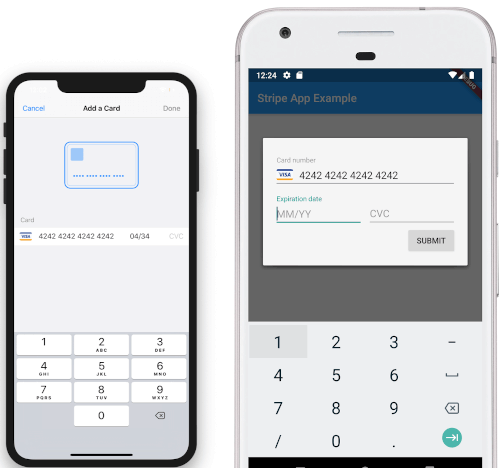
Screenshots

iOS View Android View

To Do

  • [DONE]Android Implementation
  • STPaymentCardTextField Inline Embedding

Categorias

Repositório-fonte

Projetos que usam este pacote

Ainda não há dados.