Orientação gerada a partir de informações públicas. Apenas para referência.
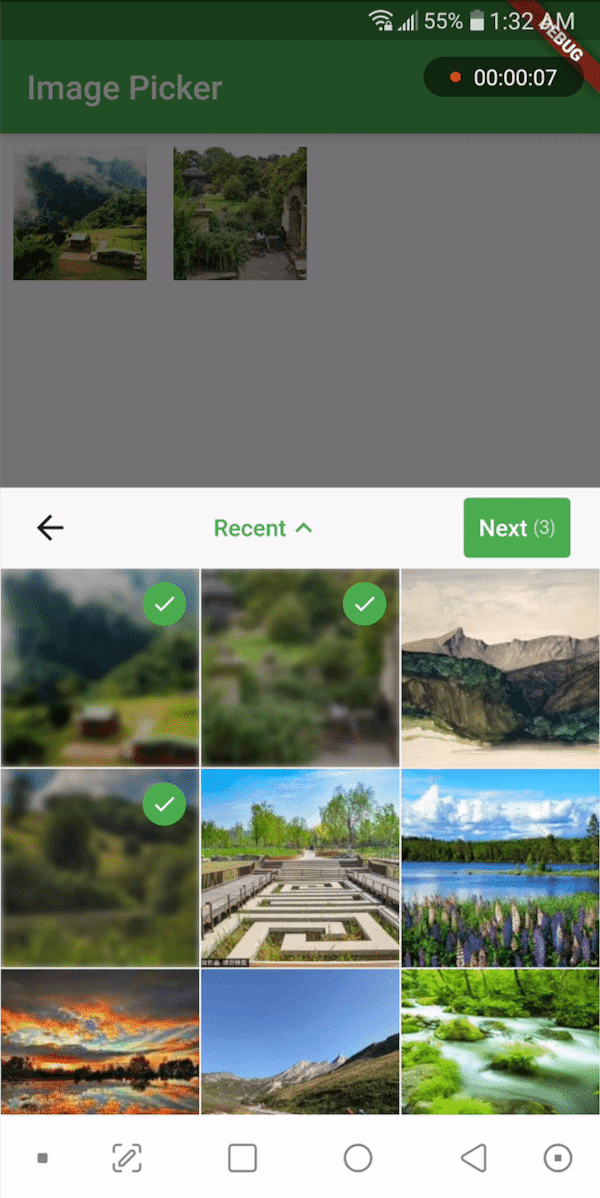
Um widget Flutter projetado para permitir que os usuários selecionem arquivos de mídia do armazenamento do dispositivo. Pode ser colocado em qualquer lugar na árvore de widgets, oferecendo flexibilidade na integração da interface. O widget gerencia a seleção de arquivos com pouca configuração, suportando diversos tipos de mídia, como imagens e vídeos. Oferece uma interface limpa e reutilizável para escolher mídia sem exigir conhecimento profundo sobre plataformas específicas. Ideal para aplicativos que precisam de funcionalidade de entrada de mídia de forma simples e consistente.
Casos de uso
Integrando a seleção de mídia em formulários
Permitir que os usuários carreguem fotos ou vídeos
Construindo ferramentas de criação de conteúdo
Adicionando seletor de mídia às telas de edição de perfil
Criando interfaces de galeria ou álbum
Principais recursos
Reutilizável em toda a árvore de widgets
Integração simples com configuração mínima
Suporta múltiplos tipos de mídia
Leve e focado em funcionalidades principais
Funciona sem código específico de plataforma
Indicado para
Desenvolvedores de aplicativos com grande volume de mídia
Aplicativos que exigem conteúdo carregado pelo usuário
Componentes da interface do usuário que precisam de seleção flexível de mídia
Projetos que priorizam simplicidade e reutilização
Considerações
Não inclui recursos de processamento de mídia
Limitado à seleção básica de arquivos
Sem visualização ou recorte embutidos
Requer manipulação manual de caminhos de arquivos
Depende das permissões da plataforma subjacente
README original
Snapshot do README original do repositório-fonte vinculado. Consulte o repositório para o conteúdo mais recente.
media_picker_widget
A widget that picks media files from storage and allows you to place it anywhere in the widget tree. You can use this widget in a dialog, bottom sheet, or anywhere else as you wish. It supports picking single or multiple images or videos. Use the PickerDecoration class to decorate the UI.
If you find this widget useful, consider supporting the developer by buying them a coffee.
Installation
Add the following line to your pubspec.yaml file:
media_picker_widget:$latest_version
The latest version of the package is
Android
To use this widget on Android, you need to add the following permissions to your AndroidManifest.xml file, located in <project root>/android/app/src/main/AndroidManifest.xml:
Starting with version 0.8.1 the iOS implementation uses PHPicker to pick (multiple) images on iOS 14 or higher.
As a result of implementing PHPicker it becomes impossible to pick HEIC images on the iOS simulator in iOS 14+. This is a known issue. Please test this on a real device, or test with non-HEIC images until Apple solves this issue. 63426347 - Apple known issue
Add the following keys to your Info.plist file, located in <project root>/ios/Runner/Info.plist:
NSPhotoLibraryUsageDescription - describe why your app needs permission for the photo library. This is called Privacy - Photo Library Usage Description in the visual editor.
NSCameraUsageDescription - describe why your app needs access to the camera. This is called Privacy - Camera Usage Description in the visual editor.
NSMicrophoneUsageDescription - describe why your app needs access to the microphone, if you intend to record videos. This is called Privacy - Microphone Usage Description in the visual editor.
To use the media_picker_widget, follow these steps:
Make sure your app's minSdkVersion is set to 21 in the app/build.gradle file.
Within your Flutter widget tree, simply add the MediaPicker widget, which extends StatefulWidget. Here's an example:
MediaPicker(
  mediaList: mediaList, //let MediaPicker know which medias are already selected by passing the previous mediaList
  onPicked: (selectedList){
    print('Got Media ${selectedList.length}');
  },
  onCancel: ()=> print('Canceled'),
  mediaCount: MediaCount.single,
  mediaType: MediaType.image,
  decoration: PickerDecoration(),
)
Customization
Customize the widget as needed. You can use the PickerDecoration class to decorate the UI.
Custom Header
New header customization have been added. MediaPicker widget has HeaderBuilder property. You can pass a HeaderBuilder to customize the header. HeaderBuilder is a function that returns a Widget. You can use HeaderBuilder to customize the header as you wish. You can use MediaPickerHeader class to get the default header. MediaPickerHeader class has a MediaPickerHeaderProps class that takes MediaPicker properties as parameters. You can use MediaPickerHeaderProps class to customize the header.
Like this,