Orientação gerada a partir de informações públicas. Apenas para referência.
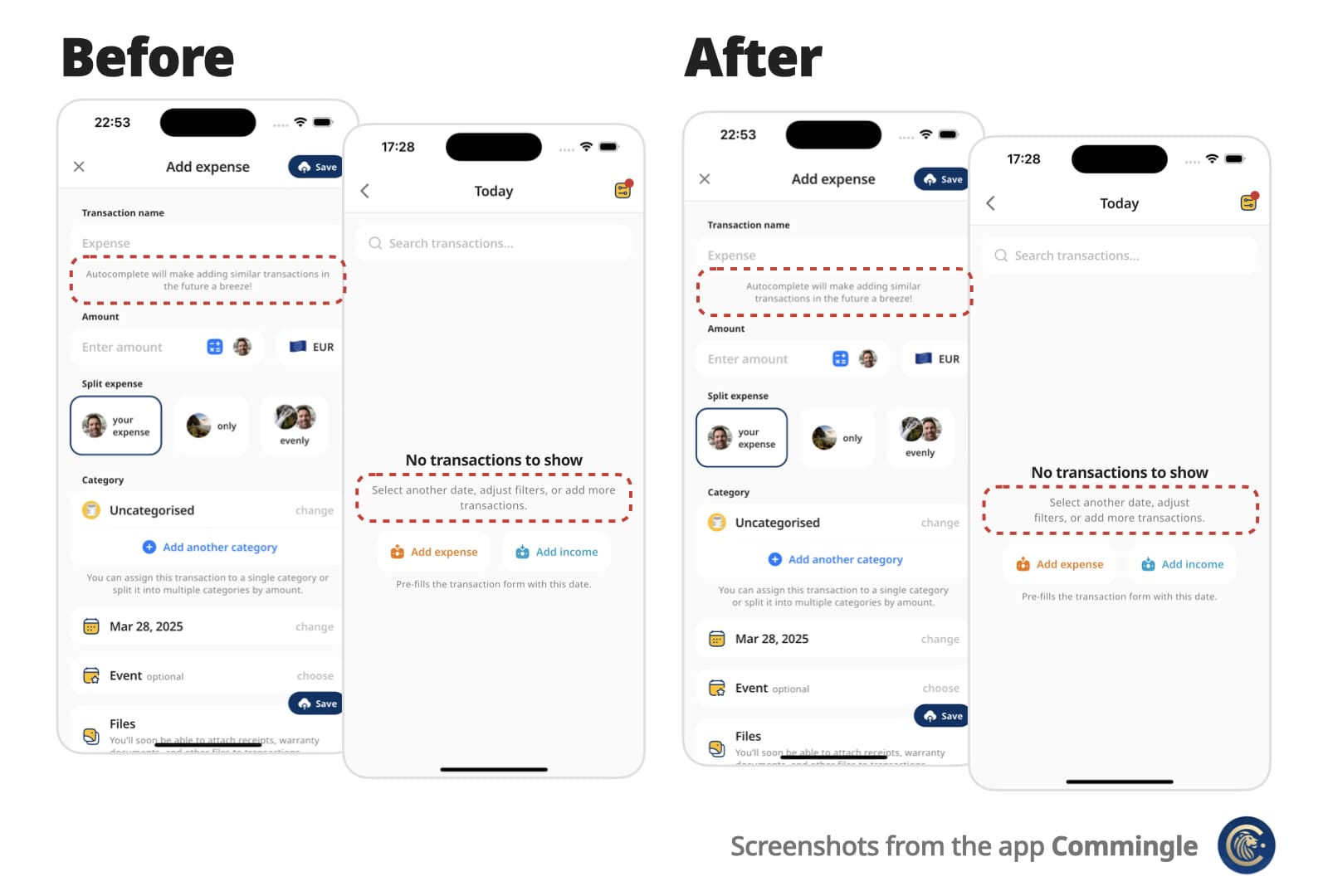
OptimalWrapText é um widget do Flutter que melhora o layout de texto ao envolver inteligentemente textos multilinha para criar linhas visualmente equilibradas com comprimentos semelhantes. Diferentemente dos widgets Text padrão, ele minimiza quebras de linha desiguais, melhorando a legibilidade e o apelo estético em interfaces com parágrafos curtos ou rótulos. É ideal para interfaces onde a harmonia tipográfica importa, como painéis, cartões ou formulários. O pacote suporta todas as principais plataformas e se integra perfeitamente em projetos Flutter existentes.
Casos de uso
Melhorar o equilíbrio visual em interfaces com muitos textos
Melhorando a legibilidade em layouts compactos
Criando comprimentos de linha consistentes em rótulos e cartões
Otimizando a exibição de texto em designs responsivos
Usando em painéis e resumos de dados
Principais recursos
Equilibra inteligentemente o comprimento das linhas
📌 For centered or right-aligned text, you may still want to wrap it in a Center, Align, or Row, just like with a regular Text widget.
Use minLines to wrap onto at least that many lines when the text has enough
words. A single unbreakable word is never forced to break.
OptimalWrapText(
  'Hello there friend',
  minLines: 2,
  textAlign: TextAlign.center,
)
Use shrinkWrap: true when the parent should hug the optimally wrapped width
(for example a chip or speech bubble). By default the widgets expand to the
available width via Align, matching typical full-width text layout.
For custom rich-text children, wrap them with the exported OptimalWrapChild
primitive instead.
🧠 How does it work?
Optimal Wrap Text uses TextPainter to determine how many lines your text will take at full available width in the given widget tree.
It runs a binary search to find the narrowest width that still fits in the same number of lines — ensuring optimal wrapping. With minLines, that target is raised so the text wraps onto at least that many lines when there are enough words.
e.g.
300px → 2 lines (width from the current BuildContext)
150px → 4 lines ❌
225px → 2 lines ✅
188px → 3 lines ❌
206px → 2 lines ✅
... and so on
Worst-case scenario for mobile screen widths (e.g. iPhone) is about 9 iterations, but typical cases resolve in 6 attempts.
It wraps the final Text in a SizedBox constrained to that optimal width.
⚠️ Known Limitations
It uses LayoutBuilder to get width in the given widget tree, which doesn’t work inside some slivers, such as SliverFillRemaining, which rely on intrinsic sizing.
For OptimalWrapRichText with WidgetSpans, prefer intrinsically sized inline children (icons, small badges, fixed-size boxes). Same as Flutter’s Text.rich, each inline widget is constrained by the paragraph’s max width — very wide or full-bleed children can prevent meaningful narrowing.
💡 You can work around this by passing a manual width:
CustomScrollView(
  slivers: [
    ...,
    SliverFillRemaining(
      child: Padding(
        padding: EdgeInsets.only(left: 15, right: 30),
        child: OptimalWrapText(
          'My slightly longer text that will span 2 or 3 lines',
          width: MediaQuery.sizeOf(context).width - 15 - 30
        ),
      )
    ),
  ]
)
📄 Copyright and License
Optimal Wrap Text is maintained by Chris Rutkowski as part of the Commingle app, and open-sourced under the MIT License.