Buscar pacotes, repositórios e categorias de apps

Capa de overlay_pop_up
Detalhes do pacotev1.0.6+6

overlay_pop_up

Um novo plugin Flutter para exibir pop-ups ou telas sobre outros aplicativos no Android, mesmo quando o aplicativo está fechado ou encerrado.

Android
Downloads em 30 dias
21
Curtidas
53
Pontos Pub
160

Instalar pacote

flutter pub add overlay_pop_up

Visão geral do pacote

Orientação gerada a partir de informações públicas. Apenas para referência.

Um plugin do Flutter que permite exibir pop-ups ou telas de sobreposição no Android, mesmo quando o aplicativo está fechado ou encerrado. Ele utiliza permissões de sobreposição de nível do sistema do Android para mostrar conteúdo acima de outros aplicativos, útil para notificações, ações rápidas ou elementos de interface persistentes. O plugin se integra perfeitamente ao Flutter e requer permissão do usuário para funcionar. É projetado especificamente para Android e não suporta iOS. Os desenvolvedores podem personalizar visualmente e comportamentalmente as sobreposições programaticamente.

Casos de uso

  • Exibindo notificações persistentes
  • Criando painéis de ação flutuantes
  • Mostrar alertas quando o aplicativo estiver em segundo plano
  • Implementando ferramentas de acesso rápido
  • Fornecendo atualizações em tempo real sobre outros aplicativos

Principais recursos

  • Funciona mesmo quando o aplicativo é encerrado
  • Suporte de sobreposição exclusivo para Android
  • conteúdo de sobreposição personalizável
  • Gerenciamento de permissões de nível do sistema
  • Integração simples com o Flutter

Indicado para

  • Desenvolvedores criando componentes de interface sempre ativos
  • Aplicativos que precisam de sobreposições persistentes
  • Ferramentas que exigem visibilidade em primeiro plano
  • Aplicações aprimoradas por notificações
  • Aplicativos úteis com interfaces flutuantes

Considerações

  • Requer permissão de sobreposição do sistema Android
  • Não disponível no iOS
  • Pode ser restrito por fabricantes de dispositivos
  • O usuário deve habilitar manualmente a permissão
  • Pode afetar a bateria e o desempenho

README original

Snapshot do README original do repositório-fonte vinculado. Consulte o repositório para o conteúdo mais recente.

overlay_pop_up

A new Flutter plugin to display pop ups or screens over other apps in Android even when app is closed or killed.

Buy Me A Coffee

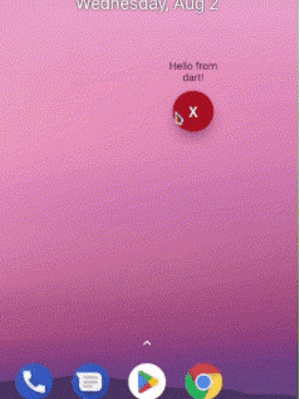
Demo

Preview

Android

add this to your AndroidManifest.xml

 <uses-permission android:name="android.permission.SYSTEM_ALERT_WINDOW" />

 <application>
        ...
        <service
           android:name="com.requiemz.overlay_pop_up.OverlayService"
           android:exported="false" />
    </application>
Android 14

applications that target SDK 34 and use foreground service should include foregroundServiceType attribute(see documentation).

 <uses-permission android:name="android.permission.SYSTEM_ALERT_WINDOW" />

 <application>
        ...
        <service
           android:name="com.requiemz.overlay_pop_up.OverlayService"
           android:exported="false"
           <!-- add this -->
           android:foregroundServiceType="camera, dataSync, location, etc" />
    </application>

Flutter implementation

configure your main.dart entry point a widget to display (make sure to add @pragma('vm:entry-point'))

NOTE: Now you can pass as parameter the dart entry point method name when showOverlay is called

@pragma("vm:entry-point")
void overlayPopUp() {
  WidgetsFlutterBinding.ensureInitialized();
  runApp(const MaterialApp(
    debugShowCheckedModeBanner: false,
    home: Text('Hello Pub.dev!'),
  ));
}

Overlay Methods

returns true when overlay permission is alreary granted if permission is not granted then open app settings

await OverlayPopUp.requestPermission();

returns true or false according to permission status

await OverlayPopUp.checkPermission();

display your overlay and return true if is showed

PARAMS

  • height is not required by default is MATCH_PARENT

  • width is not required by default is MATCH_PARENT

  • verticalAlignment is not required by default is CENTER for more info see: https://developer.android.com/reference/android/view/Gravity

  • horizontalAlignment is not required by default is CENTER for more info see: https://developer.android.com/reference/android/view/Gravity

  • backgroundBehavior by default is focusable flag that is you can take focus inside a overlay for example inside a textfield and [tapThrough] you can tap through the overlay background even if has MATCH_PARENT sizes.

  • screenOrientation by default orientation is portrait.

  • closeWhenTapBackButton by default when user presses back button the overlay no has any action if you pass true then back button will close overlay.

  • isDraggable by default is false therefore the overlay can´t be dragged.

  • entryPointMethodName by default is 'overlayPopUp' if you want you can change it

    await OverlayPopUp.showOverlay();
    

    returns true if overlay closed correctly or already is closed

    await OverlayPopUp.closeOverlay();
    

    returns the overlay status true = open, false = closed

    await OverlayPopUp.isActive();
    

    returns the last overlay position if drag is enabled

    await OverlayPopUp.getOverlayPosition();
    

    share dynamic data to overlay

    await OverlayPopUp.sendToOverlay({'data':'hello!'});
    await OverlayPopUp.sendToOverlay('hello');
    

    receive the data from flutter as stream

    await OverlayPopUp.dataListener();
    

Categorias

Dependências

Lista de dependências 1 itens

  • plugin_platform_interface^2.1.8

Repositório-fonte

Projetos que usam este pacote

Ainda não há dados.
