Buscar pacotes, repositórios e categorias de apps

Capa de page_animator
Detalhes do pacotev1.0.1

page_animator

Um pacote Flutter que oferece transições e animações suaves de página com efeitos personalizáveis. Perfeito para criar interfaces de usuário envolventes com navegação horizontal entre páginas.

AndroidiOSWebmacOSWindowsLinux
Downloads em 30 dias
14
Curtidas
9
Pontos Pub
160

Instalar pacote

flutter pub add page_animator

Visão geral do pacote

Orientação gerada a partir de informações públicas. Apenas para referência.

PageAnimator é um pacote Flutter projetado para oferecer transições de página suaves e personalizáveis para navegação horizontal. Ele aprimora as interfaces do usuário com efeitos visuais fluidos, tornando a navegação mais envolvente e intuitiva. Ideal para aplicativos que exigem mudanças dinâmicas de tela, como fluxos de introdução, painéis de controle ou processos em múltiplos passos. O pacote suporta todas as principais plataformas, incluindo Android, iOS, Web, macOS, Windows e Linux, garantindo desempenho consistente em todos os dispositivos.

Casos de uso

  • Telas de onboarding
  • Navegação do painel
  • Formulários de múltiplos passos
  • Tutoriais interativos
  • conteúdo deslizável
  • Transições animadas de guia

Principais recursos

  • Efeitos de transição personalizáveis
  • Animações horizontais suaves de página
  • Compatibilidade multiplataforma
  • Integração fácil com PageView
  • Suporte para navegação baseada em gestos
  • Duração e curva configuráveis

Indicado para

  • Desenvolvedores em busca de navegação animada
  • Aplicativos com interfaces deslizáveis
  • Implementações de UI centradas no design
  • Aplicações móveis e web com interações ricas
  • Equipes que priorizam a experiência do usuário

Considerações

  • Pode afetar o desempenho com animações complexas
  • Requer ajuste cuidadoso para uma experiência do usuário ideal
  • Pré-definições internas limitadas (personalização necessária)
  • Não ideal para páginas estáticas simples
  • Mais adequado para complexidade moderada de animação

README original

Snapshot do README original do repositório-fonte vinculado. Consulte o repositório para o conteúdo mais recente.

Page Animator

A Flutter package that provides smooth page transitions and animations with customizable effects. Perfect for creating engaging user interfaces with horizontal page navigation.

Features

  • Multiple animation types for page transitions, switchable in realtime
  • Infinite scrolling in both directions, with ability to set bounds in realtime
  • Animated switcher - tap on a page, and it will zoom out, similar to Kindle reader
  • Immersive mode support

Animation Types

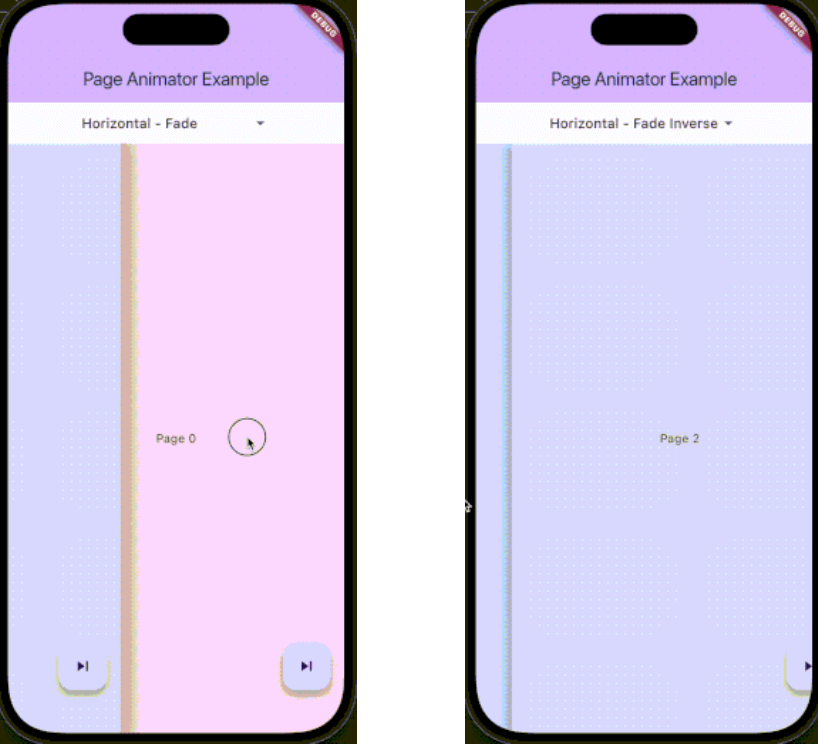
The package supports various animation types through PageAnimatorType. Here's a comprehensive list of all available animations:

Preview Preview Preview
Uncompressed gif
animatedSwitcher - Animated switcher transition
Uncompressed gif
noAnimation - No animation effect, instant page switch
Uncompressed gif
horizontalSimple - Simple horizontal slide transition
Uncompressed gif
horizontalFade - Horizontal slide with fade effect
Uncompressed gif
horizontalFadeInverse - Horizontal slide with inverse fade effect
Uncompressed gif
verticalSimple - Simple vertical slide transition
Uncompressed gif
verticalFade - Vertical slide with fade effect
Uncompressed gif
verticalFadeInverse - Vertical slide with inverse fade effect

You can change the animation type dynamically using the controller:

pageAnimatorController.type.value = PageAnimatorType.verticalFade;

Installation

Add this to your package's pubspec.yaml file:

dependencies:
  page_animator: ^1.0.0

Usage

  1. Import the package:
import 'package:page_animator/page_animator.dart';
  1. Create a PageAnimatorController:
final pageAnimatorController = PageAnimatorController(
  type: PageAnimatorType.horizontalFade,
);
  1. Use the PageAnimator widget:
PageAnimator(
  controller: pageAnimatorController,
  onPageChanged: (int currentPage) {
    print('Page offset: $currentPage');
  },
  leftMostIndex: -3,
  rightMostIndex: 3,
  children: [
    // Your page widgets here
  ],
  enableImmersiveSwitch: true,
)
Page Bounds

The PageAnimator widget allows you to set bounds for page navigation using leftMostIndex and rightMostIndex parameters:

  • leftMostIndex: The minimum page offset that can be reached by swiping left
  • rightMostIndex: The maximum page offset that can be reached by swiping right

These bounds can be changed in realtime, allowing you to dynamically control the navigation range. For example:

// Initially allow navigation indefinitelly
PageAnimator(
  leftMostIndex: null,
  rightMostIndex: null,
  // ... other parameters
)

// Later, you can update the bounds
PageAnimator(
  leftMostIndex: -3,
  rightMostIndex: 3,
  // ... other parameters
)

When a bound is reached, the page will stop scrolling in that direction, providing a natural end to the navigation.

Example

Here's a complete example showing how to use the package:

class MyPage extends StatefulWidget {
  @override
  State<MyPage> createState() => _MyPageState();
}

class _MyPageState extends State<MyPage> {
  final pageAnimatorController = PageAnimatorController(
    type: PageAnimatorType.horizontalFade,
  );

  @override
  Widget build(BuildContext context) {
    return Scaffold(
      body: PageAnimator(
        controller: pageAnimatorController,
        onPageChanged: (int currentPage) {
          print('Page offset: $currentPage');
        },
        leftMostIndex: -3,
        rightMostIndex: 3,
        children: [
          for (final page in List.generate(3, (index) => index))
            _buildPage(page),
        ],
        enableImmersiveSwitch: true,
      ),
    );
  }

  Widget _buildPage(int page) {
    return Scaffold(
      body: Center(
        child: Text('Page $page'),
      ),
      floatingActionButton: FloatingActionButton(
        onPressed: () => pageAnimatorController.animateToOffset(1),
        child: const Icon(Icons.skip_next),
      ),
    );
  }
}

Controller Methods

The PageAnimatorController provides several methods to control page transitions:

  • animateToOffset(int offset): Animate to a specific page offset
  • type: Change the animation type dynamically
  • switcherActive: Control the page switcher state

Contributing

Contributions are welcome! Please feel free to submit a Pull Request.

License

This project is licensed under the MIT License - see the LICENSE file for details.

Parameters

  • children: List of widgets to display as pages
  • onPageChanged: Callback when page is changed
  • leftMostIndex: The first page user can go to
  • rightMostIndex: The last page user can go to
  • controller: PageAnimatorController instance
  • enableImmersiveSwitch: Optional boolean that controls whether to enable immersive mode while switcher is inactive, and automatically disable it when user enters switcher. If not specified, defaults to true.
  • onDragStart: Optional callback when drag starts
  • onDragEnd: Optional callback when drag ends
  • onDragAnimationStart: Optional callback when animation starts
  • onDragAnimationEnd: Optional callback when animation ends

Categorias

Dependências

Lista de dependências 1 itens

Repositório-fonte

Projetos que usam este pacote

Ainda não há dados.