Buscar pacotes, repositórios e categorias de apps

Capa de shaky_animated_listview
Detalhes do pacotev0.0.5

shaky_animated_listview

Liste animações para acompanhar suas alterações de rolagem na tela ou sua primeira anexação da lista para animar os itens da lista com regras de transição diferentes.

AndroidiOSWebmacOSWindowsLinux
Downloads em 30 dias
98
Curtidas
73
Pontos Pub
140

Instalar pacote

flutter pub add shaky_animated_listview

Visão geral do pacote

Orientação gerada a partir de informações públicas. Apenas para referência.

ShakyAnimatedListView é um pacote Flutter que fornece animações dinâmicas para itens de lista, permitindo rastrear visualmente mudanças de rolagem ou a aparência inicial dos itens em uma lista. Ele melhora a experiência do usuário ao aplicar efeitos de transição personalizáveis quando os itens entram na janela visível ou durante o deslocamento. Ideal para criar listas envolventes e responsivas com animações suaves de entrada e movimento, ele é compatível com múltiplas plataformas, incluindo Android, iOS, Web, macOS, Windows e Linux. O pacote é leve e se integra perfeitamente a projetos Flutter existentes.

Casos de uso

  • Melhorando animações de entrada de itens da lista
  • Feedback visual durante o rolagem
  • Criando interfaces de usuário interativas com transições dinâmicas
  • Melhorando o engajamento do usuário em listas rolagens
  • Animando listas em aplicativos multiplataforma

Principais recursos

  • Regras de transição personalizáveis
  • Animações suaves de entrada para itens da lista
  • Rastreamento de animação sensível ao rolagem
  • Suporta todas as principais plataformas do Flutter
  • Leve e fácil de integrar

Indicado para

  • Desenvolvedores construindo listas interativas
  • Designers de UI em busca de acabamento visual
  • Aplicativos que exigem entradas de lista animadas
  • Aplicações Flutter multiplataforma
  • Projetos focados na melhoria da experiência do usuário

Considerações

  • Pode afetar o desempenho com listas muito grandes
  • Requer ajuste cuidadoso dos parâmetros de animação
  • Documentação disponível limitada
  • Mais adequado para tamanhos moderados de lista
  • Não ideal para listas estáticas ou simples

README original

Snapshot do README original do repositório-fonte vinculado. Consulte o repositório para o conteúdo mais recente.

Shaky_animated_list

pub

Shaky_animated_list can be used for three main things:

  1. Animate List view scroll.
  2. Animate grid view first view.
  3. Animate grid view scroll.

1. Library over view

All these animations track your scroll changes on screen or your list first attachment to animated your list items with different transition rules.

Shaking Grid Scroll list Scroll Grid
shaking_grid scroll_list scroll_grid

You can define these animation directions Axis by channing your list ScrollDirection.

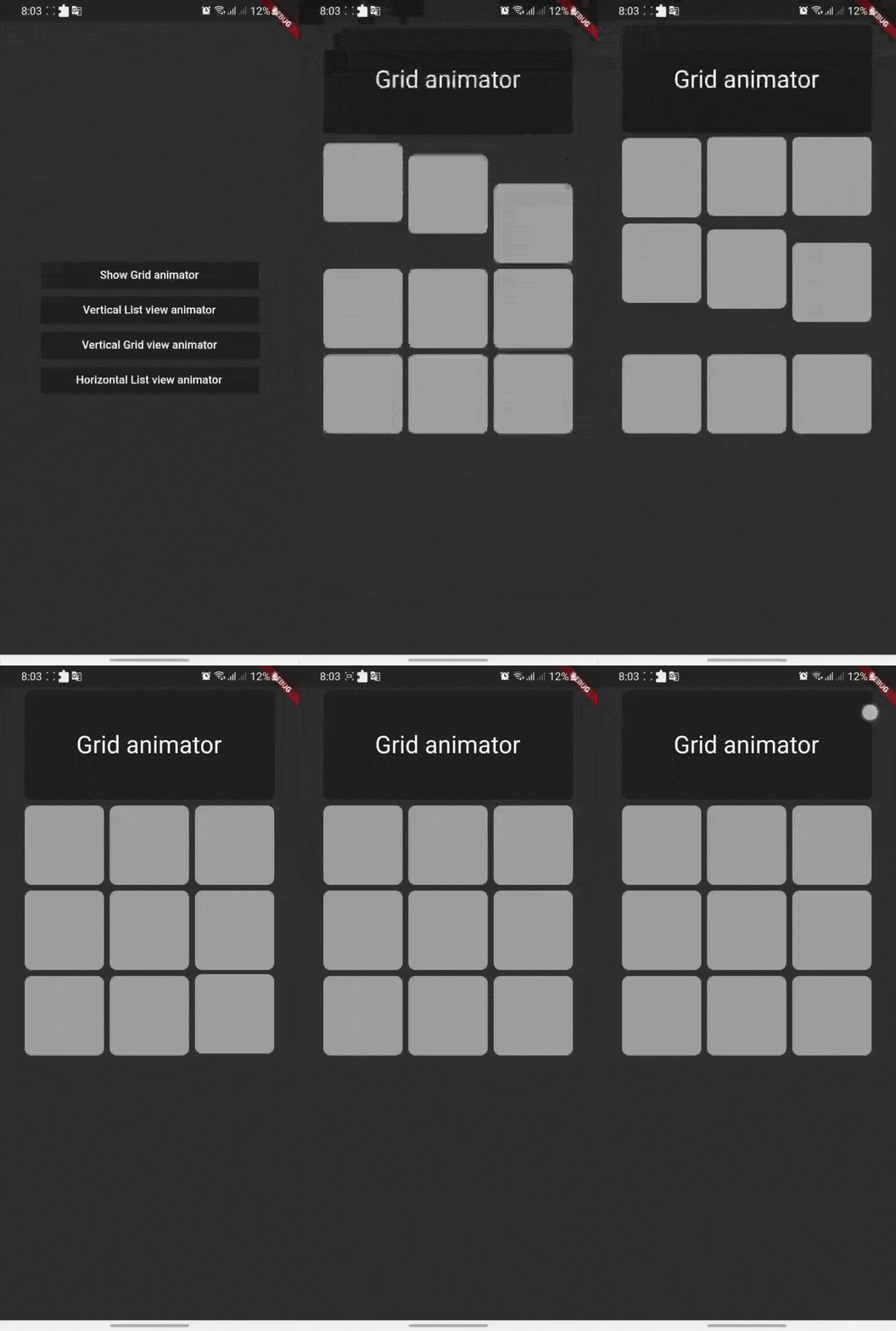
Shaking Grid

Shaking grid can be simply implemented by wrapping your grid child by GridAnimatorWidget and that's it we will take it from here ^^

for example you can simply do this to show shaking grey color cards

    GridView.count(
    crossAxisCount: 3,
    // shrinkWrap: true,
    children: List.generate(9, (i) => GridAnimatorWidget(
        child: Padding(
        padding: const EdgeInsets.all(4),
            child: ClipRRect(
            borderRadius: const BorderRadius.all(Radius.circular(10)),
                child: Container(
                color: Colors.grey,
                ),
        ),
    ),
    ),).toList()
    )

shaking_grid

ListView Scroll animations

ListView Scroll animations will enable your to implement the scroll animations with full control on animations space and duration please don't add vertical margins to your elements, you can use the spaceBetween to give a space between elements and extendedSpaceBetween to control the scroll animations space. Also you can use duration to control the reverse animations duration based on your needs

for example you can simply do this to show ListView vertical Scroll animations

    AnimatedListView(
    duration: 100,
    extendedSpaceBetween: 30,
    spaceBetween:10,
    children: List.generate(
    21,
    (index) => Card(
    elevation: 50,
    margin: const EdgeInsets.symmetric(horizontal: 20),
    shadowColor: Colors.black,
    color: Colors.grey,
        child: SizedBox(
        height: 300,
            child: Padding(
            padding: const EdgeInsets.all(20.0),
            child: Column(
                children: [
                    CircleAvatar(
                    backgroundColor: Colors.blue[500],
                    radius: 60,
                    child: const CircleAvatar(
                        backgroundImage: NetworkImage(
                        "https://avatars.githubusercontent.com/u/30810111?v=4"),
                        //NetworkImage
                        radius: 50,
                        ),
                    ),
                    const SizedBox(
                    height: 10,
                    ),
                    Text(
                    'Scroll to start',
                        style: TextStyle(
                        fontSize: 30,
                        color: Colors.blue[900],
                        fontWeight: FontWeight.w500,
                        ),
                    ),
                    const SizedBox(
                    height: 10,
                    ),
                    const Text(
                    'Animated list demo',
                        style: TextStyle(
                        fontSize: 15,
                        color: Colors.white,
                        ),
                    ),
                    const SizedBox(
                    height: 10,
                    ),
                ],
            ),
            ),
        ),
    )
))

scroll_list

Grid Scroll animations

Grid Scroll animations will enable your to implement the scroll animations on a grid view, one little change here is that we will implement the delegate, this is a design issue that we run into so you will have to to specify your crossAxisCount, crossAxisSpacing, mainAxisSpacing, and duration and we will take it from here,you can use any other default supported parameters in GridView.

for example you can simply do this to show Grid vertical Scroll animations

    AnimatedGridView(
          duration: 100,
          crossAxisCount: 2,
          mainAxisExtent: 256,
          crossAxisSpacing: 8,
          mainAxisSpacing: 8,
          children: List.generate(
              21,
              (index) => Card(
                    elevation: 50,
                    shadowColor: Colors.black,
                    color: Colors.grey[700],
                    child: SizedBox(
                      width: double.infinity,
                      child: Padding(
                        padding: const EdgeInsets.all(20.0),
                        child: Column(
                          children: const [
                            CircleAvatar(
                              backgroundColor: Colors.black,
                              radius: 60,
                              child: CircleAvatar(
                                backgroundImage: NetworkImage(
                                    "https://avatars.githubusercontent.com/u/30810111?v=4"),
                                //NetworkImage
                                radius: 50,
                              ),
                            ),
                          ],
                        ),
                      ),
                    ),
                  )
             )
       ),

scroll_grid

ListView horizontal Scroll animations

if you want to add a horizontal animations, all what you have to do is to add a scroll direction to the widget and that's it for example you can simply do this to show ListView horizontal Scroll animations

  AnimatedListView(
        duration: 100,
        scrollDirection: Axis.horizontal,
        children: List.generate(
        21,
            (index) => const Card(
            elevation: 50,
            margin: EdgeInsets.symmetric(horizontal: 10),
            shadowColor: Colors.black,
            color: Colors.grey,
                child: SizedBox(
                height: 300,
                width: 200,
                ),
            ),
        ),
  ),

horz_list

Sample source code

Example for all cases

Contribute

Let's develop with collaborations. We would love to have contributions by raising issues and opening PRs. Filing an issue before PR is must.

License

Project is published under the Apache 2.0 license. Feel free to clone and modify repo as you want, but don't forget to add reference to authors :)

Categorias

Repositório-fonte

Projetos que usam este pacote

Ainda não há dados.