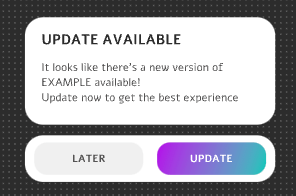
Orientação gerada a partir de informações públicas. Apenas para referência.
Updat é um pacote nativo do Flutter simples e confiável projetado para gerenciar atualizações de aplicativos em múltiplas plataformas. Simplifica o processo de verificação, download e aplicação de atualizações de forma transparente nos aplicativos Flutter. Criado com foco na facilidade de integração, o Updat suporta Android, iOS, macOS, Windows e Linux, tornando-se ideal para aplicações multiplataforma que exigem mecanismos robustos de atualização. O pacote gerencia downloads em segundo plano, comparações de versão e reinícios automáticos após as atualizações, garantindo uma experiência fluida para o usuário. Seu design leve e API clara tornam-no acessível para desenvolvedores de todos os níveis.
Casos de uso
Automatizando atualizações de aplicativos em apps Flutter multiplataforma
Gerenciando atualizações em segundo plano silenciosas no desktop e móvel
Habilitar reinicialização automática após a instalação da atualização
Gerenciar verificações de atualização no início ou em intervalos agendados
Fornecendo mecanismos de fallback durante tentativas falhas de atualização
Downloads e instalação de atualizações em segundo plano
Reinício automático do aplicativo após a atualização
Comparação de versão e detecção de atualizações
Indicado para
Desenvolvedores construindo aplicativos cross-platform com Flutter
Equipes que precisam de recursos confiáveis de atualização automática
Aplicativos que exigem experiências de atualização sem interrupções em desktop e móvel
Projetos em que minimizar a intervenção do usuário nas atualizações é crítico
Aplicações direcionadas a usuários em ambientes com conhecimento técnico limitado
Considerações
Requer configuração adequada do lado do servidor para os manifestos de atualização
Pode ser necessário lógica personalizada para lidar com rollback de atualizações
Não adequado para aplicativos que exigem fluxos de trabalho de atualização complexos
Personalização limitada para a IU/UX de atualização sem código adicional
Depende de metadados de atualização externos hospedados em um servidor
README original
Snapshot do README original do repositório-fonte vinculado. Consulte o repositório para o conteúdo mais recente.
Updat - The simple-to-use, flutter-based desktop update package
Updat is a simple-to-use reliable flutter-native updater that handles your application's updates. All you need is a place to host your files and a place to check for the latest version.
Demo
Installing
To get started simply type flutter pub add updat in your terminal.
🎉 Done, It's that simple.
Getting Started
Integration with your app requires just a few lines of code, add the following widget wherever you want your updat widget to be:
UpdatWidget(
currentVersion: "1.0.0",
getLatestVersion: () async {
// Here you should fetch the latest version. It must be semantic versioning for update detection to work properly.return"1.0.1";
},
getBinaryUrl: (latestVersion) async {
// Here you provide the link to the binary the user should download. Make sure it is the correct one for the platform!return"https://github.com/latest/release/bin.exe";
},
// Lastly, enter your app name so we know what to call your files.
appName: "Updat Example",
),
That should get you up and running in just a few seconds ⚡️.
or use the UpdatWindowManager, and let updat handle everything on autopilot. Just place it right after your MaterialApp.
Required. Must be a semantic version. This is the current package's version.
N/A
getLatestVersion
Future<String>
Required. Must be a semantic version. This should request the latest version to the server
N/A
getBinaryUrl
Future<String>
Required. This should provide the link download the binary for a certain app version. Arguments: latestVersion
N/A
appNme
String
Required. The Application's name. It is used to name the binaries when downloading.
N/A
getChangelog
Future<String>
This will render a plain text view of the changelog.
N/A
callback
void Function(UpdatStatus)
A callback that is called when the UpdatStatus gets updated.
N/A
controller
UpdatController
Optional controller for programmatic update checks and actions.
N/A
getDownloadFileLocation
Future<File>
Choose where to download the update.
N/A
updateChipBuilder
Widget Function(...)
Overrides the default update chip.
N/A
updateDialogBuilder
Widget Function(...)
Overrides the default update dialog.
N/A
openOnDownload
bool
Whether Updat should open the installer automatically once it has been downloaded.
true
closeOnInstall
bool
Whether Updat should close the application automatically once it has been downloaded.
false
Theming
Updat is extremely easy to theme. We also use updateChipBuilder and updateDialogBuilder internally to design our widgets, so you have the same customizability we do. We provide a couple of themes to get you started.
To change the theme simply add the desired theme to the builder and you're set.
Chips
defaultChip which is an elevatedButton that only shows when an update is available. Shown by default.
defaultChipWithCheckFor which is an elevatedButton that shows under all conditions, allowing to recheck for updates.
defaultChipWithSilentDownload which is an elevatedButton that only shows when an update is downloaded and ready to install.
flatChip which is an textButton that only shows when an update is available
flatChipWithCheckFor which is an textButton that shows under all condition, allowing to recheck for updates.
flatChipWithSilentDownload which is an textButton that only shows when an update is downloaded and ready to install.
floatingExtendedChip which is a compact version of the dialog, which is a bit bigger and grabs user's attention more easily.
floatingExtendedChipWithSilentDownload which is a compact version of the dialog, which is a bit bigger and grabs user's attention more easily, and only shows when the update is ready to be installed.
Dialogs
defaultDialog which is the default, M2 and M3 dialog that shows by default.
Programmatic update checks
Use an UpdatController to re-check for updates after the initial check completes — for example when your backend signals a new release via push notification or websocket:
final updatController = UpdatController();
UpdatWindowManager(
controller: updatController,
// ...
)
// Later, when your backend alerts the user:await updatController.checkForUpdate(notifyIfAvailable: true);
The *WithCheckFor chip themes also expose a UI button to recheck manually.
Advanced Usage
If you need to send additional HTTP headers when downloading a release asset, you may define your
headers by setting the downloadReleaseHeaders property of UpdatGlobalOptions, you should probably do this in the main function of your code.