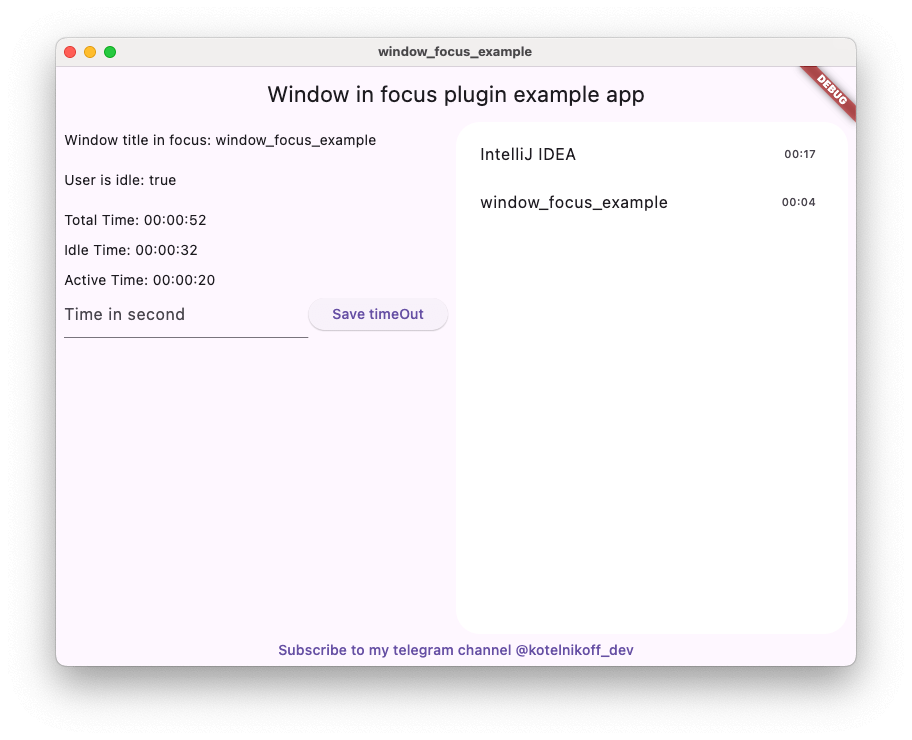
Window Focus é um plugin conveniente para o Flutter que permite rastrear a inatividade do usuário e obter informações sobre o título da janela ativa no Mac OS e no Windows.
Orientação gerada a partir de informações públicas. Apenas para referência.
Window Focus é um plugin Flutter que permite rastrear a inatividade do usuário e recuperar o título da janela ativa no macOS e no Windows. Ele fornece aos desenvolvedores insights sobre o comportamento do usuário ao monitorar qual aplicativo ou janela está atualmente em foco. O plugin é especialmente útil para ferramentas de produtividade, aplicativos de rastreamento de tempo e aplicações que exigem consciência do contexto do usuário em plataformas desktop. Ele suporta macOS, Windows e Linux, tornando-o adequado para desenvolvimento multiplataforma desktop. O pacote se integra perfeitamente ao ecossistema Flutter por meio do pub.
Casos de uso
Aplicativos de rastreamento de tempo
Ferramentas de produtividade e foco
Monitoramento de atividade do usuário
Aplicativos desktop multiplataforma
Aplicativos conscientes de contexto
Principais recursos
Rastrear título da janela ativa
Monitora a inatividade do usuário
Suporta macOS, Windows e Linux
Leve e fácil de integrar
Fornece atualizações em tempo real do estado da janela
Indicado para
Desenvolvedores de aplicativos para desktop
Criadores de ferramentas de produtividade
software de gerenciamento de tempo
Aplicações que precisam de conscientização do contexto do usuário
Projetos de desktop multiplataforma
Considerações
Requer permissões específicas da plataforma em alguns sistemas
Limitado a macOS, Windows e Linux
Pode exigir configuração adicional no Linux
Não disponível para plataformas móveis
Depende de APIs nativas do sistema para funcionalidade
README original
Snapshot do README original do repositório-fonte vinculado. Consulte o repositório para o conteúdo mais recente.
Window Focus is a Flutter plugin that allows you to track user activity and focus on the active window for Windows and macOS platforms. The plugin provides features such as detecting user inactivity, identifying the active application, and enabling debug mode for enhanced logging.
Key Features:
User Inactivity Tracking:
The plugin enables you to detect periods of user inactivity within your Flutter application. You can customize the inactivity threshold and handle inactivity events according to your needs.
Active Window Title Retrieval:
Provides the ability to retrieve the title of the active window of the operating system.
Windows: Full window title support.
macOS: Improved detection using CGWindowList. Supports capturing titles for the active process. Requires Screen Recording permission for accurate window titles.
Debug Mode
Enable detailed logs for troubleshooting during development.
Set Custom Idle Threshold
Define the timeout period after which the user is considered inactive.
Screenshot Capture
Capture the entire screen or just the active window. This is useful for time tracking applications.
Plugin Installation
Windows
No action required.
Mac OS
Setup for window focus tracking
You need to add the following code to the Info.plist file for MacOS:
To use the screenshot functionality on macOS 10.15+, you must request screen recording permission. You can check the permission status using checkScreenRecordingPermission() and request it using requestScreenRecordingPermission().
The user must manually enable this in:
System Preferences > Security & Privacy > Privacy > Screen Recording
Setup for Global Keyboard Tracking (macOS)
To track keyboard activity globally (outside the app) on macOS, the application requires Accessibility permissions.
Crucial: Without these permissions, the plugin will only detect mouse movements and clicks outside the app, but keyboard events will be ignored for security reasons.
The user must manually enable this in:
System Preferences > Security & Privacy > Privacy > Accessibility
(Or System Settings > Privacy & Security > Accessibility on macOS Ventura and newer).
Plugin Usage
Import the plugin:
import'package:window_focus/window_focus.dart';
Example
voidmain() {
final windowFocus = WindowFocus(debug: true, duration: Duration(seconds: 10));
// Add focus change listener
windowFocus.addFocusChangeListener((appWindow) {
print('Active window: ${appWindow.appName}, Title: ${appWindow.windowTitle}');
});
// Add user activity listener
windowFocus.addUserActiveListener((isActive) {
  if (isActive) {
    print('User is active');
  } else {
    print('User is inactive');
  }
});
}