
 v1.0.0+1
cosmos_epub
功能豐富的 Flutter EPUB 閱讀器套件,支援頁面翻轉動畫、文字強調、連字處理、無限嵌套章節、圖像支援、從右到左語言、可自訂主題與字型。
46喜歡 31近 30 天下載120Pub 分數
AndroidiOS
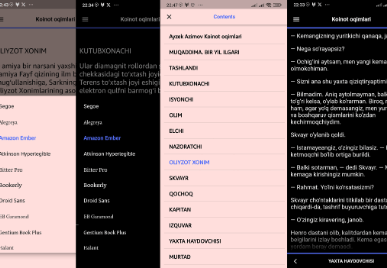
具有優秀使用者介面、容易自訂與精彩功能的 EPUB 閱讀器套件

{"sdk":"flutter"}^4.0.0^0.15.4^1.1.0^3.3.2^3.3.2^2.1.1^2.1.3^5.9.0^2.2.3^4.1.1^1.0.1^8.2.5{"sdk":"flutter"}^2.0.0^3.3.2^2.4.9以下為英文專案原文快照,最新內容請造訪 GitHub。
A feature-rich EPUB reader package for Flutter with page flip animations, text highlighting, hyphenation, infinite nested chapters, image support, RTL languages, customizable themes and fonts.
banner
Add the dependency:
dependencies:
  cosmos_epub: ^1.0.0
flutter pub get
Call initialize() once before using any other method (preferably in main.dart):
void main() async {
  WidgetsFlutterBinding.ensureInitialized();
  await CosmosEpub.initialize();
  runApp(MyApp());
}
// From assets
await CosmosEpub.openAssetBook(
  assetPath: 'assets/book.epub',
  context: context,
  bookId: 'my_book_1',
  accentColor: Colors.indigoAccent,
  onPageFlip: (currentPage, totalPages) {
    print('Page $currentPage of $totalPages');
  },
  onLastPage: (lastPageIndex) {
    print('Reached last page');
  },
);

// From local file
await CosmosEpub.openLocalBook(
  localPath: '/path/to/book.epub',
  context: context,
  bookId: 'my_book_2',
);

// From URL
await CosmosEpub.openURLBook(
  urlPath: 'https://example.com/book.epub',
  context: context,
  bookId: 'my_book_3',
);

// From bytes
await CosmosEpub.openFileBook(
  bytes: myUint8List,
  context: context,
  bookId: 'my_book_4',
);
// Get current progress
BookProgressModel progress = CosmosEpub.getBookProgress('my_book_1');
print('Chapter: ${progress.currentChapterIndex}');
print('Page: ${progress.currentPageIndex}');

// Set progress manually
await CosmosEpub.setCurrentChapterIndex('my_book_1', 5);
await CosmosEpub.setCurrentPageIndex('my_book_1', 3);

// Delete progress
await CosmosEpub.deleteBookProgress('my_book_1');
await CosmosEpub.deleteAllBooksProgress();
// Get all highlights for a book
List<HighlightModel> highlights = CosmosEpub.getBookHighlights('my_book_1');

// Remove a specific highlight
CosmosEpub.removeHighlight(highlights.first.id);

// Remove all highlights for a book
CosmosEpub.removeAllHighlights('my_book_1');
await CosmosEpub.clearThemeCache();
| Parameter | Type | Default | Description |
|---|---|---|---|
assetPath / localPath / urlPath / bytes |
String / Uint8List |
required | EPUB source |
context |
BuildContext |
required | Build context for navigation |
bookId |
String |
required | Unique ID for progress tracking |
accentColor |
Color |
Colors.indigoAccent |
Primary accent color |
onPageFlip |
Function(int, int)? |
null |
Called on page change |
onLastPage |
Function(int)? |
null |
Called on last page |
chapterListTitle |
String |
'Table of Contents' |
TOC screen title |
shouldOpenDrawer |
bool |
false |
Open TOC on start |
starterChapter |
int |
-1 |
Start at specific chapter |
Automatic detection and support for Right-to-Left languages:
No configuration needed — just open the EPUB and the library handles direction, alignment, and navigation automatically.
bookId. Using the same ID for different books will cause progress conflicts.isar_community for progress persistence (Android/iOS/Desktop only, no web support).BSD-3
Feel free to open an issue or reach out: https://allmylinks.com/mamasodikov