A feature-rich EPUB reader package for Flutter with page flip animations, text highlighting, hyphenation, infinite nested chapters, image support, RTL languages, customizable themes and fonts.
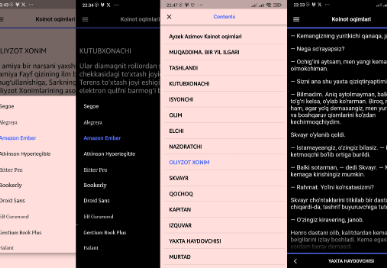
Showcase
Features
Text Highlighting — select text, pick a color (6 options), highlights persist across sessions. Re-highlight to change color. Copy & Select All support.
Hyphenation — syllable-aware word breaking for better justified text. Visible "-" at line breaks. Respects Uzbek digraphs (ch, sh, g', o').
Infinite Nested Chapters — recursive TOC with unlimited depth. Section title pages auto-generated.
// From assetsawaitCosmosEpub.openAssetBook(
assetPath: 'assets/book.epub',
context: context,
bookId: 'my_book_1',
accentColor: Colors.indigoAccent,
onPageFlip: (currentPage, totalPages) {
print('Page $currentPage of $totalPages');
},
onLastPage: (lastPageIndex) {
print('Reached last page');
},
);
// From local fileawaitCosmosEpub.openLocalBook(
localPath: '/path/to/book.epub',
context: context,
bookId: 'my_book_2',
);
// From URLawaitCosmosEpub.openURLBook(
urlPath: 'https://example.com/book.epub',
context: context,
bookId: 'my_book_3',
);
// From bytesawaitCosmosEpub.openFileBook(
bytes: myUint8List,
context: context,
bookId: 'my_book_4',
);
Progress Management
// Get current progressBookProgressModel progress = CosmosEpub.getBookProgress('my_book_1');
print('Chapter: ${progress.currentChapterIndex}');
print('Page: ${progress.currentPageIndex}');
// Set progress manuallyawaitCosmosEpub.setCurrentChapterIndex('my_book_1', 5);
awaitCosmosEpub.setCurrentPageIndex('my_book_1', 3);
// Delete progressawaitCosmosEpub.deleteBookProgress('my_book_1');
awaitCosmosEpub.deleteAllBooksProgress();
Highlight Management
// Get all highlights for a bookList<HighlightModel> highlights = CosmosEpub.getBookHighlights('my_book_1');
// Remove a specific highlightCosmosEpub.removeHighlight(highlights.first.id);
// Remove all highlights for a bookCosmosEpub.removeAllHighlights('my_book_1');
Clear Theme Cache
awaitCosmosEpub.clearThemeCache();
Parameters
Parameter
Type
Default
Description
assetPath / localPath / urlPath / bytes
String / Uint8List
required
EPUB source
context
BuildContext
required
Build context for navigation
bookId
String
required
Unique ID for progress tracking
accentColor
Color
Colors.indigoAccent
Primary accent color
onPageFlip
Function(int, int)?
null
Called on page change
onLastPage
Function(int)?
null
Called on last page
chapterListTitle
String
'Table of Contents'
TOC screen title
shouldOpenDrawer
bool
false
Open TOC on start
starterChapter
int
-1
Start at specific chapter
RTL Language Support 🌍
Automatic detection and support for Right-to-Left languages:
Arabic (العربية), Persian (فارسی), Hebrew (עברית), Urdu (اردو)