GetStorage 是一個完全以 Dart 編寫的輕量級、同步鍵值儲存解決方案,專為跨多個平台實現快速且高效的数据持久化而設計。它提供簡單的 API,可儲存與取得字串、數字、布林值及清單等基本資料類型,無需使用非同步操作。非常適合小型應用狀態管理或快取,可在 Android、iOS、Web、macOS、Windows 與 Linux 上順暢運行。其極小的佔用空間與易用性,使其成為開發者尋求比複雜資料庫更簡便替代方案的理想選擇。
適用情境
儲存使用者偏好
快取小資料集
持久化應用設定
管理會話數據
簡單的本地狀態管理
主要特色
同步操作
輕巧且快速
支援多個平台
易於使用的 API
無外部依賴
適合對象
小型到中型應用
快速原型設計
簡單資料持久化需求
跨平台開發
應用避免複雜的資料庫設定
使用建議
不適用於大型資料集
有限的查詢功能
無內建加密
以純文字形式儲存的資料
僅適用於簡單的鍵值對
原始 README
以下為關聯原始碼儲存庫的 README 原文快照,最新內容請造訪原始碼儲存庫。
get_storage
A fast, extra light and synchronous key-value in memory, which backs up data to disk at each operation.
It is written entirely in Dart and easily integrates with Get framework of Flutter.
Supports Android, iOS, Web, Mac, Linux, and fuchsia and Windows**.
Can store String, int, double, Map and List
If you subscribe to events, be sure to dispose them when using:
disposeListen?.call();
To listen changes on key you can use listenKey:
box.listenKey('key', (value){
  print('new key is $value');
});
To erase your container:
box.erase();
If you want to create different containers, simply give it a name. You can listen to specific containers, and also delete them.
GetStorage g = GetStorage('MyStorage');
To initialize specific container:
awaitGetStorage.init('MyStorage');
SharedPreferences Implementation
classMyPref{
staticfinal _otherBox = () => GetStorage('MyPref');
final username = ''.val('username');
final age = 0.val('age');
final price = 1000.val('price', getBox: _otherBox);
// orfinal username2 = ReadWriteValue('username', '');
final age2 = ReadWriteValue('age', 0);
final price2 = ReadWriteValue('price', '', _otherBox);
}
...
voidupdateAge() {
final age = 0.val('age');
// or final age = ReadWriteValue('age', 0, () => box);
// or final age = Get.find<MyPref>().age;
age.val = 1; // will save to boxfinal realAge = age.val; // will read from box
}
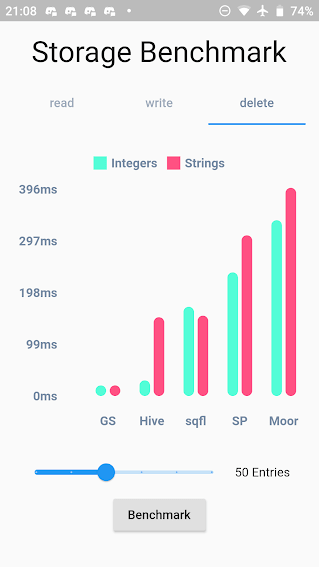
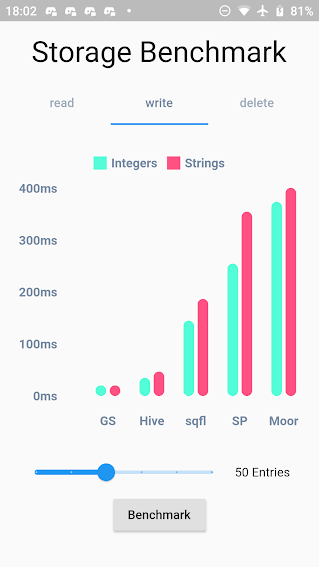
Benchmark Result:
GetStorage is not fast, it is absurdly fast for being memory-based. All of his operations are instantaneous. A backup of each operation is placed in a Container on the disk. Each container has its own file.
What GetStorage is:
Persistent key/value storage for Android, iOS, Web, Linux, Mac and Fuchsia and Windows, that combines fast memory access with persistent storage.
What GetStorage is NOT:
A database. Get is super compact to offer you a solution ultra-light, high-speed read/write storage to work synchronously. If you want to store data persistently on disk with immediate memory access, use it, if you want a database, with indexing and specific disk storage tools, there are incredible solutions that are already available, like Hive and Sqflite/Moor.
As soon as you declare "write" the file is immediately written in memory and can now be accessed immediately with box.read(). You can also wait for the callback that it was written to disk using await box.write().
When to use GetStorage:
simple Maps storage.
cache of http requests
storage of simple user information.
simple and persistent state storage
any situation you currently use sharedPreferences.
When not to use GetStorage:
you need indexes.
when you need to always check if the file was written to the storage disk before starting another operation (storage in memory is done instantly and can be read instantly with box.read(), and the backup to disk is done in the background. To make sure the backup is complete, you can use await, but if you need to call await all the time, it makes no sense you are using memory storage).
You can use this lib even as a modest persistent state manager using Getx SimpleBuilder