v6.1.5+1
provider
一個包裝 InheritedWidget 的工具,讓它們更容易使用且更具可重複使用性。
1.1萬喜歡 117萬近 30 天下載150Pub 分數
AndroidiOSWebmacOSWindowsLinux
Aves 是一個使用 Flutter 為 Android 構建的相簿與元資料探索應用程式。

以下為英文專案原文快照,最新內容請造訪 GitHub。


Aves is a gallery and metadata explorer app. It is built for Android, with Flutter.





Aves can handle all sorts of images and videos, including your typical JPEGs and MP4s, but also more exotic things like multi-page TIFFs, SVGs, old AVIs and more!
It scans your media collection to identify motion photos, panoramas (aka photo spheres), 360° videos, as well as GeoTIFF files.
Navigation and search is an important part of Aves. The goal is for users to easily flow from albums to photos to tags to maps, etc.
Aves integrates with Android (including Android TV) with features such as widgets, app shortcuts, screen saver and global search handling. It also works as a media viewer and picker.


The list of changes for past and future releases is available here.
| Permission | Purpose |
|---|---|
| READ_MEDIA_IMAGES READ_MEDIA_VIDEO READ_MEDIA_VISUAL_USER_SELECTED ACCESS_MEDIA_LOCATION |
Media collection read access |
| MANAGE_MEDIA | Media collection write access |
| FOREGROUND_SERVICE FOREGROUND_SERVICE_MEDIA_PROCESSING POST_NOTIFICATIONS ACCESS_NETWORK_STATE ACCESS_WIFI_STATE RECEIVE_BOOT_COMPLETED |
Media scan service feedback |
| INTERNET | Map view, reverse geocoding |
| SET_WALLPAPER | Wallpaper setting |
| USE_BIOMETRIC USE_FINGERPRINT |
Vault lock |
| WAKE_LOCK | Keeping screen on |
Bug reports and feature requests are welcome, but read the guidelines first. If you have questions, check out the discussions.
At this stage this project does not accept PRs.
Translations are powered by Weblate and the effort of wonderfully generous volunteers.
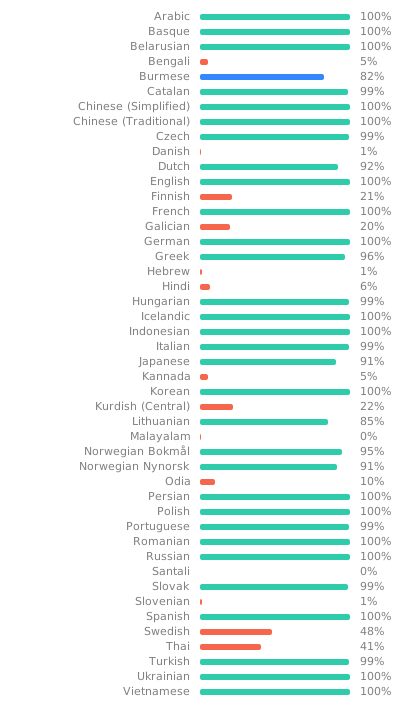
If you want to translate this app in your language and share the result, there is a guide.
Some users have expressed the wish to financially support the project. Thanks! ❤️


Before running or building the app, update the dependencies for the desired flavor:
# scripts/apply_flavor_play.sh
To build the project, create a file named <app dir>/android/key.properties. It should contain a reference to a keystore for app signing, and other necessary credentials. See key_template.properties for the expected keys.
To run the app:
# ./flutterw run -t lib/main_play.dart --flavor play
To debug the app Kotlin code, if attaching the debugger from Android Studio fails:
android folder in Android Studio,Edit Configurations...,app,DebuggerLLDB Post Attach Commandsprocess handle SIGSEGV --pass true --stop false --notify true
Owner: CN=Thibault Deckers
Issuer: CN=Thibault Deckers
Serial number: 12957861
Valid from: Wed Dec 07 08:07:30 CET 2016 until: Sun Dec 01 08:07:30 CET 2041
Certificate fingerprints:
         SHA1: 59:A5:00:13:FA:7A:2F:97:91:1B:52:D6:81:CA:FA:EB:F8:35:05:E8
         SHA256: F4:79:47:27:E4:54:16:D8:7C:48:71:38:29:2B:70:9F:11:D1:CD:7D:AB:55:84:D8:C6:85:7D:92:E0:66:60:4B
SHA1:
59:A5:00:13:FA:7A:2F:97:91:1B:52:D6:81:CA:FA:EB:F8:35:05:E8
SHA256:
F4:79:47:27:E4:54:16:D8:7C:48:71:38:29:2B:70:9F:11:D1:CD:7D:AB:55:84:D8:C6:85:7D:92:E0:66:60:4B
一個包裝 InheritedWidget 的工具,讓它們更容易使用且更具可重複使用性。
推薦用於 Flutter 應用程式、套件和外掛的程式碼檢查規則,以促進良好的程式設計習慣。
Flutter 插件,允許透過生物識別、密碼、PIN 碼或圖案進行本機驗證。
用於讀取和寫入簡單鍵值對的 Flutter 插件。在 iOS 上封裝了 NSUserDefaults,在 Android 上封裝了 SharedPreferences。
Flutter 插件用於 SQLite,一個自我包含、高可靠性、嵌入式 SQL 資料庫引擎。
Flutter 的首選非商業地圖客戶端:易於使用、多功能、無供應商依賴、完全跨平台,且 100% 純 Flutter
Flutter 的權限外掛。此外掛提供跨平台(iOS、Android)API,用於請求和檢查權限。
為 Material Design 3 色彩系統提供支援的演算法與實用工具,包含從影像中選擇主題色彩以及建立色彩的色調;全部都在新的色彩空間中實現。
用於在 Android 和 iOS 上發現網路(Wi-Fi 與行動/蜂巢)連線狀態的 Flutter 外掛程式。
Flutter 插件,提供有關裝置(品牌、型號等)的詳細資訊,以及應用程式正在執行的 Android 或 iOS 版本。
用於發現網路資訊(例如 WiFi 詳細資料)的 Flutter 插件。
Flutter 插件,用於查詢應用程式套件的資訊,例如 iOS 上的 CFBundleVersion 或 Android 上的 versionCode。
依賴清單 81 項
{"sdk":"flutter"}{"sdk":"flutter"}{"path":"plugins/aves_magnifier"}{"path":"plugins/aves_map"}{"path":"plugins/aves_model"}{"path":"plugins/aves_report"}{"path":"plugins/aves_report_crashlytics"}{"path":"plugins/aves_screen_state"}{"path":"plugins/aves_services"}{"path":"plugins/aves_services_google"}{"path":"plugins/aves_video"}{"path":"plugins/aves_video_mpv"}{"path":"plugins/aves_ui"}{"path":"plugins/aves_utils"}—{"git":{"url":"https://github.com/deckerst/flutter_community_charts.git","ref":"aves","path":"community_charts_flutter"}}—————————{"git":{"url":"https://github.com/deckerst/expansion_tile_card.git"}}—{"git":{"url":"https://github.com/deckerst/floating.git","ref":"agp9"}}———{"git":{"url":"https://github.com/deckerst/flutter_localizations_plus.git"}}——{"git":{"url":"https://github.com/deckerst/flutter_staggered_animations","ref":"aves"}}——————————————{"git":{"url":"https://github.com/deckerst/overlay_support.git","ref":"aves"}}—{"git":{"url":"https://github.com/deckerst/aves_panorama.git","ref":"aves"}}———{"git":{"url":"https://github.com/deckerst/flutter_percent_indicator.git","ref":"aves"}}————————————{"git":{"url":"https://github.com/deckerst/aves_streams_channel.git"}}——^9.0.0-beta————{"sdk":"flutter"}{"sdk":"flutter"}———先依使用情境篩選,再比較專案活躍情況,最後到原始儲存庫確認使用要求。
“A repository is the most basic element of GitHub.”
GitHub Docs — About repositories ↗