搜尋套件、儲存庫與 APP 分類

animated_fab_button_menu 封面
套件詳情v0.0.2

animated_fab_button_menu

用於實現帶可滾動菜單的動畫浮動按鈕的 Flutter 套件。

AndroidiOSWebmacOSWindowsLinux
近 30 天下載
61
喜歡數
27
Pub 分數
150

安裝套件

flutter pub add animated_fab_button_menu

套件介紹

根據套件公開資料產生的選型評估,僅供參考。

一個 Flutter 套件,可建立具有可捲動選單的動畫浮動操作按鈕(FAB)。它透過將 FAB 平滑展開為可自訂選單來增強使用者互動,非常適合需要直覺存取多個動作之應用程式。選單支援捲動,適用於超過螢幕空間的選項清單。專為現代 UI 設計,可在跨平台環境中無縫整合並保持一致行為。

適用情境

  • 增強移動應用導航
  • 建立互動式操作中心
  • 提高對多個功能的存取性
  • 設計響應式介面
  • 為浮動操作按鈕添加動態過渡效果

主要特色

  • 平滑的動畫展開
  • 可捲動選單支援
  • 跨平台相容性
  • 可自定義的選單項目
  • 響應式設計整合

適合對象

  • 行動應用程式開發者
  • UI/UX 設計師
  • 互動式原型建構工具
  • Flutter 初學者
  • 具有複雜操作工作流程的應用程式

使用建議

  • 可能需要額外的樣式來實現自訂
  • 大型菜單的性能影響
  • 僅限基於 FAB 的互動
  • 不適用於不可滾動的操作集
  • 依賴於平台特定的觸控手勢處理

原始 README

以下為關聯原始碼儲存庫的 README 原文快照,最新內容請造訪原始碼儲存庫。

Animated FAB Menu

Animated FAB Menu package lets you add an animated floating action button to your Flutter app that open a list of menu items.

Features

The FabMenu widget is built to be placed in the Scaffold.floatingActionButton argument, replacing the FloatingActionButton widget. Its position is set by the fabAlignment property so you don't need to set it with the Scaffold.floatingActionButtonLocation argument. By default the position is set to bottomCenter, but you can change it by the fabAlignment property to place the button anywhere in the screen. By using the fabIcon and fabBackgroundColorproperties, you can change the icon and the color of the button to whatever you like.

  • Menu

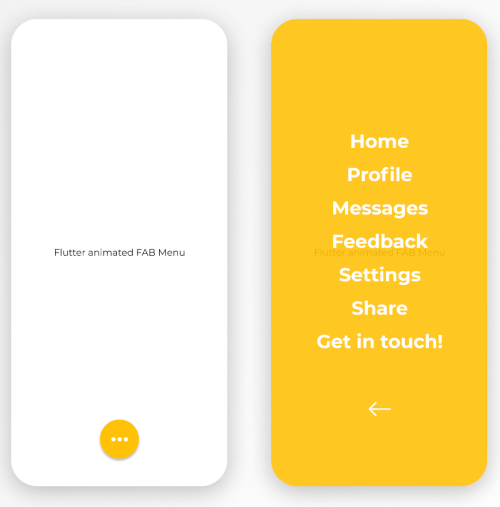
By pressing the floating action button, a page containing a menu list will be opening with some cool animation. This menu contains items that you can specify by the children list property. Every child inside the list takes a title for the item name, style for the text widget of the name, onTap function to provide the logic of the on tap action on each child. On top of that, you have an overlayColor property to change the color of the background opened page, overlayOpacity to change the opacity of the background color and closeMenuButton to choose your own back button widget.

The package will handle the animation by itself.

animated_fab_menu


Getting started

  1. Add the latest version of package to your pubspec.yaml (and run dart pub get):
dependencies:
  animated_fab_button_menu: ^0.0.2
  1. Import the package and use it in your Flutter App.
import 'package:animated_fab_button_menu/animated_fab_button_menu.dart';

Usage

There are a number of properties that you can modify:

  • fabIcon
  • fabBackgroundColor
  • fabAlignment
  • overlayColor (Color of the background menu)
  • overlayOpacity (Opacity of the background menu color)
  • elevation
  • closeMenuButton (Button that close the menu item)
  • children (Items of the menu)
  • title (Name of the child menu)
  • style (Text style for the child menu)
  • onTap (onTap function for the child menu)

Example Usage ( complete with all params ):

class MyHomePage extends StatefulWidget {
  const MyHomePage({Key? key}) : super(key: key);

  @override
  _MyHomePageState createState() => _MyHomePageState();
}

class _MyHomePageState extends State<MyHomePage> {
  @override
  Widget build(BuildContext context) {
    return Scaffold(
      floatingActionButton: FabMenu(
          fabBackgroundColor: Colors.amber,
          elevation: 2.0,
          fabAlignment: Alignment.bottomCenter,
          fabIcon: const Icon(Icons.more_horiz),
          closeMenuButton: const Icon(
            Icons.arrow_back,
            color: Colors.white,
          ),
          overlayOpacity: 0.5,
          overlayColor: Colors.amber,
          children: [
            MenuItem(
              title: 'Home',
              onTap: () {},
              style: const TextStyle(
                  color: Colors.white,
                  fontSize: 24,
                  fontWeight: FontWeight.bold),
            ),
            MenuItem(
              title: 'Profile',
              onTap: () {},
              style: const TextStyle(
                  color: Colors.white,
                  fontSize: 24,
                  fontWeight: FontWeight.bold),
            ),
            MenuItem(
              title: 'Messages',
              onTap: () {},
              style: const TextStyle(
                  color: Colors.white,
                  fontSize: 24,
                  fontWeight: FontWeight.bold),
            ),
            MenuItem(
              title: 'Feedback',
              onTap: () {},
              style: const TextStyle(
                  color: Colors.white,
                  fontSize: 24,
                  fontWeight: FontWeight.bold),
            ),
            MenuItem(
              title: 'Settings',
              onTap: () {},
              style: const TextStyle(
                  color: Colors.white,
                  fontSize: 24,
                  fontWeight: FontWeight.bold),
            ),
            MenuItem(
              title: 'Share',
              onTap: () {},
              style: const TextStyle(
                  color: Colors.white,
                  fontSize: 24,
                  fontWeight: FontWeight.bold),
            ),
            MenuItem(
              title: 'Get in touch!',
              onTap: () {},
              style: const TextStyle(
                  color: Colors.white,
                  fontSize: 24,
                  fontWeight: FontWeight.bold),
            ),
          ]),
      body: const Center(
        child: Text('Flutter animated FAB Menu'),
      ),
    );
  }
}
Here's what it looks like:

https://user-images.githubusercontent.com/68671238/134640734-751456fa-686b-4e77-bc8d-04ba3a324baf.mp4


Next Goals

We are working on some improvements including:

  • [x] Change color and opacity for menu background. Change color and opacity by specifying overlayColor and overlayOpacity properties.
  • [ ] Make the distance between menu items customizable.
  • [ ] Change opening animation with more smooth and user friendly one.

Issues & Feedback

Please file an issue! to send feedback or report a bug. Thank you!

所屬分類

原始碼儲存庫

使用此套件的專案

暫無相關資料。