搜尋套件、儲存庫與 APP 分類

animated_toast_list 封面
套件詳情v2.0.0

animated_toast_list

任何使用此套件的人將會感覺更自由。因為這個套件是通用的,您可以創建您想要的提示。

AndroidiOSWebmacOSWindowsLinux
近 30 天下載
940
喜歡數
30
Pub 分數
160

安裝套件

flutter pub add animated_toast_list

套件介紹

根據套件公開資料產生的選型評估,僅供參考。

AnimatedToastList 是一個 Flutter 套件,讓開發者能輕鬆建立可自訂的動畫彈出訊息。此套件設計為通用且靈活,允許使用者定義自己的彈出訊息外觀與行為,非常適合需要獨特通知樣式的應用程式。該套件支援 Android、iOS、Web、macOS、Windows 與 Linux 多個平台,確保跨裝置提供一致的使用者體驗。透過順暢的動畫與僅需單一指令即可整合的簡便方式,它在不增加複雜度的情況下提升應用程式的回饋效果。

適用情境

  • 自訂應用內通知
  • 用戶在操作後的反饋
  • 互動式使用者介面元素
  • 跨平台通知顯示
  • 即時狀態更新

主要特色

  • 高度可定制的吐司設計
  • 流暢的動畫效果
  • 多平台支援
  • 與 Flutter 的簡單整合
  • 適用於任何吐司樣式的通用範本

適合對象

  • 尋求獨特吐司設計的開發者
  • 需要跨平台通知的應用
  • 強調使用者體驗的專案
  • UI密集型應用
  • 希望擁有可重複使用通知組件的團隊

使用建議

  • 需要自定樣式知識
  • 可能需要對複雜動畫進行效能調校
  • 有限的內建主題
  • 最適合頻繁使用者互動的應用程式
  • 依賴於動態通知的正確狀態管理

原始 README

以下為關聯原始碼儲存庫的 README 原文快照,最新內容請造訪原始碼儲存庫。

Introduction

When using Flutter, did you ever want to show toast with the design you want? Also, did you want to list the toast and show it with the desired animation? Then you have found what you are looking for! This package is generic, so there will be no problem with your toast. This package supports all platforms.

Usage

To use this package, wrap any widget with ToastListOverlay, as in the example below. For more details, see the example.

Widget build(BuildContext context) {
    return ToastListOverlay<MyToastModel>(
      itemBuilder: (BuildContext context, MyToastModel item, int index,
          Animation<double> animation) {
        return ToastItem(
          animation: animation,
          item: item,
          onTap: () => context.hideToast(
              item,
              (context, animation) =>
                  _buildItem(context, item, index, animation)),
        );
      },
      child: MaterialApp(
        theme: ThemeData(
          primarySwatch: Colors.blue,
        ),
        home: const MainScreen(),
        debugShowCheckedModeBanner: false,
      ),
    );
  }
Property Default value Description
child Required Widget Wrapped widget
position Alignment.topCenter Specifies where toast to be displayed.
reverse false Reverse the Toast list.
limit 5 Specify how much toast to display.
itemBuilder Required ToastListItemBuilder The Toast widget is defined here.
width 375 Specifies the width of the toast.
timeoutDuration 5 seconds Specifies how long toast will be displayed.

Now you can call the context.showToast method to display your toast. You can see more details in the example.

  context.showToast(MyToastModel(ToastType.success.name, ToastType.success));

Note: MyToastModel is an example model.

To close the Toast, call the context.hideToast method.

context.hideToast(
  item,
  (context, animation) => ToastItem(
    animation: animation,
    item: item,
  ),
);

Live demo

Example

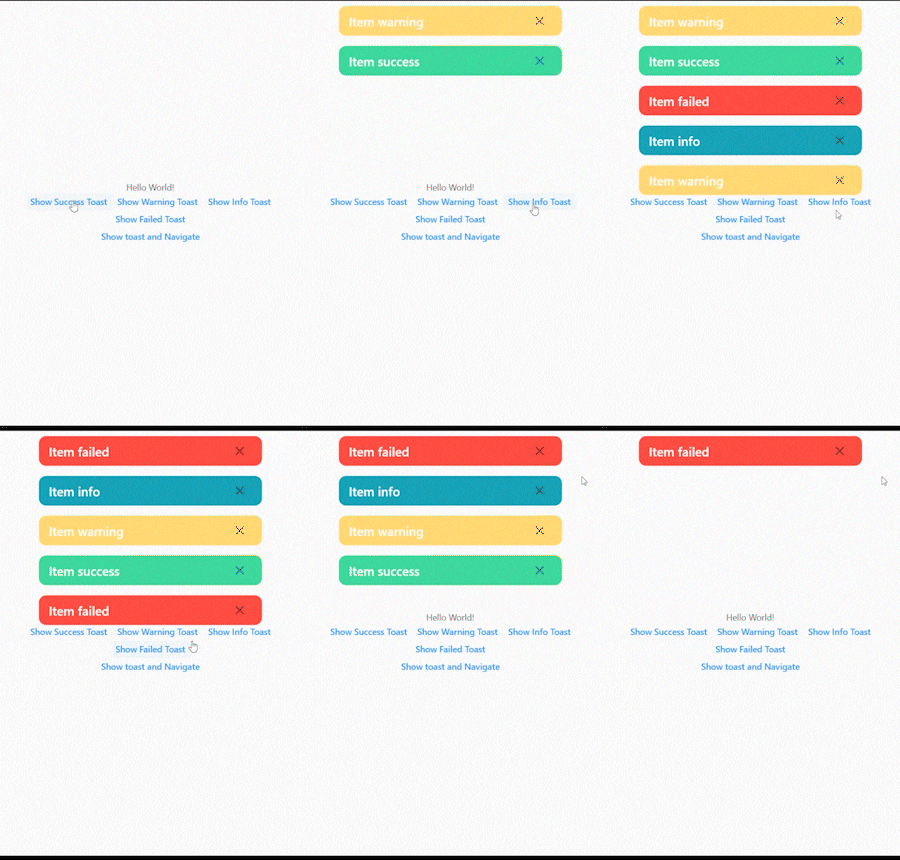
The figure below shows when the toast exceeds the limit.
2022-06-11_01-25-41_AdobeExpress

The figure below shows how to remove the toast by clicking the close button.
2022-06-11_01-25-41_AdobeExpress (1)

In the figure below, you can see the toast without any problems even if you navigate to another screen.
2022-06-11_01-25-41_AdobeExpress (2)

The figure below shows the toast list reversed.
2022-06-11_01-39-18_AdobeExpress

所屬分類

原始碼儲存庫

使用此套件的專案

暫無相關資料。