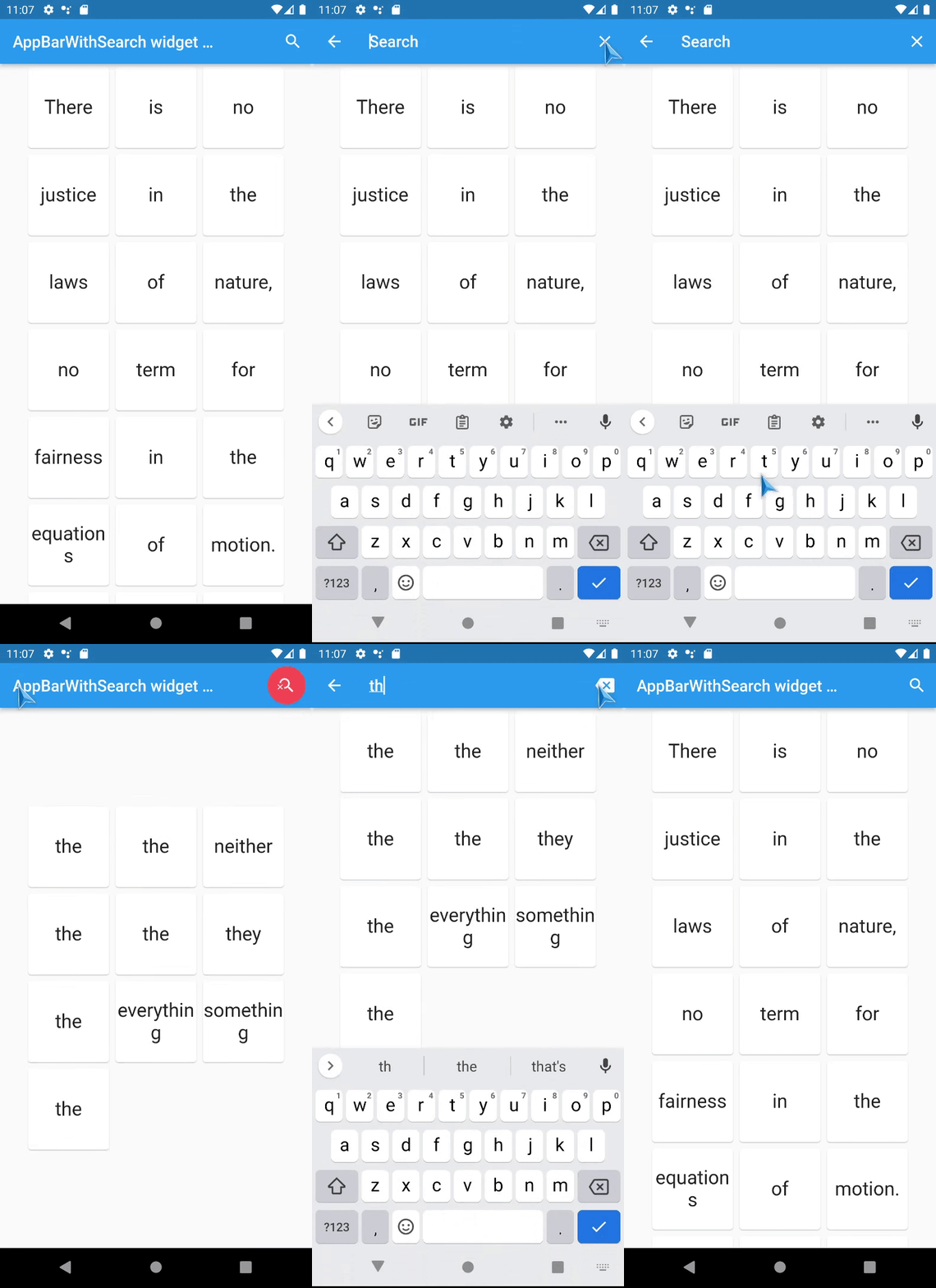
AppBar with search switch
Content
Intro
An AppBar that can switch into search field.
The AppBarWithSearchSwitch
is a replacement class for AppBar , essentially, it returns
two different app bars based on whether search is active.
Note: version 1.5+ is lightweight version of this package, version 2.0+ uses SpeechToText
package for speech recognition.
This is complete rewrite of flutter_search_bar with support of these features:
Features
support Stateless widgets! ,work with ValueNotifier inside, which can be
used directly or can easily work with any providers,
full customization,
it works in place(no Navigation shenanigans),
don't need additional variables somewhere,
support custom animation (and have nice prebuilt animations: AppBarAnimationSlideDown and AppBarAnimationSlideLeft ) (new in v1.5+ ),
Also, there are a few helpers(optional) :
Quick overview
Use appBarBuilder
parameter to build default AppBar with:
The appBarBuilder
is the only required parameter , all other parameters are optional!
Use one of these callbacks to get text from TextField :
Also, there are callbacks for:
This widget support almost all AppBar ,
but:
leading
and title
properties are now expect - Widget Function(context)?:
this is made in order to access AppBarWithSearchSwitch.of(context) methods in them,
don't change them unless it necessary and use templates if you need to change these properties.
preferredSize here is a method, you should set it
via toolbarWidth
and toolbarHeight .
Here is a list of all other new properties(without mentioned above) with their default values:
this.tooltipForClearButton = 'Clear',
this.tooltipForCloseButton = 'Close search',
this.fieldHintText = 'Search',
this.closeSearchIcon = Icons.close,
this.clearSearchIcon = Icons.backspace,
this.keepAppBarColors = true,
this.closeOnSubmit = true,
this.clearOnSubmit = false,
this.clearOnClose = false,
this.showClearButton = true,
this.closeOnClearTwice = true,
this.submitOnClearTwice = true,
this.keyboardType = TextInputType.text,
this.toolbarWidth = double.infinity,
// Style
this.searchInputDecoration ,
this.theme ,
this.titleTextStyle ,
this.animation - (new in 1.5+ ),
// And optional ValueNotifier s
(can be used to control state of AppBarWithSearchSwitch ):
this.customIsSearchModeNotifier ,
this.customTextNotifier ,
// And optional ValueNotifier s (read only):
this.customHasText ,
this.customSubmitNotifier ,
// And optional TextEditingController :
this.customTextEditingController ,
Examples
Online example here: https://alexqwesa.github.io/app_bar_with_search_switch/ .
Full example of Stateful widget is here: https://pub.dev/packages/app_bar_with_search_switch/example .
Full example of Stateless widget is here: (github) .
Full example of Stateless widget with 10000 elements searched in place and with search button outside of app bar is
here: (github) .
Full example of Stateless widget there android back button will close search is here: (github) .
And the fragment of example code is here:
@override
Widget build (BuildContext context) {
return Scaffold (
appBar: AppBarWithSearchSwitch (
onChanged: (text) {
},
appBarBuilder: (context) {
return AppBar (
title: Text ('Example ' ),
actions: [
AppBarSearchButton (),
],
);
},
),
body: AppBarOnEditListener (builder: (context) { return ;} ),
);
}
Screenshots
TODO
[x] Add speech to text support - done in version 2.0+,
[x] Animation for Search app bar activation - done in versions 1.5+
[ ] don't use shared default ValueNotifier and TextEditingController ?
FAQ
How to activate search field (isSearchMode=true)
of AppBarWithSearchSwitch
from somewhere far away?
If it is inside the same Scaffold or its children, then:
use AppBarWithSearchFinder ,
call AppBarWithSearchFinder.of(context)?.triggerSearch() inside.
If it is outside of Scaffold ,
use customIsSearchModeNotifier ,
Initialise variable of type ValueNotifier somewhere up in the widget tree,
Set customIsSearchModeNotifier property of AppBarWithSearchSwitch with this variable,
Set value of this ValueNotifier to true to show Search AppBar,
(Note: currently, if you stop search via this variable(by setting it false), clearOnClose will not work, and callBack onClose will not be called), so use GlobalKey if you need them.
How to make android back button close search? (instead of going to previous screen or exit app)
Initialise variable searchText and isSearchMode of type ValueNotifier somewhere up in the widget tree,
Assign these variables to customIsSearchModeNotifier ,
customTextNotifier ,
Wrap WillPopScope widget over Scaffold ,
and define parameter onWillPop as in example below:
...
final isSearchMode = ValueNotifier <bool >(false );
final searchText = ValueNotifier <String >('' );
@override
Widget build (BuildContext context) {
return WillPopScope (
onWillPop: () async {
if (searchText.value != '' ) {
isSearchMode.value = false ;
searchText.value = '' ;
return false ;
}
return true ;
},
child: Scaffold (
appBar: AppBarWithSearchSwitch (
customIsSearchModeNotifier: isSearchMode,
customTextNotifier: searchText,
appBarBuilder: (context) {
return AppBar (
...
How to add autocompletion to search field?
...
@override
Widget build (BuildContext context) {
return Scaffold (
appBar: AppBarWithSearchSwitch (
title: (context) {
return Autocomplete <String >(
optionsBuilder: (TextEditingValue textEditingValue) {
},
);
}
appBarBuilder: (context) {
return AppBar (
...
Can it be used with old flutter sdk versions?
The release 1.3.5 is a special release with support of old flutter sdk, it tested with flutter 2.10.0
Known issues