import'package:arabic_font/arabic_font.dart';
Text(
'تجربة الخط',
/// Add ArabicTextStyle in style of text
style: ArabicTextStyle(
/// Select The type of font by useing ArabicFont
arabicFont: ArabicFont.dubai,
/// you can use any Parameters of TextStyle /// EX: fontSize:
fontSize:25
),
);
To Change the font in the entire application:
import'package:arabic_font/arabic_font.dart';
ThemeData(
///Add this Class in your ThemeData after fontFamily
fontFamily: ArabicThemeData.font(
/// Select The type of font
arabicFont: ArabicFont.dinNextLTArabic
),
///Add this Class in your ThemeData after package
package: ArabicThemeData.package,
),
Note:
If The Font doesn't Change , just stop the project and run it again
Parameters of the ArabicTextStyle:
/// Use ArabicFont then select type of font/// EX: ArabicFont.dubaifinalString arabicFont;
/// TextStyle Parametersbool inherit = true,
/// the color of textColor? color,
/// The color to use as the background for the text./// If background is specified, this value must be null. The backgroundColor property is shorthand for background: Paint()..color = backgroundColor./// In merge, apply, and lerp, conflicts between backgroundColor and background specification are resolved in background's favor - i.e. if background is specified in one place, it will dominate color in another.Color? backgroundColor,
///The size of glyphs (in logical pixels) to use when painting the text.///During painting, the fontSize is multiplied by the current textScaleFactor to let users make it easier to read text by increasing its size./// getParagraphStyle will default to 14 logical pixels if the font size isn't specified here.double? fontSize,
/// The typeface thickness to use when painting the text (e.g., bold).FontWeight? fontWeight,
/// The typeface variant to use when drawing the letters (e.g., italics).FontStyle? fontStyle,
/// The amount of space (in logical pixels) to add between each letter./// A negative value can be used to bring the letters closer.double? letterSpacing,
/// The amount of space (in logical pixels) to add at each sequence of/// white-space (i.e. between each word). A negative value can be used to/// bring the words closer.double? wordSpacing,
/// The common baseline that should be aligned between this text span and its/// parent text span, or, for the root text spans, with the line box.TextBaseline? textBaseline,
/// The height of this text span, as a multiple of the font size.////// When [height] is null or omitted, the line height will be determined/// by the font's metrics directly, which may differ from the fontSize./// When [height] is non-null, the line height of the span of text will be a/// multiple of [fontSize] and be exactly `fontSize * height` logical pixels/// tall.////// For most fonts, setting [height] to 1.0 is not the same as omitting or/// setting height to null because the [fontSize] sets the height of the EM-square,/// which is different than the font provided metrics for line height. The/// following diagram illustrates the difference between the font-metrics/// defined line height and the line height produced with `height: 1.0`/// (which forms the upper and lower edges of the EM-square):////// 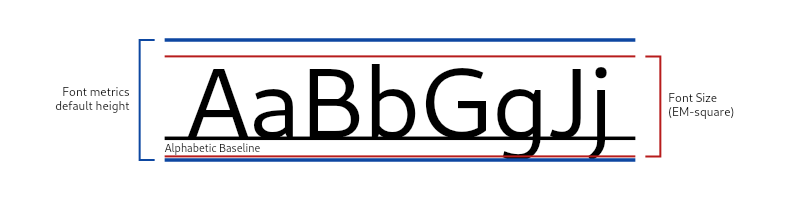////// Examples of the resulting line heights from different values of `TextStyle.height`:////// 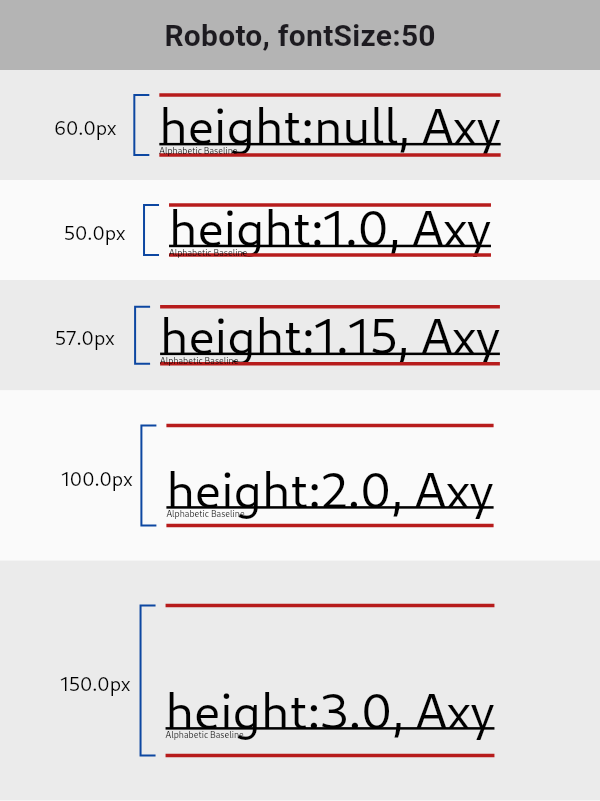////// See [StrutStyle] and [TextHeightBehavior] for further control of line/// height at the paragraph level.double? height,
/// How the vertical space added by the [height] multiplier should be/// distributed over and under the text.////// When a non-null [height] is specified, after accommodating the glyphs of/// the text, the remaining vertical space from the allotted line height will/// be distributed over and under the text, according to the/// [leadingDistribution] property. See the [TextStyle] class's documentation/// for an example.////// When [height] is null, [leadingDistribution] does not affect the text/// layout.////// Defaults to null, which defers to the paragraph's/// `ParagraphStyle.textHeightBehavior`'s [leadingDistribution]./// TextLeadingDistribution? leadingDistribution,
/// The locale used to select region-specific glyphs.////// This property is rarely set. Typically the locale used to select/// region-specific glyphs is defined by the text widget's [BuildContext]/// using `Localizations.localeOf(context)`. For example [RichText] defines/// its locale this way. However, a rich text widget's [TextSpan]s could/// specify text styles with different explicit locales in order to select/// different region-specific glyphs for each text span.Locale? locale,
/// The paint drawn as a foreground for the text.////// The value should ideally be cached and reused each time if multiple text/// styles are created with the same paint settings. Otherwise, each time it/// will appear like the style changed, which will result in unnecessary/// updates all the way through the framework.////// If [color] is specified, this value must be null. The [color] property/// is shorthand for `Paint()..color = color`.////// In [merge], [apply], and [lerp], conflicts between [color] and [foreground]/// specification are resolved in [foreground]'s favor - i.e. if [foreground] is/// specified in one place, it will dominate [color] in another.Paint? foreground,
/// The paint drawn as a background for the text.////// The value should ideally be cached and reused each time if multiple text/// styles are created with the same paint settings. Otherwise, each time it/// will appear like the style changed, which will result in unnecessary/// updates all the way through the framework.////// If [backgroundColor] is specified, this value must be null. The/// [backgroundColor] property is shorthand for/// `background: Paint()..color = backgroundColor`.////// In [merge], [apply], and [lerp], conflicts between [backgroundColor] and/// [background] specification are resolved in [background]'s favor - i.e. if/// [background] is specified in one place, it will dominate [backgroundColor]/// in another.Paint? background,
/// A list of [Shadow]s that will be painted underneath the text.////// Multiple shadows are supported to replicate lighting from multiple light/// sources.////// Shadows must be in the same order for [TextStyle] to be considered as/// equivalent as order produces differing transparency.List<Shadow>? shadows,
List<FontFeature>? fontFeatures,
List<FontVariation>? fontVariations,
/// The decorations to paint near the text (e.g., an underline).////// Multiple decorations can be applied using [TextDecoration.combine].TextDecoration? decoration,
/// The color in which to paint the text decorations.Color? decorationColor,
/// The style in which to paint the text decorations (e.g., dashed).TextDecorationStyle? decorationStyle,
/// The thickness of the decoration stroke as a multiplier of the thickness/// defined by the font.////// The font provides a base stroke width for [decoration]s which scales off/// of the [fontSize]. This property may be used to achieve a thinner or/// thicker decoration stroke, without changing the [fontSize]. For example,/// a [decorationThickness] of 2.0 will draw a decoration twice as thick as/// the font defined decoration thickness.////// {@tool snippet}/// To achieve a bolded strike-through, we can apply a thicker stroke for the/// decoration.////// ```dart/// const Text(/// 'This has a very BOLD strike through!',/// style: TextStyle(/// decoration: TextDecoration.lineThrough,/// decorationThickness: 2.85,/// ),/// )/// ```/// {@end-tool}////// {@tool snippet}/// We can apply a very thin and subtle wavy underline (perhaps, when words/// are misspelled) by using a [decorationThickness] < 1.0.////// ```dart/// const Text(/// 'oopsIforgottousespaces!',/// style: TextStyle(/// decoration: TextDecoration.underline,/// decorationStyle: TextDecorationStyle.wavy,/// decorationColor: Colors.red,/// decorationThickness: 0.5,/// ),/// )/// ```/// {@end-tool}////// The default [decorationThickness] is 1.0, which will use the font's base/// stroke thickness/width.double? decorationThickness,
/// A human-readable description of this text style.////// This property is maintained only in debug builds.////// When merging ([merge]), copying ([copyWith]), modifying using [apply], or/// interpolating ([lerp]), the label of the resulting style is marked with/// the debug labels of the original styles. This helps figuring out where a/// particular text style came from.////// This property is not considered when comparing text styles using `==` or/// [compareTo], and it does not affect [hashCode].String? debugLabel,
/// How visual text overflow should be handled.TextOverflow? overflow,
Parameters of the ArabicThemeApp:
///### Use ArabicFont then select type of font/// EX: ArabicFont.dubaifinalString arabicFont;
staticconstString package='arabic_font';