搜尋套件、儲存庫與 APP 分類

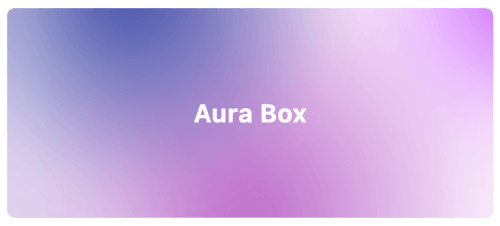
aura_box 封面
套件詳情v1.0.2

aura_box

結合多個徑向漸變與模糊效果的 Flutter 小部件。

AndroidiOSWebmacOSWindowsLinux
近 30 天下載
416
喜歡數
74
Pub 分數
160

安裝套件

flutter pub add aura_box

套件介紹

根據套件公開資料產生的選型評估,僅供參考。

Aura Box 是一個 Flutter widget,透過結合多個徑向漸層與模糊疊加,創造出視覺上令人印象深刻的背景效果。適合現代應用程式介面,能在不造成沉重效能負擔的情況下提升視覺深度與優雅感。此 widget 支援順暢動畫,並可自訂漸層顏色、強度與模糊程度。可在 Android、iOS、Web、macOS、Windows 及 Linux 等所有主要平台運作,非常適合跨平台開發。適用於啟動畫面、登入頁面或沉浸式 UI。

適用情境

  • 啟動畫面
  • 登入與引導畫面
  • 沉浸式儀表板背景
  • 應用主題自定義
  • 動畫使用者介面轉換

主要特色

  • 多個徑向漸變
  • 模糊效果整合
  • 跨平台相容性
  • 可自定義的漸變顏色
  • 平滑動畫支援
  • 輕量級效能

適合對象

  • 注重設計的 Flutter 應用
  • 現代的UI/UX實作
  • 移動和Web應用中的背景增強
  • 尋求視覺精緻的開發者
  • 創意應用原型

使用建議

  • 可能影響低階裝置的效能
  • 需要仔細選擇顏色,以避免視覺混亂
  • 不適合內容密集型版面
  • 最適合用作背景,而非主要內容容器
  • 開箱即用的互動功能有限

原始 README

以下為關聯原始碼儲存庫的 README 原文快照,最新內容請造訪原始碼儲存庫。

Aura Box

style: very good analysis patrol_finders on pub.dev License: MIT

Flutter widget that combines multiple radial gradients and blur effect.

Aura box banner image

Installation

Add this line into the project pubspec.yaml file.

dependencies:
    aura_box: ^1.0.4

Then in your files you can import it:

import 'package:aura_box/aura_box.dart';

Usage

The package exposes two widgets.

  • AuraBox acts as a container which can receive a child, a decoration and a list of AuraSpot.
  • AuraSpot represent the point where the radiant gradients are generated.
AuraBox(
    spots: [
        // Places one blue spot in the center
        AuraSpot(
            color: Colors.blue,
            radius: 100.0,
            alignment: Alignment.center,
            blurRadius: 5.0,
            stops: const [0.0, 0.5],
        ),
        // Places one red spot in the bottom right
        AuraSpot(
            color: Colors.red,
            radius: 150.0,
            alignment: Alignment.bottomRight,
            blurRadius: 10.0,
            stops: const [0.0, 0.7],
        ),
    ],
    decoration: BoxDecoration(
        color: Colors.transparent,
        shape: BoxShape.rectangle,
        borderRadius: BorderRadius.circular(10.0),
    ),
    child: const SizedBox(
        height: 100,
        width: 100,
    ),
)

Alignment

The single spots are positioned inside a stack widget. This gives control over their position using the alignment property.

For further details you can refer to the Alignment class documentation.

Example

An example project is available within the project:

example

所屬分類

原始碼儲存庫

使用此套件的專案