搜尋套件、儲存庫與 APP 分類

套件詳情v0.1.18

auto_app_translate

這是一個可將應用程式翻譯成80種語言並自動設定的函式庫。

AndroidiOSmacOSWindowsLinux
近 30 天下載
123
喜歡數
38
Pub 分數
115

安裝套件

flutter pub add auto_app_translate

套件介紹

根據套件公開資料產生的選型評估,僅供參考。

Auto App Translate 是一個 Flutter/Dart 套件,可將應用程式自動翻譯成 80 種語言,並簡化本地化設定。它透過處理語言檢測、翻譯工作流程與跨平台設定管理,簡化國際化。專為尋求高效多語支援的開發者設計,可無縫整合至 Flutter 項目,並支援 Android、iOS、macOS、Windows 與 Linux。此函式庫可減少管理翻譯的手動工作量,提升應用程式的全球可存取性。

適用情境

  • 多語言應用程式部署
  • 自動化翻譯工作流程
  • 跨平台本地化
  • 即時語言切換
  • 簡化的國際化設定
  • 全球用戶基礎支援

主要特色

  • 支援80種語言
  • 自動化翻譯設定
  • 跨平台相容性
  • 無縫的 Flutter 集成
  • 語言檢測
  • 輕鬆設定

適合對象

  • 開發全球應用的開發者
  • 管理多種語言的團隊
  • 需要快速國際化設定的專案
  • 面向不同地區的應用
  • 新創企業國際化擴張
  • 需要動態語言更新的應用

使用建議

  • 依賴外部翻譯服務
  • 可能需要設定 API 金鑰
  • 翻譯品質取決於來源
  • 不適合高度敏感的內容
  • 有限的離線功能
  • 即時翻譯中的潛在延遲

原始 README

以下為關聯原始碼儲存庫的 README 原文快照,最新內容請造訪原始碼儲存庫。

Auto App Translate

Pub

It is a library that translates apps into 80 languages and automates settings.

"Buy Me A Coffee"

How to Use?

1. Setup the config file
dependencies:
  easy_localization: ^3.0.3
  easy_localization_loader: ^2.0.0
  auto_app_translate:
  
flutter:
  assets:
    - assets/localization.csv
2. Create the asset folder and insert the localization.csv file.


lozalization.csv file download

3. Config easy_localization library. Please refer to the official documentation.
import 'package:auto_app_translate/callable/core_my/my_language_code/entity/flutter_support_language_locale.dart';
import 'package:easy_localization/easy_localization.dart';
import 'package:easy_localization_loader/easy_localization_loader.dart';
import 'package:flutter/material.dart';

void main() async {
  WidgetsFlutterBinding.ensureInitialized();
  await EasyLocalization.ensureInitialized();
  runApp(
    EasyLocalization(
        supportedLocales: flutterLocalizeSupportLanguagesLocale,
        path: 'assets/localization.csv',
        assetLoader: CsvAssetLoader(), // <- important option for translation
        fallbackLocale: const Locale('en', 'US'),
        child: MyApp()
    ),
  );
}

class MyApp extends StatelessWidget {
  @override
  Widget build(BuildContext context) {
    return MaterialApp(
        localizationsDelegates: context.localizationDelegates,
        supportedLocales: context.supportedLocales,
        locale: context.locale,
        home: MyHomePage()
    );
  }
}
4. Fill in the localization file.

Fill in str for the key value and the standard language (start translate language) column.

5. use tr() in your code for localization.

import 'package:easy_localization/easy_localization.dart';

tr('hello world')
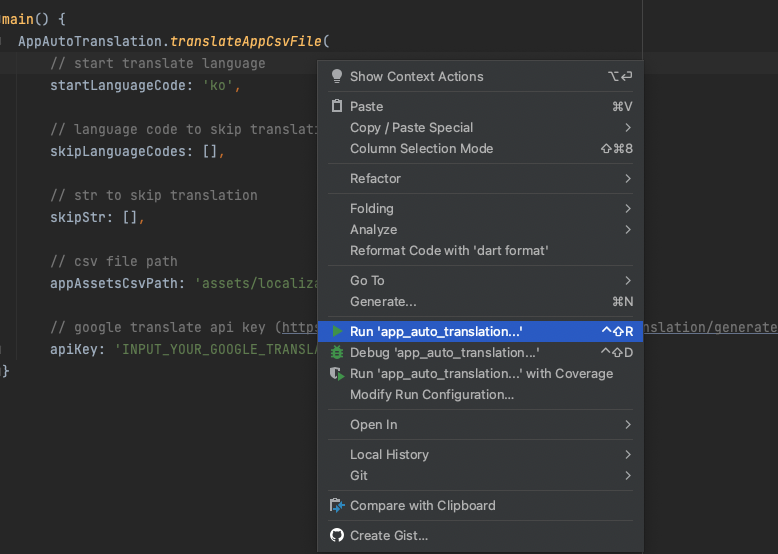
6. Create a dart file in your project and paste the code below.

create auto_translation folder in your project root, and create auto_translation.dart file. and then copy paste code below.

import 'package:auto_app_translate/auto_app_translate.dart';

main() {
  AutoAppTranslate.translateAppCsvFile(
    // start translate language
    startLanguageCode: 'en',
    
    // language code to skip translation
    skipLanguageCodes: [],
    
    // str to skip translation
    skipStr: [],
    
    // csv file path
    appAssetsCsvPath: 'assets/localization.csv',
    
    // google translate api key (https://translatepress.com/docs/automatic-translation/generate-google-api-key/)
    apiKey: 'INPUT_YOUR_GOOGLE_TRANSLATE_API_KEY');
}

It works even if you don't put the Google Translate api key, but you will soon reach the free limit.
For a guide to getting the Google Translate api key, please refer to this document.

7. Run the file. The translation will be completed in the csv file.

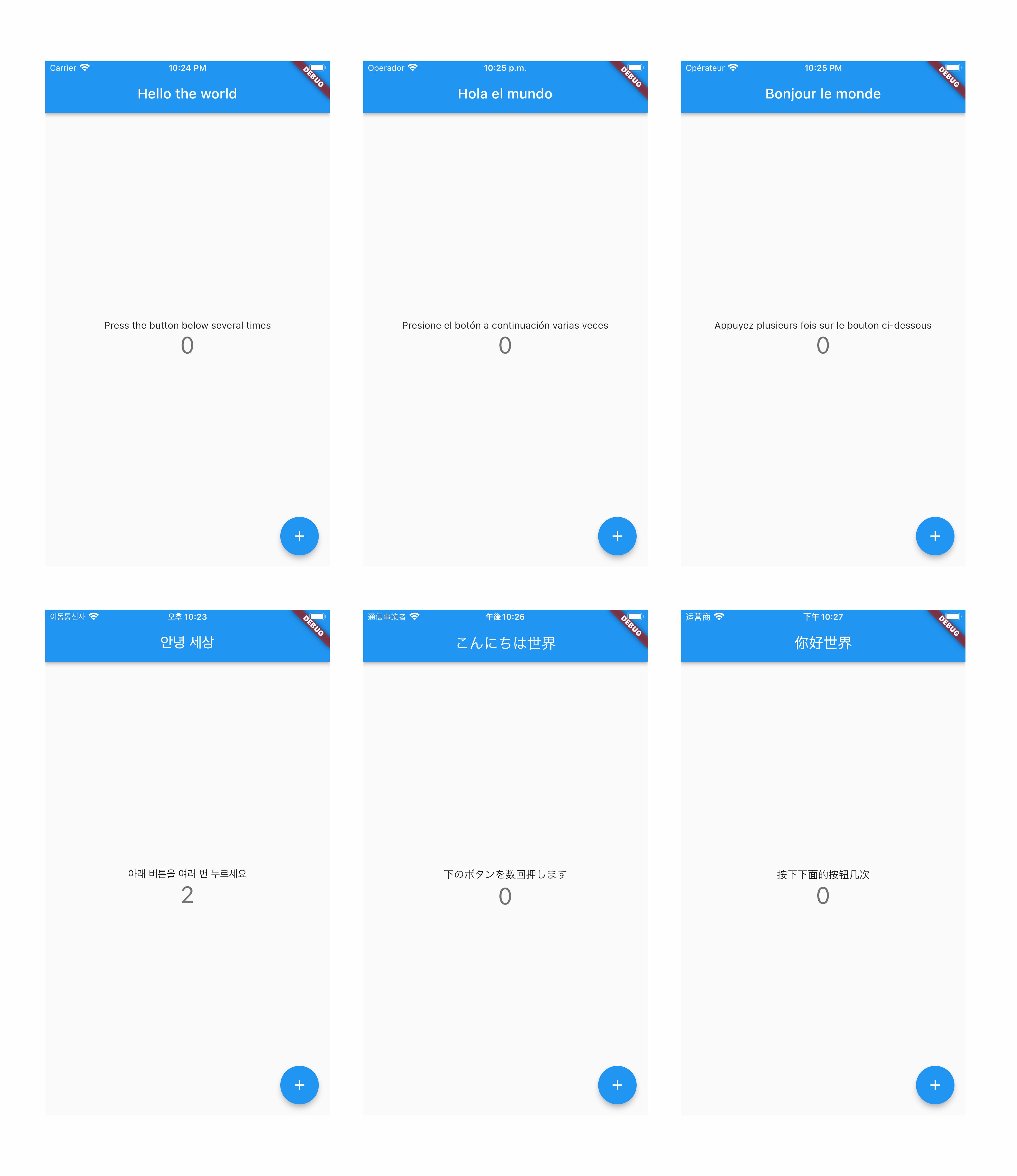
8. Check out apps translated into more than 80 languages :)

所屬分類

依賴

依賴清單 6 項

原始碼儲存庫

使用此套件的專案

暫無相關資料。