搜尋套件、儲存庫與 APP 分類

awesome_snackbar_content 封面
套件詳情v0.1.8

awesome_snackbar_content

透過各種警示訊息(例如成功、失敗、幫助或警告)提升您的 snackbar 經驗,擁有獨特的 UI 設計。

AndroidiOSWebmacOSWindowsLinux
近 30 天下載
1.5萬
喜歡數
1050
Pub 分數
160

安裝套件

flutter pub add awesome_snackbar_content

套件介紹

根據套件公開資料產生的選型評估,僅供參考。

一個 Flutter 套件,透過視覺上吸引人、主題化的警示訊息來增強 snackbar,適用於成功、失敗、警告和幫助狀態。它提供現代化、可自訂的 UI,以在各個平台上改善使用者回饋體驗。此套件支援多種平台,包括 Android、iOS、Web、macOS、Windows 和 Linux,非常適合實現一致的跨平台體驗。透過 pub add 簡單整合,開發者可以快速實作引人注目的通知,使其與預設的 snackbar 設計區分開來。

適用情境

  • 表單提交後顯示成功訊息
  • 在 API 失敗時顯示錯誤警告
  • 提供有用的技巧或指導
  • 通知使用者系統狀態變更
  • 透過吸引人的回饋提升使用者體驗
  • 建立一致的通知樣式

主要特色

  • 主題警報類型:成功,失敗,警告,幫助
  • 可自定義的顏色和圖示
  • 響應式和平台自適應設計
  • 與 Flutter 的 Scaffold 輕鬆整合
  • 對多個平台的支援
  • 內建動畫和過渡效果

適合對象

  • 移動和網路應用開發者
  • 以使用者體驗為導向的專案
  • 需要明確用戶反饋的應用程式
  • 希望獲得精美通知的開發者
  • 注重視覺一致性的團隊
  • 具有跨平台需求的專案

使用建議

  • 需要 Flutter 2.5 或更高版本
  • 僅限基本的snackbar功能
  • 可能需要額外的樣式來處理複雜的佈局
  • 最適合簡單、即時的回饋
  • 不適用於持續通知
  • 取決於外部依賴項以實現完整自定義

原始 README

以下為關聯原始碼儲存庫的 README 原文快照,最新內容請造訪原始碼儲存庫。

A package that lets you uplift your SnackBar or MaterialBanner experience in the app.

🛠 Attributes

  • title: Top label that will be shown in the body
  • message: Body message reflecting some error message, success message etc.
  • color: Color of SnackBar body
  • contentType: ContentType class reflecting failure, success, help or warning.
  • inMaterialBanner: Simply configure the working according to showMaterialBanner

Overall Look'n Feel

https://user-images.githubusercontent.com/43790152/200166529-51927c9d-66a6-4f76-b8f7-990680db2eba.mov

📱 Usage

To use the package:

  • add the dependency to your pubspec.yaml file
dependencies:
  flutter:
      sdk: flutter

  awesome_snackbar_content: <latest-package>

Then import it in your flutter project:

import 'package:awesome_snackbar_content/awesome_snackbar_content.dart';

👀 SnackBar Looks

Below are the looks of various types in package used as Snackbar

🔴 Failure
✅ Success
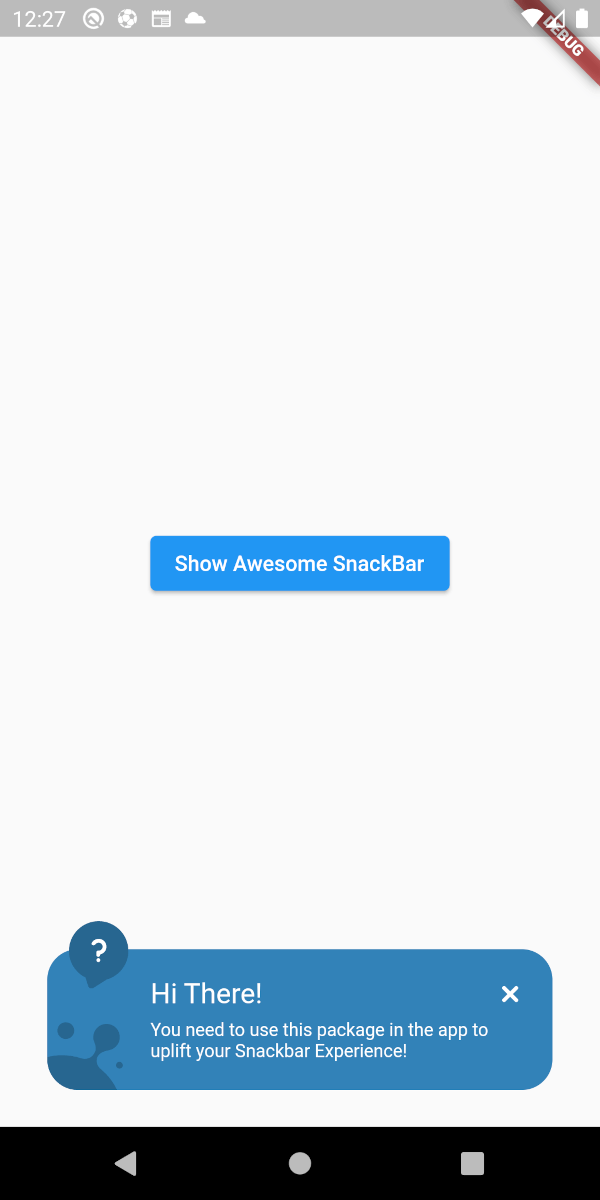
❔ Help
⚠ Warning

👀 Material Banner Looks

Below are the looks of various types in package used as Snackbar

🔴 Failure
✅ Success
❔ Help
⚠ Warning
💻 Example

Below is a basic example usage of the awesome_snackbar_content

import 'package:flutter/material.dart';
import 'package:awesome_snackbar_content/awesome_snackbar_content.dart';

class AweseomSnackBarExample extends StatelessWidget {
  const AweseomSnackBarExample({Key? key}) : super(key: key);

  @override
  Widget build(BuildContext context) {
    return Scaffold(
      body: Center(
        child: Column(
          mainAxisSize: MainAxisSize.min,
          children: [
            ElevatedButton(
              child: const Text('Show Awesome SnackBar'),
              onPressed: () {
                final snackBar = SnackBar(
                  /// need to set following properties for best effect of awesome_snackbar_content
                  elevation: 0,
                  behavior: SnackBarBehavior.floating,
                  backgroundColor: Colors.transparent,
                  content: AwesomeSnackbarContent(
                    title: 'On Snap!',
                    message:
                        'This is an example error message that will be shown in the body of snackbar!',

                    /// change contentType to ContentType.success, ContentType.warning or ContentType.help for variants
                    contentType: ContentType.failure,
                  ),
                );

                ScaffoldMessenger.of(context)
                  ..hideCurrentSnackBar()
                  ..showSnackBar(snackBar);
              },
            ),
            const SizedBox(height: 10),
            ElevatedButton(
              child: const Text('Show Awesome Material Banner'),
              onPressed: () {
                final materialBanner = MaterialBanner(
                  /// need to set following properties for best effect of awesome_snackbar_content
                  elevation: 0,
                  backgroundColor: Colors.transparent,
                  forceActionsBelow: true,
                  content: AwesomeSnackbarContent(
                    title: 'Oh Hey!!',
                    message:
                        'This is an example error message that will be shown in the body of materialBanner!',

                    /// change contentType to ContentType.success, ContentType.warning or ContentType.help for variants
                    contentType: ContentType.success,
                    // to configure for material banner
                    inMaterialBanner: true,
                  ),
                  actions: const [SizedBox.shrink()],
                );

                ScaffoldMessenger.of(context)
                  ..hideCurrentMaterialBanner()
                  ..showMaterialBanner(materialBanner);
              },
            ),
          ],
        ),
      ),
    );
  }
}

🧑 Credits

This packages has been created in reference to Abu Anwar (GDE Flutter) YouTube video. So, make sure to check his work!

所屬分類

依賴

依賴清單 1 項

原始碼儲存庫

使用此套件的專案