搜尋套件、儲存庫與 APP 分類

套件詳情v2.4.6

bluetooth_print_plus

bluetooth_print_plus 是一個用於藍牙熱敏打印機的 Flutter 插件,支援 Android 與 iOS,支援 TSPL/TSC、CPCL、ESC/POS。

AndroidiOSWebmacOSLinux
近 30 天下載
2210
喜歡數
65
Pub 分數
135

安裝套件

flutter pub add bluetooth_print_plus

套件介紹

根據套件公開資料產生的選型評估,僅供參考。

bluetooth_print_plus 是一個 Flutter 插件,可在 Android 和 iOS 上實現與藍牙熱敏打印機的通訊。它支援多種打印機語言,包括 TSPL/TSC、CPCL 和 ESC/POS,適用於打印收據、標籤和票券。該套件提供簡單的 API,用於發送打印指令和管理裝置連接。它也具備跨平台相容性,支援 Web、macOS 和 Linux,但非行動平台上的功能可能有限。非常適合需要可靠行動打印的零售、餐飲及物流應用。

適用情境

  • 零售應用中的收據列印
  • 庫存系統的標籤列印
  • 活動管理中的票務生成
  • 移動POS整合
  • 隨身文件列印

主要特色

  • 支援 TSPL/TSC、CPCL 和 ESC/POS 語言
  • 跨平台支援(Android、iOS、Web、macOS、Linux)
  • 用於發送列印命令的簡單 API
  • 藍牙設備發現和配對
  • 即時狀態監控

適合對象

  • 零售和銷售點應用程式
  • 物流與倉儲管理
  • 事件票務系統
  • 移動列印解決方案
  • 開發跨平台列印功能的開發者

使用建議

  • 非 Android/iOS 平台上的功能有限
  • 需要藍牙存取的正確權限
  • 印表機特定的命令語法可能需要測試
  • 並非所有印表機型號都完全支援所有語言
  • Web 支援可能具有受限的藍牙功能

原始 README

以下為關聯原始碼儲存庫的 README 原文快照,最新內容請造訪原始碼儲存庫。

Bluetooth Print Plus

pub package GitHub stars GitHub forks qq_group tg_group

Introduction

Bluetooth Print Plus is a Bluetooth plugin used to print thermal printers in Flutter, a new mobile SDK to help developers build bluetooth thermal printer apps for iOS and Android.

Important, important, important. First, you need to run the demo to confirm the printer command type ! ! ! now support tspl/tsc、cpcl、esc pos. If this plugin is helpful to you, please give it a like, Thanks.

Buy Me A Coffee/请我喝杯咖啡

Plan

Version plan
1.1.x blue and tsc command, esc print image command
1.5.x support cpcl command
2.x.x improve esc command
3.x.x support zpl command

Features

Android iOS Description
scan :white_check_mark: :white_check_mark: Starts a scan for Bluetooth Low Energy devices.
connect :white_check_mark: :white_check_mark: Establishes a connection to the device.
disconnect :white_check_mark: :white_check_mark: Cancels an active or pending connection to the device.
state :white_check_mark: :white_check_mark: Stream of state changes for the Bluetooth Device.

Usage

Example

To use this plugin :
dependencies:
  flutter:
    sdk: flutter
  bluetooth_print_plus: ^2.4.5
Add permissions for Bluetooth

We need to add the permission to use Bluetooth and access location:

Android

In the android/app/src/main/AndroidManifest.xml let’s add:

<uses-permission android:name="android.permission.BLUETOOTH" />
<uses-permission android:name="android.permission.BLUETOOTH_SCAN" />
<uses-permission android:name="android.permission.BLUETOOTH_CONNECT" />
<uses-permission android:name="android.permission.BLUETOOTH_ADMIN" />
<uses-permission android:name="android.permission.ACCESS_FINE_LOCATION"/>
<uses-permission android:name="android.permission.ACCESS_COARSE_LOCATION"/>
IOS

In the ios/Runner/Info.plist let’s add:

<key>NSBluetoothAlwaysUsageDescription</key>
<string>Need BLE permission</string>
<key>NSBluetoothPeripheralUsageDescription</key>
<string>Need BLE permission</string>
import
import 'package:bluetooth_print_plus/bluetooth_print_plus.dart';
BluetoothPrintPlus useful property
BluetoothPrintPlus.isBlueOn;
BluetoothPrintPlus.isScanning;
BluetoothPrintPlus.isConnected;
listen

late StreamSubscription<bool> _isScanningSubscription;
late StreamSubscription<BlueState> _blueStateSubscription;
late StreamSubscription<ConnectState> _connectStateSubscription;
late StreamSubscription<Uint8List> _receivedDataSubscription;
late StreamSubscription<List<BluetoothDevice>> _scanResultsSubscription;
late List<BluetoothDevice> _scanResults;
  • scan results
/// listen scanResults
_scanResultsSubscription = BluetoothPrintPlus.scanResults.listen((event) {
  if (mounted) {
    setState(() {
      _scanResults = event;
    });
  }
});
  • state
/// listen isScanning
_isScanningSubscription = BluetoothPrintPlus.isScanning.listen((event) {
  print('********** isScanning: $event **********');
  if (mounted) {
    setState(() {});
  }
});

/// listen blue state
_blueStateSubscription = BluetoothPrintPlus.blueState.listen((event) {
  print('********** blueState change: $event **********');
  /// blue state changed, do something...
});

/// listen connect state
_blueStateSubscription = _BluetoothPrintPlus.connectState.listen((event) {
  print('********** connectState change: $event **********');
  /// connect state changed, do something...
});
  • received Data
_BluetoothPrintPlus.receivedData.listen((data) {
  print('********** received data: $data **********');
  /// received data, do something...
});
scan

// begin scan
await BluetoothPrintPlus.startScan(timeout: Duration(seconds: 10));

// get devices
_scanResultsSubscription = BluetoothPrintPlus.scanResults.listen((event) {
  if (mounted) {
    setState(() {
      _scanResults = event;
    });
  }
});
connect

await BluetoothPrintPlus.connect(_device);
disconnect

await BluetoothPrintPlus.disconnect();
print/write

final ByteData bytes = await rootBundle.load("assets/dithered-image.png");

/// write tsc command, for example:
final Uint8List image = bytes.buffer.asUint8List();
await tscCommand.cleanCommand();
await tscCommand.size(width: 76, height: 130);
await tscCommand.cls(); // most after size
await tscCommand.image(image: image, x: 50, y: 60);
await tscCommand.print(1);
final cmd = await tscCommand.getCommand();
if (cmd == null) return;
BluetoothPrintPlus.write(cmd);

/// write cpcl command, for example:
await cpclCommand.cleanCommand();
await cpclCommand.size(width: 76 * 8, height: 76 * 8);
await cpclCommand.image(image: image, x: 10, y: 10);
await cpclCommand.print();
final cmd = await cpclCommand.getCommand();
if (cmd == null) return;
BluetoothPrintPlus.write(cmd);

/// write esc command, for example:
await escCommand.cleanCommand();
await escCommand.print();
await escCommand.image(image: image);
await escCommand.print();
final cmd = await escCommand.getCommand();
if (cmd == null) return;
BluetoothPrintPlus.write(cmd);
Cancel Subscription
@override
void dispose() {
  super.dispose();
  _isScanningSubscription.cancel();
  _blueStateSubscription.cancel();
  _connectStateSubscription.cancel();
  _receivedDataSubscription.cancel();
  _scanResultsSubscription.cancel();
  _scanResults.clear();
  _device = null;
}

Troubleshooting

error:'State restoration of CBCentralManager is only allowed for applications that have specified the "bluetooth-central" background mode'

info.plist add:

<key>NSBluetoothAlwaysUsageDescription</key>
<string>Allow App use bluetooth?</string>
<key>NSBluetoothPeripheralUsageDescription</key>
<string>Allow App use bluetooth?</string>
<key>UIBackgroundModes</key>
<array>
    <string>bluetooth-central</string>
    <string>bluetooth-peripheral</string>
</array>

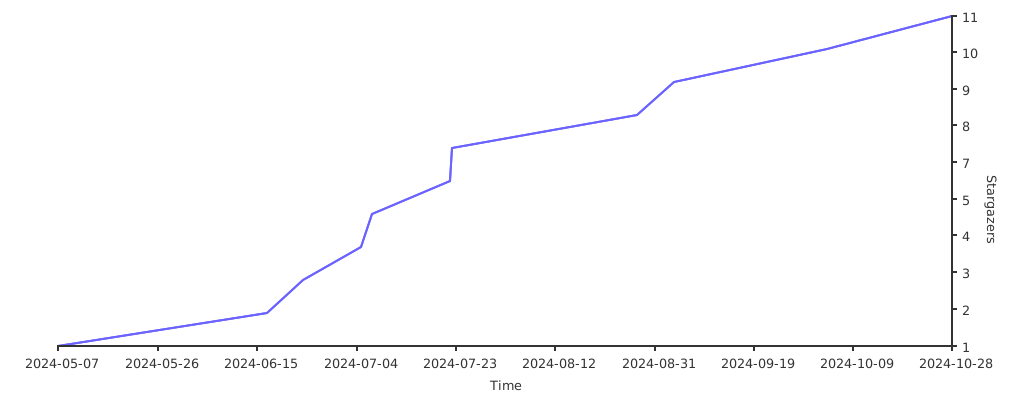
Stargazers over time

Stargazers over time

所屬分類

依賴

依賴清單 1 項

原始碼儲存庫

使用此套件的專案

暫無相關資料。